Fashion Site Search: The Product Is in Stock. Your Search Can't Find It.
We analyzed 13,374 fashion searches. AI tagging increased product discovery by 22% and boosted clicks 11% more. Here’s what the data revealed.

by YesPlz.AIJanuary 26, 2026

We analyzed 13,374 fashion searches. AI tagging increased product discovery by 22% and boosted clicks 11% more. Here’s what the data revealed.
by YesPlz.AIJanuary 26, 2026
Site search is one of the highest-converting channels in eCommerce. Only about 15% of visitors use it, yet those users generate nearly 45% of total eCommerce revenue. Also, many retailers already know their site search isn't great. Shoppers type a query, then irrelevant products appear. Or worse, nothing shows up at all. Either way, they leave.
But, here's what many fashion retailers don’t realize: Poor tagging is the main reason site search fails. So, we decided to run a test with 13,374 search queries to measure what happens when you use appropriate tagging and when you skip tagging—same product catalog, but two different setups. One used AI fashion tagging. The other didn’t.
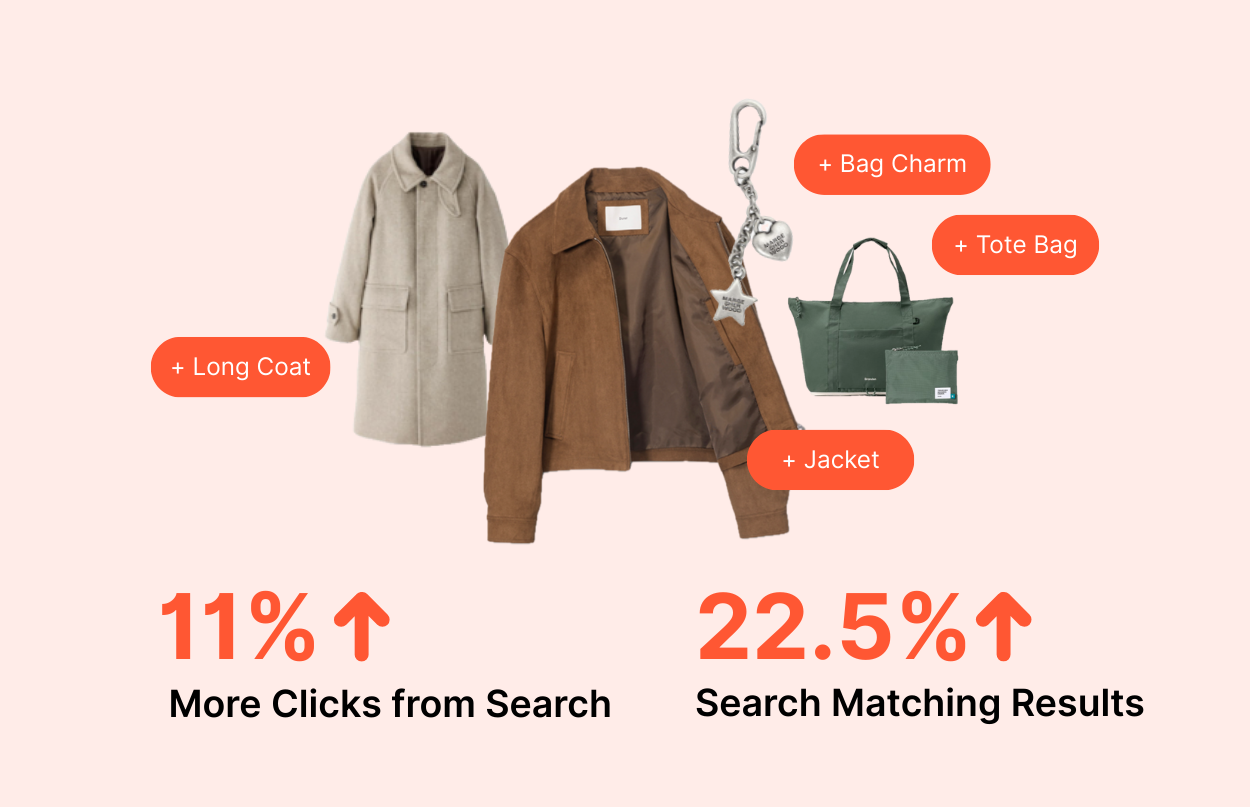
According to our experiment, the AI-tagged setup returned 22% more products per search and generated 11% more clicks. At this point, you might wonder why AI tagging performs better. To answer that, we need to first look at what we measured.
Surface-level metrics aren’t helpful. Counting how many tags were applied or how fast tagging was completed doesn’t tell you anything about revenue. You need metrics that directly link tagging to customer behavior and business outcomes.
So, we want to go beyond vanity metrics. It’s not enough to know that tagging helps. We need to know how much it helps, where it helps most, and even when it actually hurts. So we tracked two critical metrics:
Product Discovery: How many relevant products become searchable with tags?
Click Engagement: Which products actually got clicked by shoppers?
These two metrics answer a simple but critical question: Does tagging help shoppers find and choose products they would otherwise miss?
And the data told us a clear story. Here’s what we found:
12.5% unique pairs of search queries and clicked products only happened because of tagging. Without tags, these connections between shoppers and products would not happen at all. That's 11% more clicks powered purely by fashion tags compared to untagged search.
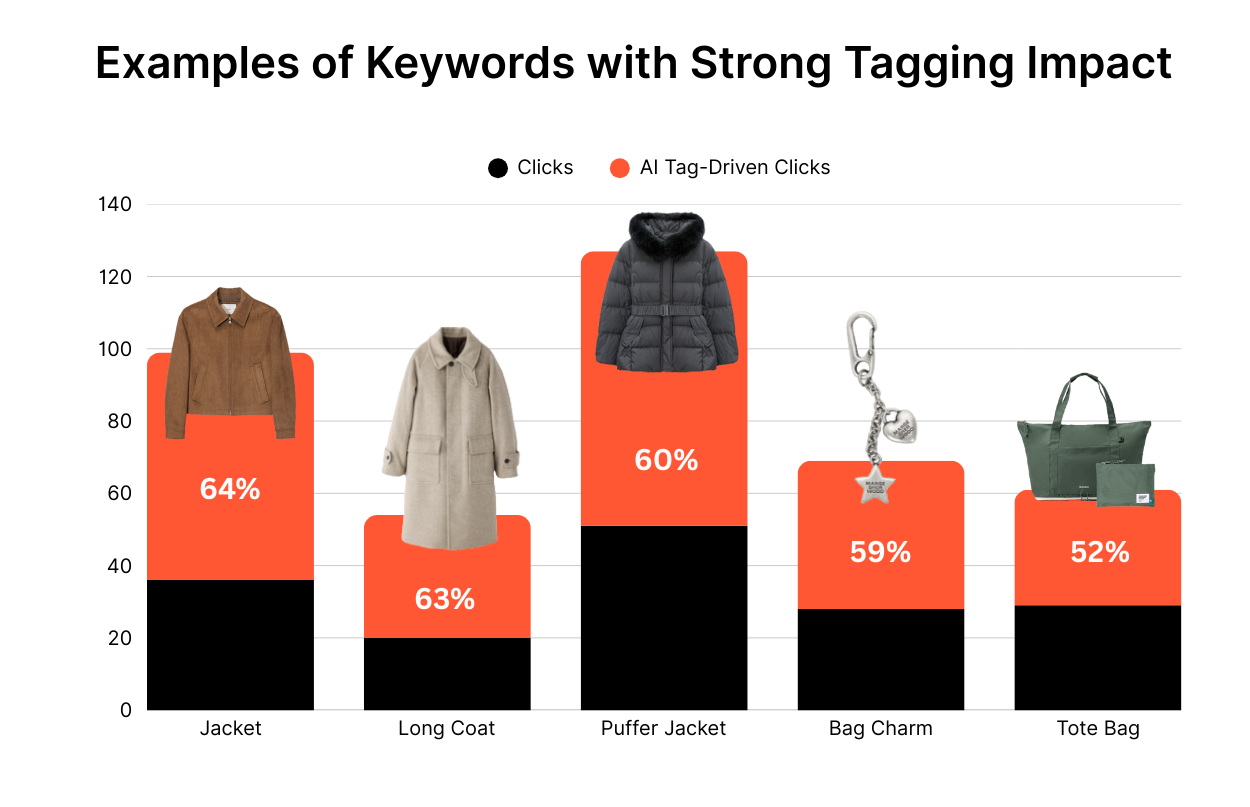
Here’s a snapshot of how tagging contributed to clicks for common fashion queries:
Keywords | Total Clicks | Tag-Driven Clicks | Tag Share (%) |
jacket | 99 | 63 | 64% |
long coat | 54 | 34 | 63% |
puffer jacket | 127 | 76 | 60% |
bag charm | 69 | 41 | 59% |
tote bag | 61 | 32 | 52% |
down jacket | 78 | 35 | 45% |
leather jacket | 693 | 282 | 41% |
suede jacket | 91 | 29 | 32% |
For the search query ‘jacket,’ removing tagging would eliminate 64% of shopper clicks. That means more than half of shoppers searching for this keyword would fail to find a product worth clicking.
 Why Category Searches Break on Fashion Sites
According to our statistics and from the table above, you can see that category names like ‘jacket,’ ‘coat,’ and ‘bag’ are massively popular search keywords. But why do many site search engines still return irrelevant products or no results at all for those queries?
Our data points to two main reasons.
Many product titles and descriptions focus on brand, fabric, or style details. But they never explicitly state the category. For example, a product might be clearly a jacket. Yet, the word ‘jacket’ never appears in the title or description. As a result, when shoppers search for ‘jacket,’ that product is excluded from results.
You use industry terminology instead of shopper language. Let’s say your product title is ‘women’s outerwear in black.’ However, your shoppers don’t use the keyword ‘outerwear’ to search. They use ‘coat.’ Even though the intent matches, your site search engine fails to connect the two. It causes your black outerwear not be displayed in shopper search results.
In both cases, the gap between how products are described and how shoppers search leads to missed results, missed clicks, and lost conversions. Manual tagging struggles to keep up with this mismatch. And skipping tagging entirely makes the problem worse.
So how do you close the gap between product data and shopper language? By applying comprehensive, consistent fashion tags across the entire catalog. AI fashion tagging allows a single product to carry multiple relevant categories and attribute terms. With this automated approach, your products can be discovered through different keywords—whether a shopper searches for ‘jacket,’ ‘coat,’ or ‘outerwear.’ This ensures the product appears regardless of the exact term the shopper uses.
In our experiment, the AI-tagged catalog showed a clear net gain in performance. Even after accounting for minor mismatches, tagging delivered a strong positive impact:
Basis | Tagging Contribution (%) | Tagging Loss (%) | Net Contribution (%) |
Click-weighted | 11% More | 1.1% | 9.9% |
The result you can expect:
More products discovered
More clicks generated
Fewer shoppers are leaving empty-handed
We also looked at how AI fashion tagging affects product discovery. So, we analyzed 1,000 keywords and counted how many products each search query could surface:
Without tagging: 2,058 products per keyword on average
With tagging: 2,520 products per keyword on average
That’s 462 additional products per keyword. A 22.5% increase in product discovery. Some keywords saw extreme jumps:
Keyword | Without Tags (Products) | With Tags (Products) | Increase (Products) | Growth Rate (%) |
collar | 8,343 | 33,977 | +25,634 | +307.3% |
blue | 17,464 | 34,555 | +17,091 | +97.9% |
graphic tee | 1,135 | 13,407 | +12,272 | +1,081.2% |
wedding | 51 | 11,613 | +11,562 | +22,670.6% |
leather | 7,056 | 18,086 | +11,030 | +156.3% |
sleeveless | 7,383 | 18,010 | +10,627 | +143.9% |
pink | 12,201 | 20,613 | +8,412 | +68.9% |
leather bag | 1,504 | 9,031 | +7,527 | +500.5% |
jeans | 1,323 | 8,193 | +6,870 | +519.3% |
Look at ‘collar.’ We went from 8,343 products to nearly 34,000 overnight. More products in search results means more options for your shoppers. More options mean a higher chance they find exactly what they want. And that leads directly to more sales.
Not all shoppers search by category names. Some know exactly what they want, so they use long-tail, specific queries like ‘wedding dress,’ ‘wool pleated skirt,’ ‘ivory long coat,’ or ‘leather woven bag.’ These searches are deliberate and high-intent. For these queries, AI fashion tagging becomes critical.
In our dataset, tags were the only reason these products were discovered. The table below shows keywords where 100% clicks came from tagged products:
Keywords | Total Clicks | Tag-Driven Clicks | Tag Share |
wedding dress | 30 | 30 | 100% |
white coat | 20 | 20 | 100% |
wool pleated skirt | 16 | 16 | 100% |
ivory long coat | 13 | 13 | 100% |
bootcut slacks | 12 | 12 | 100% |
belted wool long coat | 10 | 10 | 100% |
jacket for baby | 10 | 10 | 100% |
brown jacket | 9 | 9 | 100% |
leather woven bag | 9 | 9 | 100% |
white pants | 9 | 9 | 100% |
Every single click in the table came from tags. Remove tagging, and these searches return zero meaningful results.
Take ‘wedding dress’ as an example. When shoppers typed in the search bar ‘wedding dress,’ not a single matching product actually contains those exact words in the title or description. Some products were labeled ‘bridal.’ Others had titles like ‘long dress’ or ‘halter-neck dress’ with no wedding reference at all. Yet, thanks to improved tagging, these products now surface in relevant searches and are attracting meaningful shopper engagement—clicks they likely wouldn’t have received otherwise.
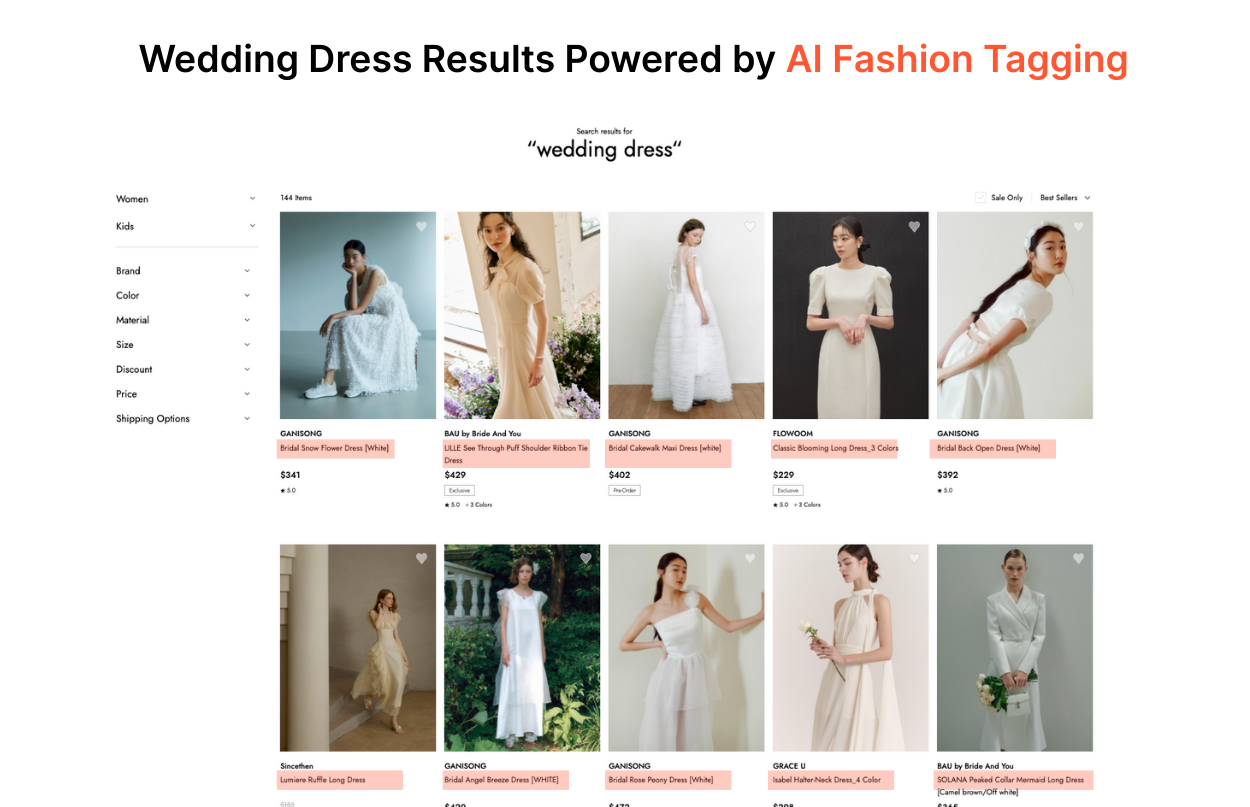
Why? Because AI fashion tagging identified the occasion and tagged them as appropriate for weddings. The system recognized visual cues—white or ivory fabric, formal silhouettes, delicate details, floor-length cuts—and connected them to wedding occasions even when the product data never mentioned weddings explicitly.
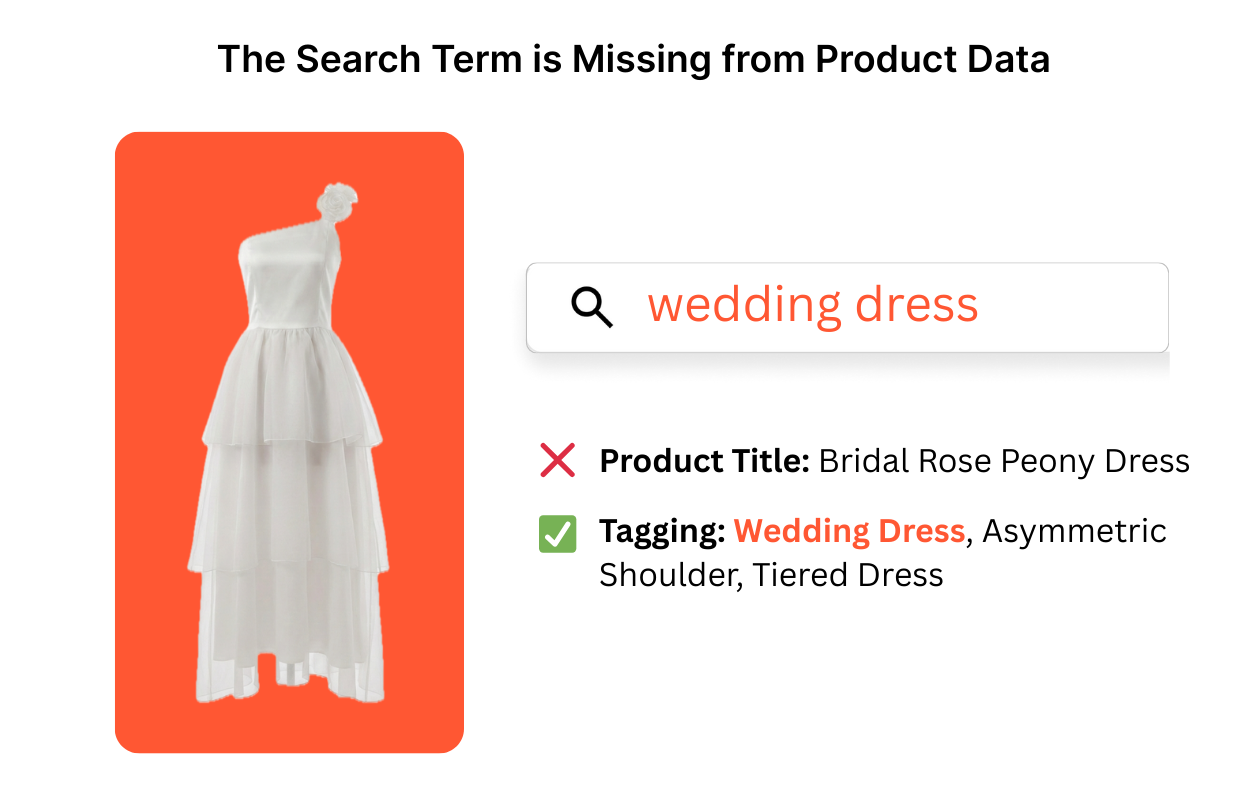 So, when a shopper types ‘wedding dress’ into your search bar, dresses that are suitable for a wedding occasion will show up even though their titles or descriptions don’t contain those exact words.
This is the gap that manual tagging can't close at scale. A person reviewing products might tag obvious items labeled ‘bridal,’ but they'll miss the elegant white dresses that could work perfectly for weddings, but aren't marketed that way.
The challenge multiplies when shoppers combine multiple attributes in one query. Take ‘wool pleated skirt’ as an example. To match this query, a product must be tagged with:
Material: wool
Style: pleated
Category: skirt
Now consider that a single clothing item can have 20-60 relevant attributes, the possible combinations become enormous. A shopper might search for:
black leather jacket for winter
casual striped cotton shirt
vintage high-waisted wide-leg jeans
minimalist beige trench coat
etc.
Each query requires multiple tags to align perfectly. Manual tagging can't maintain this level of coverage across thousands of products. They might tag the obvious attributes but miss secondary or tertiary combinations that shoppers actually search for.
AI fashion tagging handles this complexity automatically. It analyzes each product image and description, then generates comprehensive tags across all relevant dimensions:
Materials (cotton, wool, leather, silk)
Colors (including specific shades like ivory, burgundy, navy)
Patterns (striped, floral, geometric, solid)
Style attributes (pleated, belted, cropped, oversized)
Categories (dress, jacket, skirt, pants)
Occasions (wedding, casual, work, party)
Seasonal fit (winter coat, summer dress)
Design vibes (minimalist, vintage, bohemian, elegant)
This allows specific, multi-attribute searches to surface exactly the right products—even when shoppers combine attributes in ways you never anticipated. The system doesn't need a human to predict every possible search combination. It simply tags comprehensively, and the search engine does the matching.
That's what enables a shopper searching for ‘ivory long coat’ to find a product titled ‘cream wool overcoat’—different words, same intent, perfect match.
We analyzed the top 100 search keywords with the highest share of tagged products. The impact on engagement was immediate and measurable. The results speak for themselves:
Average CTR: 205.76%
Average Session: 53.34%
53.7% of valid clicks went to products that were only discoverable through tagging
In short, more than half of shopper engagement came from products that would not appear without tags.
Here’s a snapshot of representative queries:
Keywords | Total Searches | Without Tags (Products) | With Tags(Products) | Tag Share (%) | CTR (of tagged products) (%) | Session (of tagged products) (%) |
work bag | 30 | 9 | 5,446 | 99.8% | 290.0% | 66.67% |
wedding | 17 | 51 | 11,613 | 99.6% | 135.29% | 50.0% |
winter coat | 17 | 31 | 2,578 | 98.8% | 176.47% | 50.0% |
handbag | 25 | 30 | 2,163 | 98.6% | 120.0% | 47.37% |
handbags | 12 | 30 | 2,163 | 98.6% | 75.0% | 45.45% |
wedding dress | 38 | 3 | 143 | 97.9% | 334.21% | 64.71% |
silver ring | 22 | 1,547 | 3,775 | 59.0% | 172.73% | 50.0% |
The pattern is clear. When tagged products dominate search results, shoppers engage more.
Adding more tags isn’t always better. Tagging that isn’t tuned to the search context can create noise. It surfaces irrelevant products and confuses shoppers instead of helping them. While evaluating whether the additional products brought in by tagging were actually relevant to search queries, we initially found some issues :
Keywords | Accuracy (%) | Relevant Products | Irrelevant Products |
belt | 0% | 0/10 | 10/10 |
white bag | 30% | 3/10 | 7/10 |
flats | 50% | 5/10 | 5/10 |
Dresses with attached belts got tagged for details as ‘belt’. But shoppers searching for ‘belt’ seem to look for standalone belt accessories.
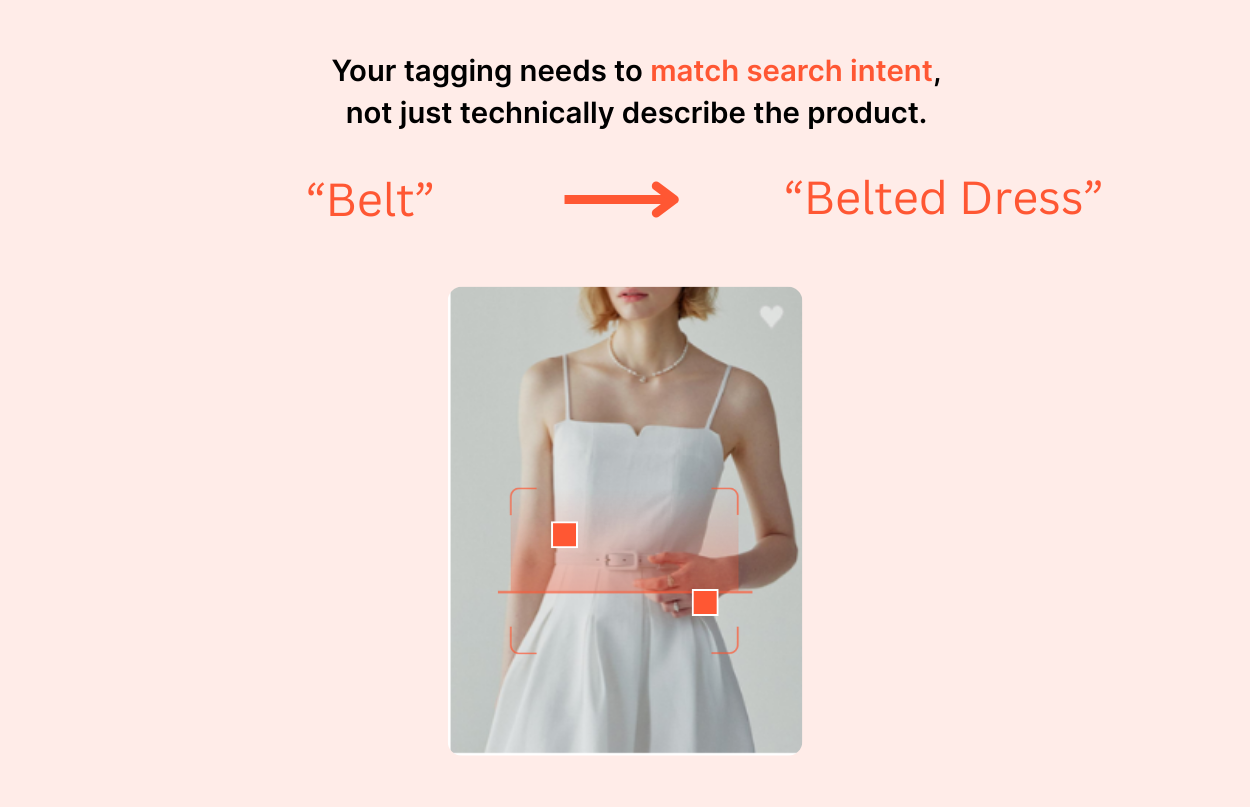 The Fix: We refined our AI to tag standalone belts as "belt" only, excluding belted dresses. Dresses and skirts with belts now get precise tags like "belted dress" or "belted skirt" to eliminate shopper confusion.
Multi-colored bags with small white accents were tagged as ‘white bag.' However, shoppers searching for ‘white bag’ expect ones that are primarily white, not bags with minor white details.
The Fix: We trained our AI fashion tagging system to recognize all colors in a product but to prioritize the dominant color for search. For color-based queries, the search engine now relies on the dominant color tag rather than every detected color, making results more aligned with the shopper’s intent.
The AI tagged any footwear with flat heels as ‘flats’—including knee-high boots and ankle boots. But shoppers searching for this keyword expect ballet flats and slip-on shoes. While technically accurate, these results didn't match shopper intent.
The Fix: We updated the tagging to distinguish between ‘flats’ (ballet flats, loafers) and ‘flat heel' (boots and other footwear with flat heels). Now, when shoppers search for ‘flats,’ ballet flats appear first. If they search for ‘flat heel boots,’ those boots match correctly.
Your tagging needs to match search intent, not just technically describe the product. You need to understand what shoppers mean when they search. Then align your tags with those expectations. That requires testing, reviewing real search behavior, and continuously refining tags.
The takeaway for retailers is simple: start with core tags for your highest-traffic queries. Focus first on the searches that drive the most revenue. These queries create the biggest impact when tagging improves discovery and relevance.
Once the core is in place, test and iterate on edge cases. Look for queries where shoppers are highly specific, where intent is strong, or where results feel noisy. That’s how you unlock the additional 11% CTR we saw in our study.
Tagging works best as an iterative process, not a one-time setup. Measure how search results perform, review mismatches, and refine tags based on real shopper behavior. Over time, this approach compounds: more relevant results, higher engagement, and fewer missed clicks. Or you can always use pre-processed fashion tagging that doesn’t require updates, but is ready to integrate into your search and improve conversion.
This is also where the difference between manual tagging and AI fashion tagging becomes clear.
You don’t need a long implementation cycle or a large upfront investment to get value from AI fashion tagging. You can start small. Tag a subset of your catalog. Test performance on high-impact queries. Then, scale as results compound. Our tagging pricing is designed for this exact approach. You can:
Upload a CSV and get products tagged in minutes
Plug into a tagging API to automate workflows
Pay only for what you use, with no long-term lock-in
This makes it easy to experiment, measure results, and expand when the data proves it works.
Because site search matches your product data, not your inventory. If a dress is titled "Amelia Midi" with no occasion or category attributes, a shopper searching "wedding guest dress" gets nothing — the product exists, but the words she used don't. In YesPlz's analysis of 13,374 fashion searches, adding AI tags took the query "wedding" from 51 matching products to 11,613.
It adds the attributes shoppers actually search by — occasion, silhouette, fabric, style — that product titles usually leave out. Across 13,374 fashion searches, YesPlz found AI tagging surfaced 22% more products per query (2,058 to 2,520 on average, or 462 additional products per keyword) and drove 11% more clicks. More than half of valid clicks — 53.7% — went to products that were only findable because of tags.
No. A tag can be accurate and still be wrong for the query. A belted dress genuinely has a belt — but a shopper searching "belt" wants a belt, not a dress. YesPlz saw the same pattern with "white bag," which surfaced bags with any white detail, and "flats," which returned every flat-soled shoe rather than the flat-shoe category. The fix isn't fewer tags. It's tags that separate what a product is from what it has, tuned against real query logs.
Retailers name products by what they are; shoppers search by what they're for. A catalog says "pleated wool skirt." A shopper types "work outfit" or "wedding guest." Neither is wrong, but keyword search can only match text that exists in the product record — so the gap turns into a zero-results page.

Written by YesPlz.AI
We build the next gen visual search & recommendation for online fashion retailers
