Apparel Categories: How to Organize Your Fashion Taxonomy
A practical guide to organizing apparel categories. See a copy-ready example of fashion taxonomy. Plus, download a free ebook to help you get started.

by YesPlz.AIJuly 13, 2026

A practical guide to organizing apparel categories. See a copy-ready example of fashion taxonomy. Plus, download a free ebook to help you get started.
by YesPlz.AIJuly 13, 2026
Apparel categorization is the practice of organizing and labeling your clothing products, so shoppers can easily find what they're looking for in your online store. The system of these categories — along with the attributes that describe each product in more detail — is called a fashion taxonomy.
Structure your catalog for search, filters, and AI discovery — with a copy-ready category hierarchy.
Here's an example. A black wrap dress might live on this path: Women › Clothing › Dresses › Wrap dress. That path is the category tree. It tells shoppers where the product belongs. From there, you'd tag the dress with more specific details, like color, length, and fabric. Those tags are the attribute layer, and they're what let shoppers filter and refine within a category.
Together, categories and attributes give shoppers three ways to find that same dress. First, they can browse to ‘Wrap dress’ in your site's navigation menu. Second, they can type in the search bar: ‘black wrap dress.’ Or, they can use multiple filters, such as ‘black’ and ‘cocktail party,’ to narrow down the results.
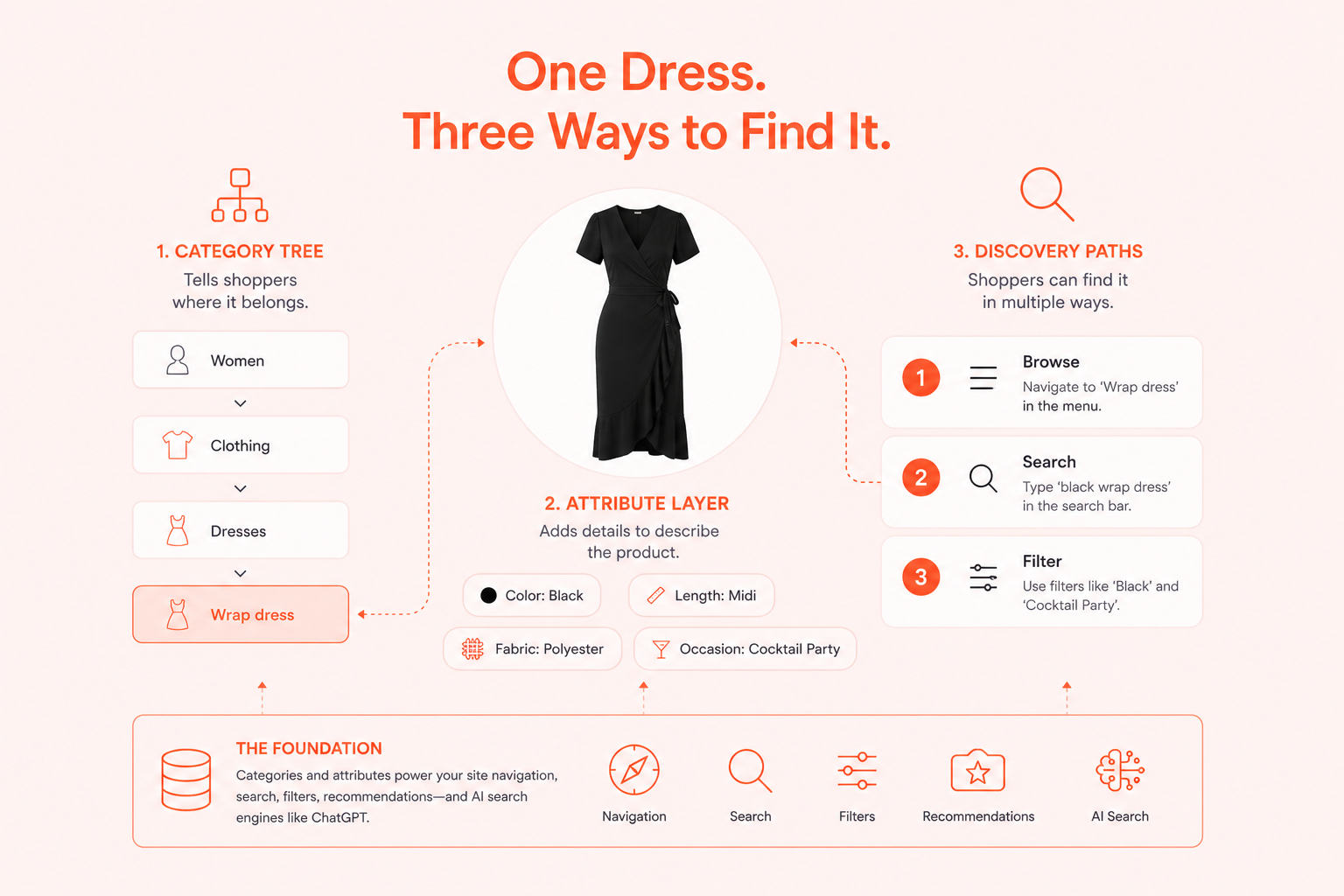 This categorization system is the foundation of every good product discovery. Your site navigation, your search, your filters, and even your product recommendations all pull from it. Increasingly, it matters beyond your own eCommerce site, too. AI search engines like ChatGPT rely on clearly structured, well-labeled product data to understand what you sell and surface it in their answers.
In the next sections, we’ll cover the two building blocks of a good fashion taxonomy: the category tree and the attribute layer.
The category tree is the map of your store. It's the hierarchy of folders and subfolders that shows where every product lives, from broad groups down to specific items. It answers two simple questions:
What is this product?
Where does it belong?
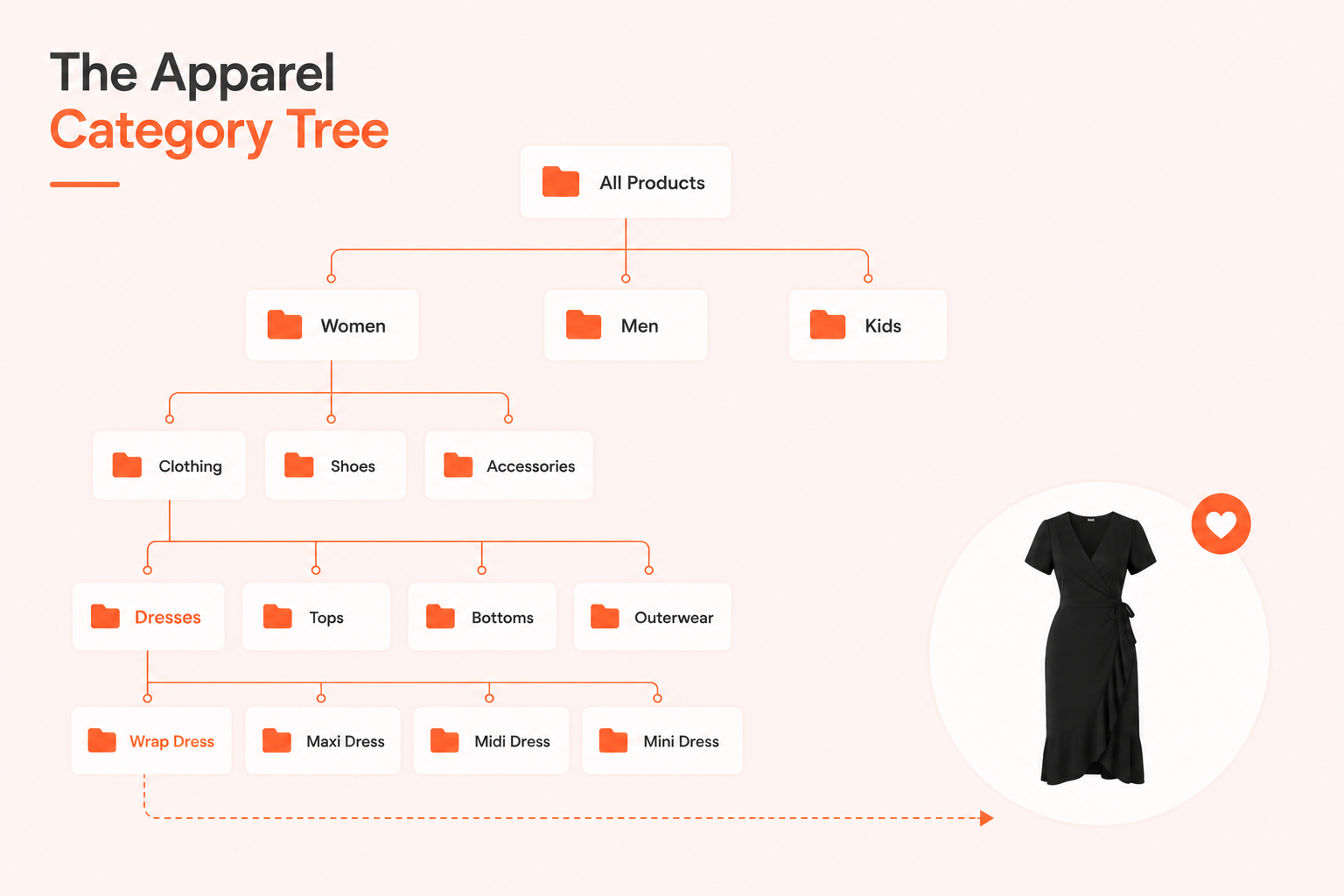 Based on our experience working with worldwide fashion retailers, a category tree with four levels works best for most online stores. This insight came from studying:
How shoppers actually navigate fashion sites
What happens when stores go too shallow or too deep
Four levels tend to hit the sweet spot: specific enough to be useful, simple enough to navigate in a few clicks.
Of course, there's no single perfect formula that fits every store. But the category tree below reflects what actually works, and what shoppers expect to see.
Level | What it means | Example |
L1 — Gender/Department | Who it's for | Women, Men, Kids |
L2 — Division | Type of product | Clothing, Shoes, Bags, Accessories |
L3 — Category | Broad group | Tops, Pants, Skirts |
L4 — Product Type | Specific item | Shirts, Blouses, Hoodies |
The four levels are easier to understand once you see them in action. So let's build one copy-ready example of a category tree from start to finish. We'll use Women as our level 1 (gender), and Clothing as our level 2 (division). Then, we'll walk you through every L3 (category) and L4 (product type) underneath it.
Here's what the Women's Clothing category tree looks like when it's fully built out:
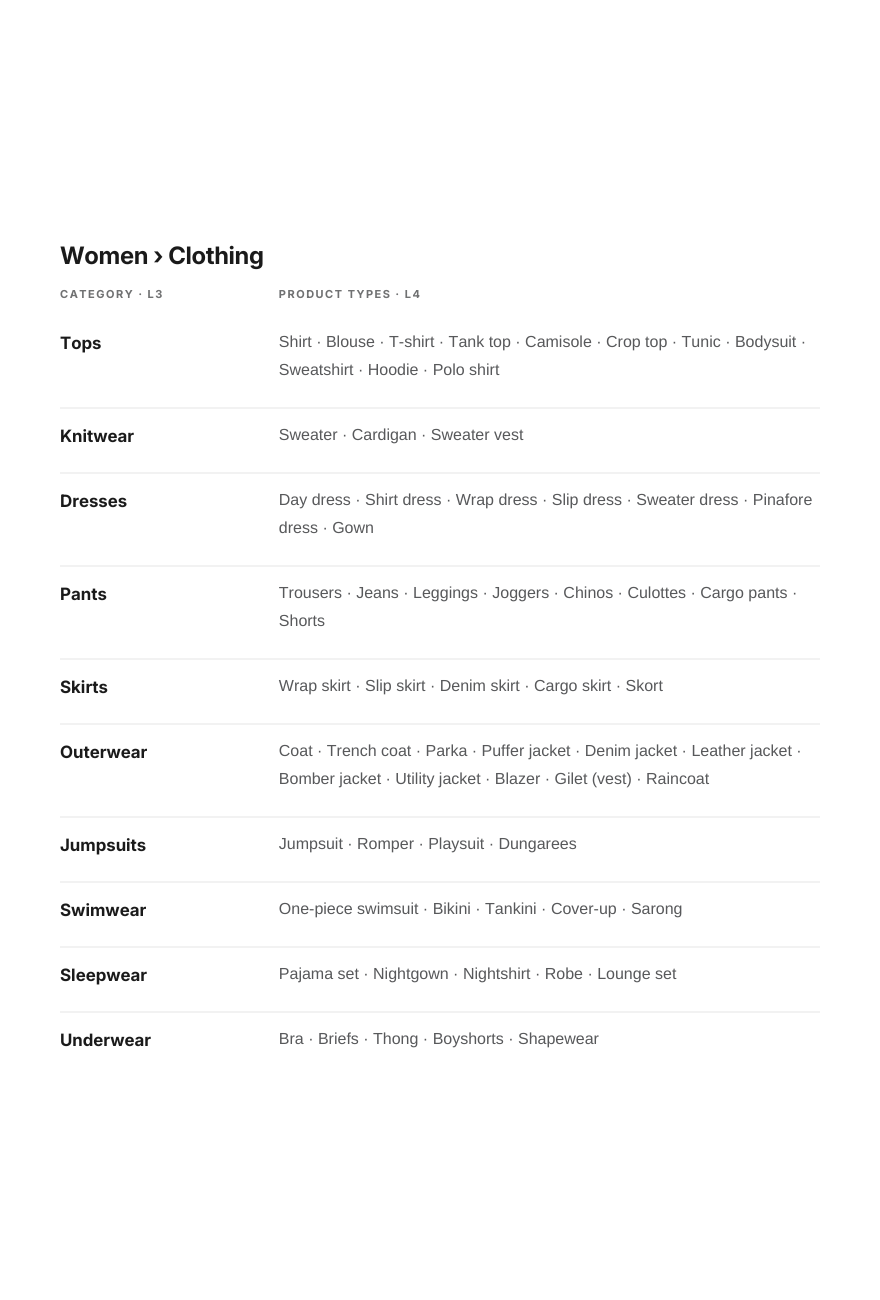 We picked women's clothing because it's typically the widest and most complex L1 in a fashion catalog. Therefore, it is the best example for showing how the four levels work together in practice.
This example covers only one L2: Clothing. Other divisions, like shoes, bags, and accessories, follow the same underlying logic, just with different categories and product types.
If you want to see more examples, download our free ebook. You can copy directly into your own catalog.
Attributes are the descriptive words used to describe a single product. Think about black (color), fitted (waist), wrap (fabric design), minimal (vibe), or work (occasion). In the industry, these are called fashion tags.
They are the invisible infrastructure that powers filters and recommendations. They also help search engines — from Google’s free product listing to AI platforms — understand and surface your clothing items.
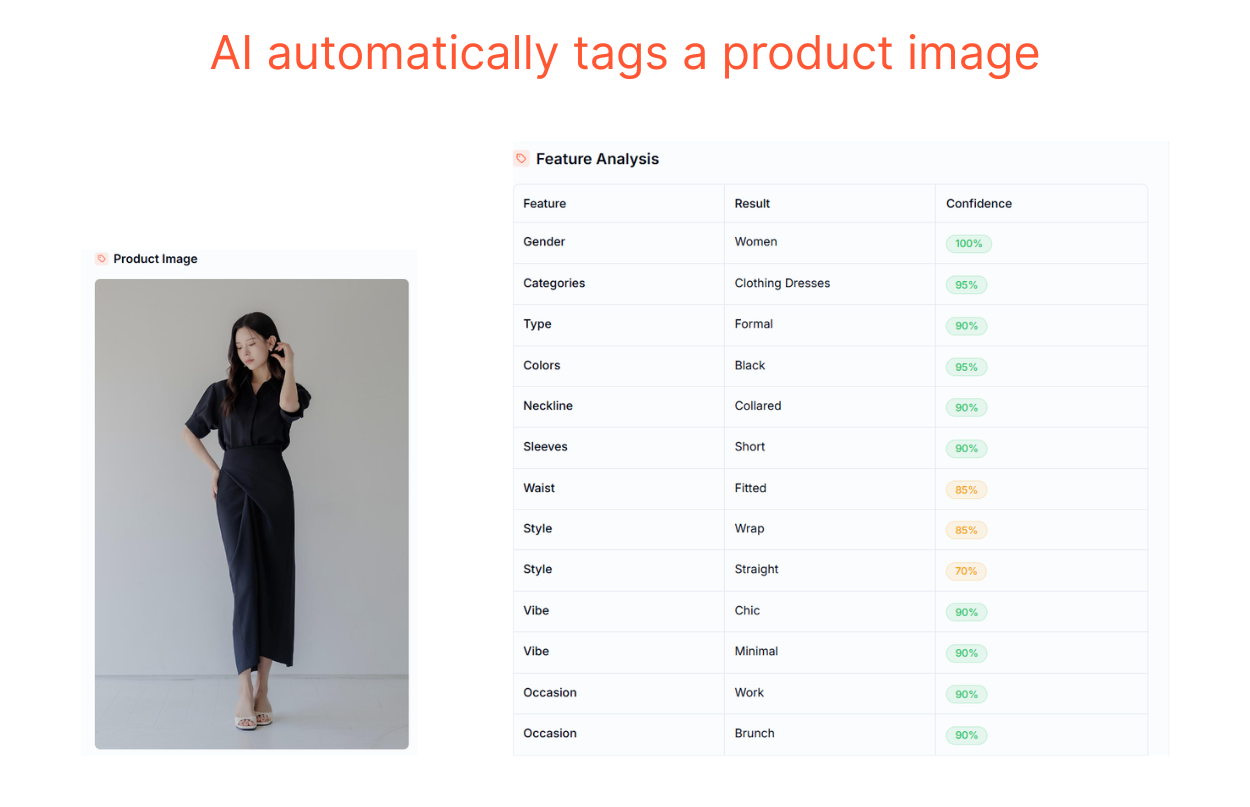 Take the black wrap dress example from earlier. On its own, the name “wrap dress” only tells shoppers the category (dress) and the product type (wrap dress). Tag it further with rich fashion-specific attributes, as in the image above, and then it can be found through multiple paths:
Different search queries, for instance, ‘fitted wrap dress’ or ‘wrap dress for work’
Faceted filters (category: dress, sleeves: short, neckline: collared, style: wrap, straight, etc.)
Personalized recommendations matching it to shoppers who've browsed similar pieces
This is what separates a well-organized fashion taxonomy from a basic folder system. The category tells shoppers what the product is, while the attributes tell them which one.
Below are the core attribute families for womenswear, with example values. We defined these from shopper interviews, then grouped some of the more niche attributes to keep them practical for real eCommerce catalogs and inventory.
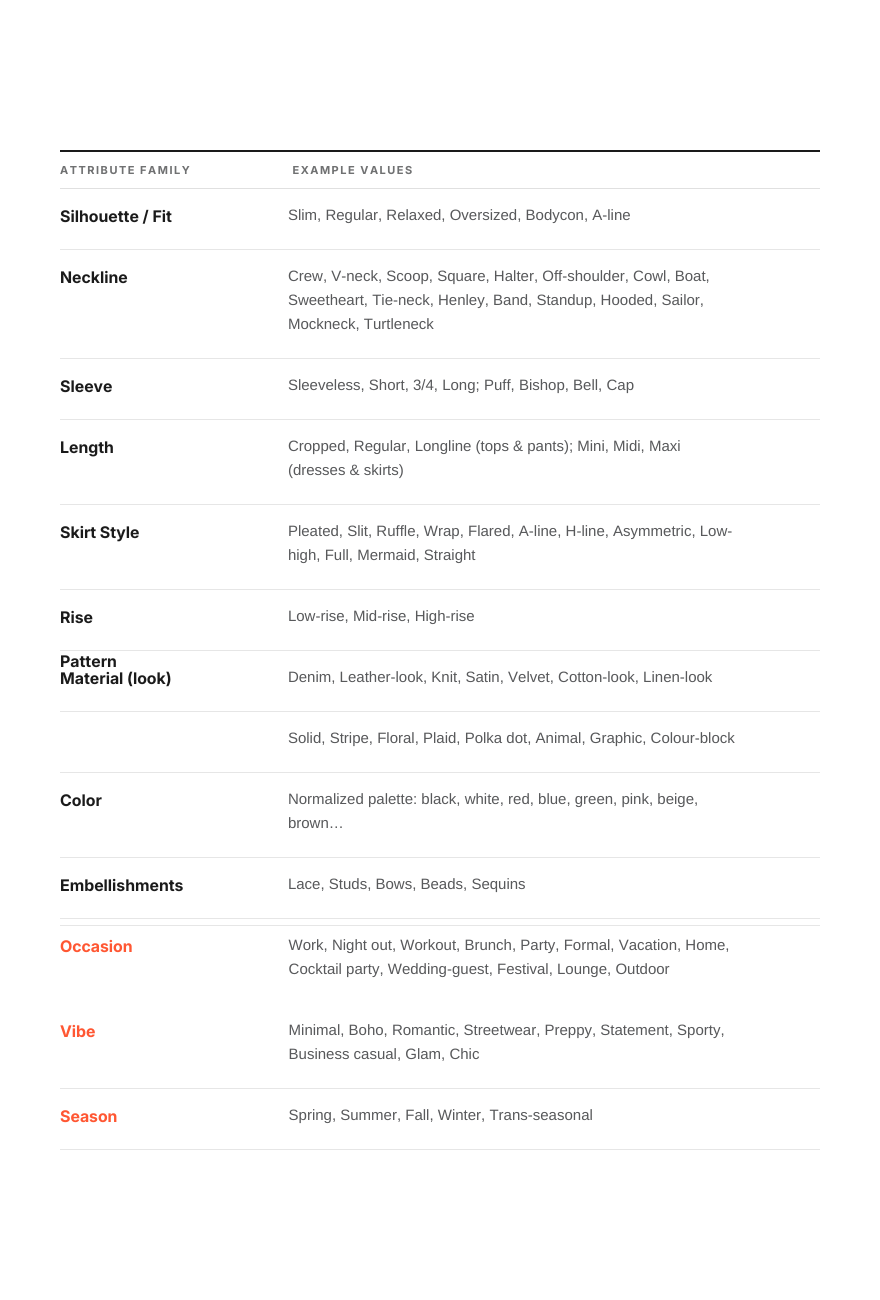 Objective Attributes vs. Subjective Attributes
From the table above, you can see there are two types of attributes: objective and subjective. Objective attributes are the ones that people generally agree on — neckline, pattern, fabric, season. Almost anyone looking at the same product would label it the same way. This makes these attributes reliable to tag at scale, whether manually or automatically.
Meanwhile, subjective attributes are the ones people tend to disagree about. Vibe and occasion are the clearest examples. These are where manual tagging tends to fall apart because everyone has their own idea of what counts. One person's work outfit is someone else's casual outfit.
Attributes are what power filters and personalized recommendations. If they're missing or inconsistent, filters and search stop working. And, most shoppers won't tell you why they left.
Your category tree and attribute layer are set up. Now comes the hard part: keeping them clean as your catalog grows. Two habits make the biggest difference.
First, name categories and describe products the way shoppers think and search. Second, resist the urge to add a new category every time you spot a product variation. Get these two right, and your fashion taxonomy stays easy to use no matter how big your catalog gets.
Your team might name a category ‘eyewear.’ But shoppers don't search that way; they might search ‘sunglasses.’ This happens more often than you'd think. The people building taxonomy are fashion experts. And, experts naturally reach for precise, professional terms.
The problem is that precision isn't the same as clarity. A shopper scanning your navigation menu isn't thinking in industry vocabulary. They're thinking in the plain words they'd use with a friend, like ‘jeans’ instead of ‘denim bottoms,’ or ‘sneakers’ instead of ‘athletic footwear.’ So, always choose simple, common words that almost every shopper knows.
It's tempting to create a new category every time you spot a product variation. Over time, though, this makes your apparel categories more complicated than they need to be. Take a midi skirt and a pleated skirt, for example.
Length (midi) and fabric design (pleated) aren't opposites. A skirt can have both attributes at the same time. Splitting them into two categories doesn't make your taxonomy more precise. It just makes it harder to navigate.
The fix is simple: keep both under the Skirts category. Then, tag rich attributes to capture the variation.
Objective attributes are tedious to tag by hand, but still doable. Subjective ones like vibe and occasion are harder. They need consistent judgment across thousands of products. And that judgment shifts depending on who's doing the tagging.
That’s why many fashion retailers choose AI tagging to solve this issue. The technology applies the same judgment across your entire catalog, instead of five team members tagging five different ways.
AI tagging works by analyzing product images and automatically tagging rich fashion attributes. These rich, consistent attributes unlock your shoppers' entire discovery experience: navigation, search, filters, personalization, and even mentions in AI answers.
Structure your catalog for search, filters, and AI discovery — with a copy-ready category hierarchy.
Your taxonomy is never really done. New products, new trends, and new attributes will keep testing whether your structure holds up. The stores that get this right treat their category tree and attribute layer as living systems, not a one-time setup.
Start with the four-level tree. Keep it simple. Then let AI-tagged attributes do the heavy lifting as your catalog grows.
Want the full structure without building it from scratch? Download our free ebook for the complete, ready-to-copy fashion taxonomy.

Written by YesPlz.AI
We build the next gen visual search & recommendation for online fashion retailers
