How AI Turns Product Images into Shopify Filters for Fashion Stores
Stop losing sales to poor product filtering. Discover how AI simplifies creating Shopify filters, saving you 25-50 hours per 100 products.

by YesPlz.AINovember 30, 2025

Stop losing sales to poor product filtering. Discover how AI simplifies creating Shopify filters, saving you 25-50 hours per 100 products.
by YesPlz.AINovember 30, 2025
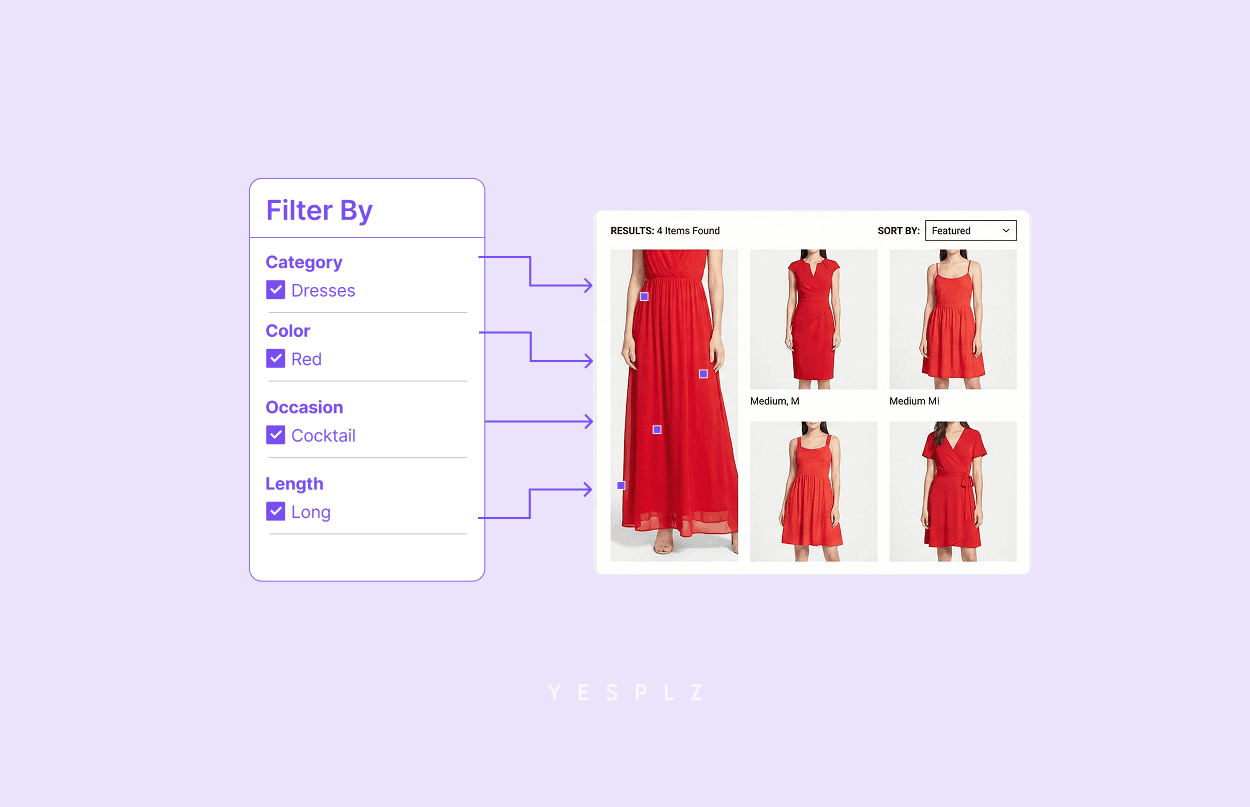
Every shopper visiting your Shopify fashion store does one of two things. They search. Or, they browse. When searching, they often start broad: 'shirt,' ‘dress,’ ‘denim,’ ‘pyjama,’ ‘joggers,’ etc. This initial query may return over 100 products. This is where Shopify filters matter.
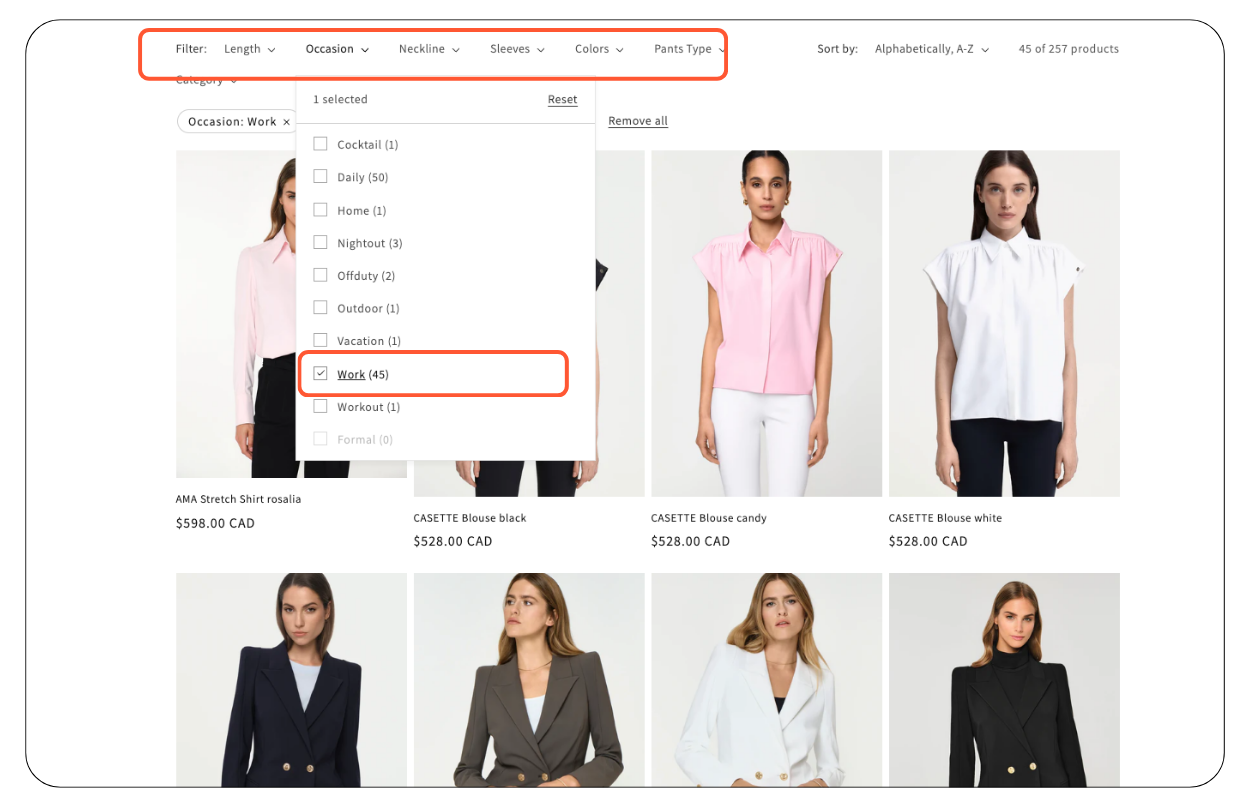 Shoppers want to narrow down results quickly. Does this store offer a V-neck or crew neck style? Is it a long-sleeve or a short-sleeve? Are any of them available in my size? Is it in olive green? Without effective filters, shoppers must browse through hundreds of items. In reality, most don’t. They bounce off your site and go to a competitor who has a better filtering system.
Table of Contents:
Why Clothing Stores Need Fashion-Specific Filters in Shopify?
How AI Turns Product Images into Shopify Filters: The 3-Step Process
Before AI: Why Most Shopify Fashion Merchants Skip Filter Setup
Fashion is uniquely visual and detail-oriented. In electronics or home goods, people filter by features or measurable specs like battery life, storage capacity, weight limit… But in fashion, shoppers filter by more nuanced attributes such as:
Style details: V-neck vs. scoop neck, slim fit vs. relaxed fit…
Visual elements: Patterns, colors, embellishments…
Vibe: Sporty, chic, minimal, quiet luxury…
Occasion: Workout, work, casual, formal, party…
For this reason, basic filters such as category, brand, gender, color, size, and price aren’t enough. Your shoppers need more detailed, fashion-forward filters that align with their natural way of thinking and searching. When your Shopify store offers these filters, shoppers can go from 100 items to the perfect pieces in seconds.
During discovery calls with YesPlz AI, many merchants wonder how AI simplifies the process of building fashion-specific filters from product images. "So, it scans product images, and then based on that, the algorithm creates filters?" one merchant asked us. The short answer is: Yes. But this simple “yes” deserves a deeper explanation.
Step 1: AI Vision Analysis - The Eyes that Never Miss a Detail
Step 2: AI Auto-Fills Product Metafields with Extracted Attributes
Step 3: Turn Product Metafields Into Fashion-Specific Filters in Shopify
The moment you upload a product image to your Shopify store, AI computer vision technology springs into action. But this sophisticated fashion AI didn’t just appear overnight. It was built on a foundation of deep understanding of how fashion shoppers think and search.
Before a single line of code was written, YesPlz started with extensive user interviews. We needed to understand:
What attributes do fashion shoppers actually care about?
What details matter most for each type of fashion item?
How do shoppers describe what they’re looking for?
These interviews reveal the real attributes that fashion shoppers use to search and filter products. For example, obvious elements like color and size. Or, nuanced details like specific style, vibe, and occasion.
Think about how you would describe a fashion item to your shoppers. You’d mention the color, style, fit, what occasion it’s suitable for, and the vibe it gives off. AI does exactly that. But it can identify over 1,100 distinct attributes with remarkable accuracy in seconds. Can you and your team manually do the same thing?
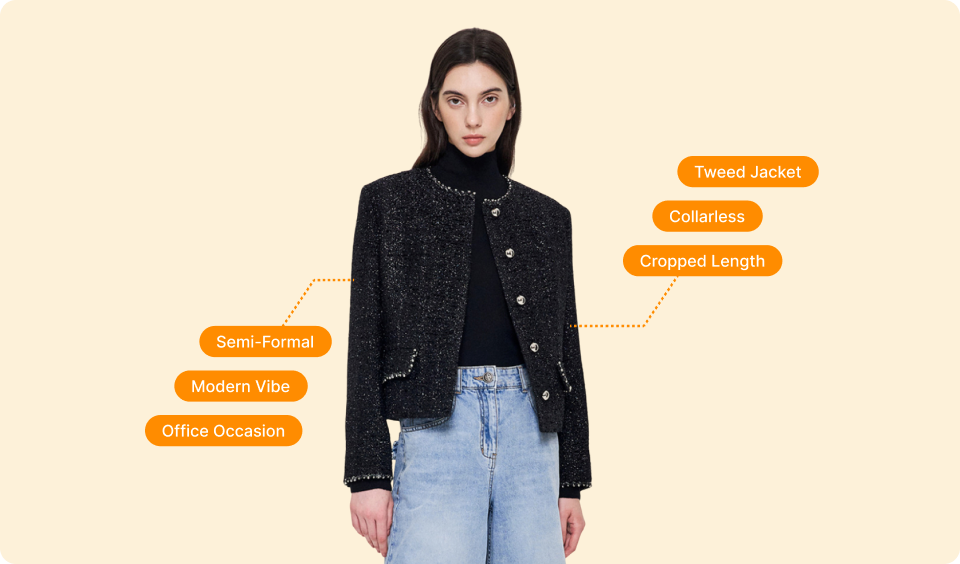 The table below lists fashion attributes automatically extracted by YesPlz AI through product images. All based on what fashion shoppers told us they want. These attributes will come in handy for creating comprehensive product metafields for later use in Shopify filters setup.
Visual Characters | Colors | Full spectrum recognition, including subtle shade variations. |
Patterns | Solid, striped, floral, tie-dye, abstract, geometric, animal print, color-blocked… | |
Details | Buttons, zippers, pockets, embellishments, ribbed cuffs, ruffles, pleats, cutouts… | |
Length | Short, regular, long, cropped, midi, maxi, mini, ankle-length… | |
Style Elements | Necklines | Crew, V-neck, boat neck, collared, hoodie, scoop, square, halter, off-shoulder… |
Sleeve Lengths | Sleeveless, short, long, three-quarter, puffed, bishop, bell, cap sleeves… | |
Silhouettes & Fit Types | Slim, relaxed, jogger, A-line, oversized, fitted, loose, tailored, bodycon… | |
Contextual Attributes | Occasion | Daily, work, workout, formal, casual, festival, evening, brunch, airport, travel… |
Vibe & Aesthetic | Sporty, chic, minimal, business casual, bohemian, edgy, romantic, preppy… | |
Product Classification | Gender | Women's, men's, unisex… |
Product Types | Joggers, sweatpants, activewear, dress shirts, blouses, dresses, jackets, coats… | |
Specific Categories | Tops, bottoms, dresses, outerwear, accessories, all analyzed with category-specific attributes. |
After analyzing fashion attributes in images, AI uses that data to automatically fill product metafields, which are the foundation of Shopify filters.
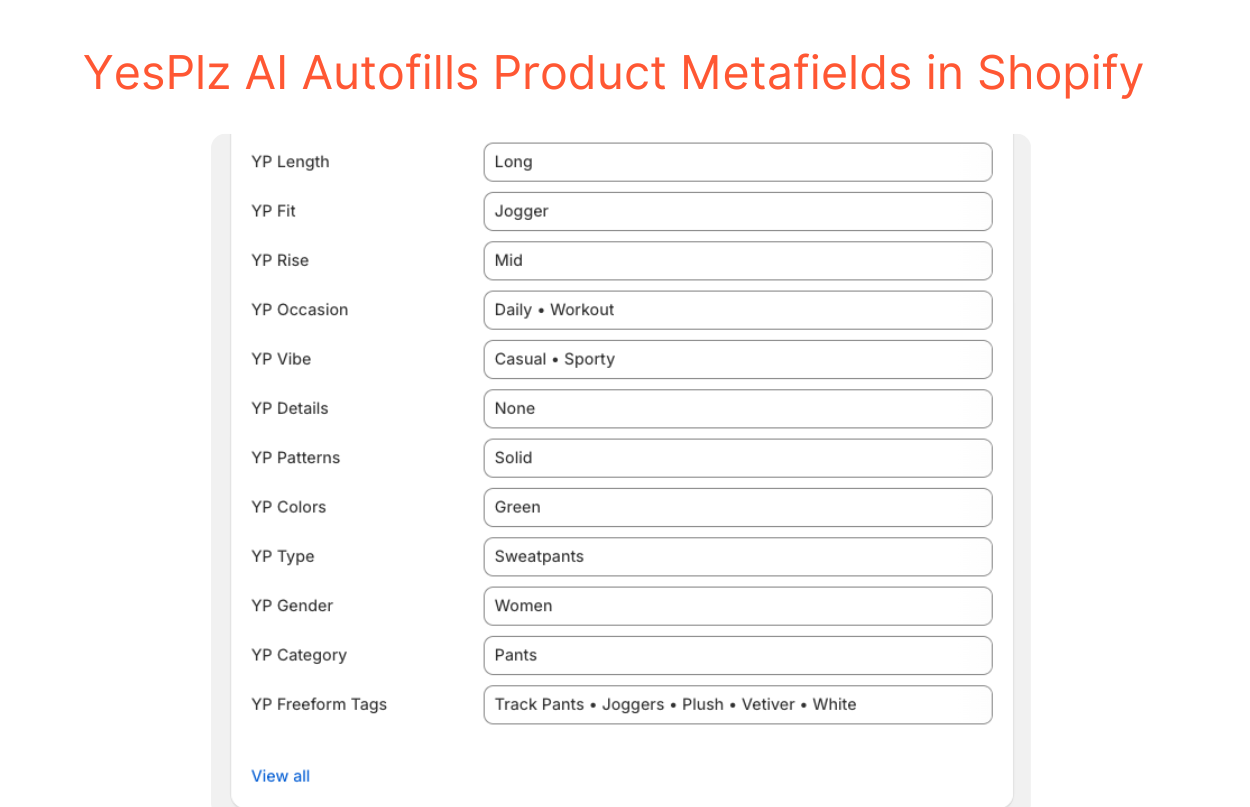 Without AI, creating filters requires manually entering product details into these metafields. Just imagine repeating this process for hundreds or thousands of products. It is slow, tedious, and unrealistic at scale.
Because of this, it’s no surprise that many fashion merchants skip this step entirely, leaving their Shopify stores without filters. AI removes that burden instantly. It auto-fills every product metafield with the correct attributes extracted from product images. Consistent, accurate, and complete in seconds.
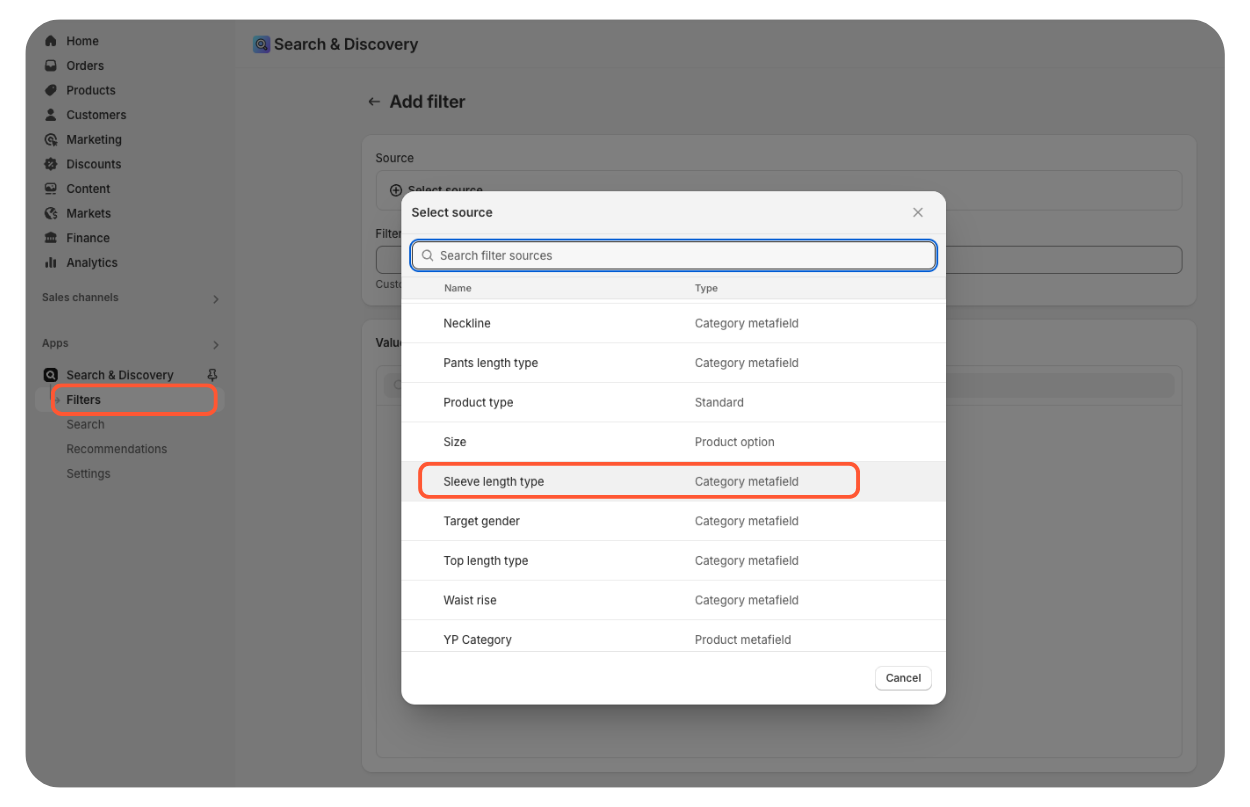
Once product metafields are auto-filled, adding Shopify filters becomes easier with just a few clicks. Access the Shopify Admin dashboard, go to your store’s filter settings, and click Add filter. Then, select filter sources from the AI-generated metafields. You can rename the filter labels and pick which values to show to your shoppers. It's just as simple as that.
 The Complete Picture
So yes, AI scans product images and simplifies Shopify filter setup. But that simple statement doesn’t fully explain what actually happens behind the scenes:
(1) AI leverages computer vision to analyze images and extract both visual and contextual attributes.
(2) It automatically fills each product metafield with the attributes it extracts.
(3) You then manually create filters based on those auto-filled metafields.
Now, consider this scenario: A shopper wants an olive-green jogger for working out. Without filters, she has to scroll through potentially hundreds of products. Meanwhile, with AI-powered filters, her shopping journey looks like this:
Type ‘joggers’ into the search bar → 103 results
Filter by ‘olive green’ color → 26 results
Filter by ‘workout’ occasion → 11 results
Filter by ‘relaxed’ fit → 4 perfect matches
By applying these multiple filters at once, she narrows 103 options down to just 4 ideal items. Within seconds, she finds exactly what she wants, without endless scrolling, losing interest, and heading to a competitor.
To truly appreciate how AI simplifies Shopify filter creation, let’s walk through what the process looks like without it. If you sell fashion on Shopify, this might feel painfully familiar.
Task 1: Manually Input Product Metafields
Task 2: Create Shopify Filters (or Skip It)
For each product, you must:
Carefully examine it to identify all attributes (every missing attribute is a lost opportunity to appear in shoppers' search or filter results).
Enter 10+ product metafields with relevant attributes (the number varies by product type).
Remember previous values you entered to stay consistent (for example, did you input ‘t-shirt,’ ‘tee,’ ‘tee-shirt,’ or all of them?).
Double-check for typos and accuracy.
Time investment: 15-30 minutes per product.
The consistency challenge: Using different values for the same attribute can create ineffective filters. For instance, you might enter ‘workout’ for some items, ‘gym’ for others, and ‘exercise’ for the rest. A ‘workout’ filter will then only show items labeled exactly that way. That means others labeled ‘gym’ or ‘exercise’ are hidden from shoppers.
Suppose that you finish the first task. All product metafields are comprehensively filled across your entire catalog (which rarely happens!). The second step is to create relevant filters. This is where many merchants give up, and where the filtering creation dies before it begins.
Here’s the reality: many fashion merchants skip this step entirely. Why? Because after spending a lot of time and effort on the first task, they're now exhausted. Setting up filters in Shopify requires that all product metafield work be done first, consistently across every single product.
Create filters in the Shopify Admin dashboard.
Test each filter and its combinations to ensure they work correctly.
Adjust and re-test until filters work properly.
“I’ll create filters later.” (Spoiler: Later never comes!)
Inconsistent product metafields cause filters to miss relevant products.
Shoppers are left with no filters and must manually browse endlessly.
Numbers tell the story best, so let's do some simple math. The time required to enter metafields manually is 15-30 minutes per product. For a 100-product catalog, it would take 1,500-3,000 minutes, or 25-50 hours. With the help of AI, this process takes just seconds, which is equivalent to 0 hours for 100 products.
With 25-50 hours saved per 100 products and a 50% reduction in manual work, the efficiency gains are clear now. But the benefits extend far beyond time savings. AI is impacting every aspect of your fashion store's operations and customer experience.
You can't afford to spend 25-50 hours manually creating filters for every 100 products in your catalog. AI eliminates that burden. What once consumed weeks of your team's time now happens automatically in seconds. Your shoppers get the fashion-specific filters they deserve. And your team gets your time back to focus on strategic work: building collections, planning campaigns, etc.
Ready to get those 25-50 hours back? Schedule a demo with us to see how AI simplifies building Shopify filters from your product images in seconds.

Written by YesPlz.AI
We build the next gen visual search & recommendation for online fashion retailers
