Every online fashion retailer has unique ideas and different problems. We built a solid search and discovery solution to cover most of them. However, we still get the same questions: Can you add this new feature? Can you add one more button? Can you remove that one?
Each request is reasonable. Each becomes a ticket, then a sprint, then a wait. That is why we built Wanda by YesPlz: vibe coding for fashion search and discovery.
In this article, we share what merchandisers ask AI in Wanda, plus prompts you can copy to analyze competitors, spot trends, build discovery features, and reshape your storefront, no coding or design skills required.
On October 22, 2026, we brought a hands-on AI merchandising workshop to Gangnam, the heart of Seoul’s style scene. Each participant used Wanda, our AI workspace, to build and test their own shopping experience ideas. That’s right: everyone in the room vibe-coded for their own store.
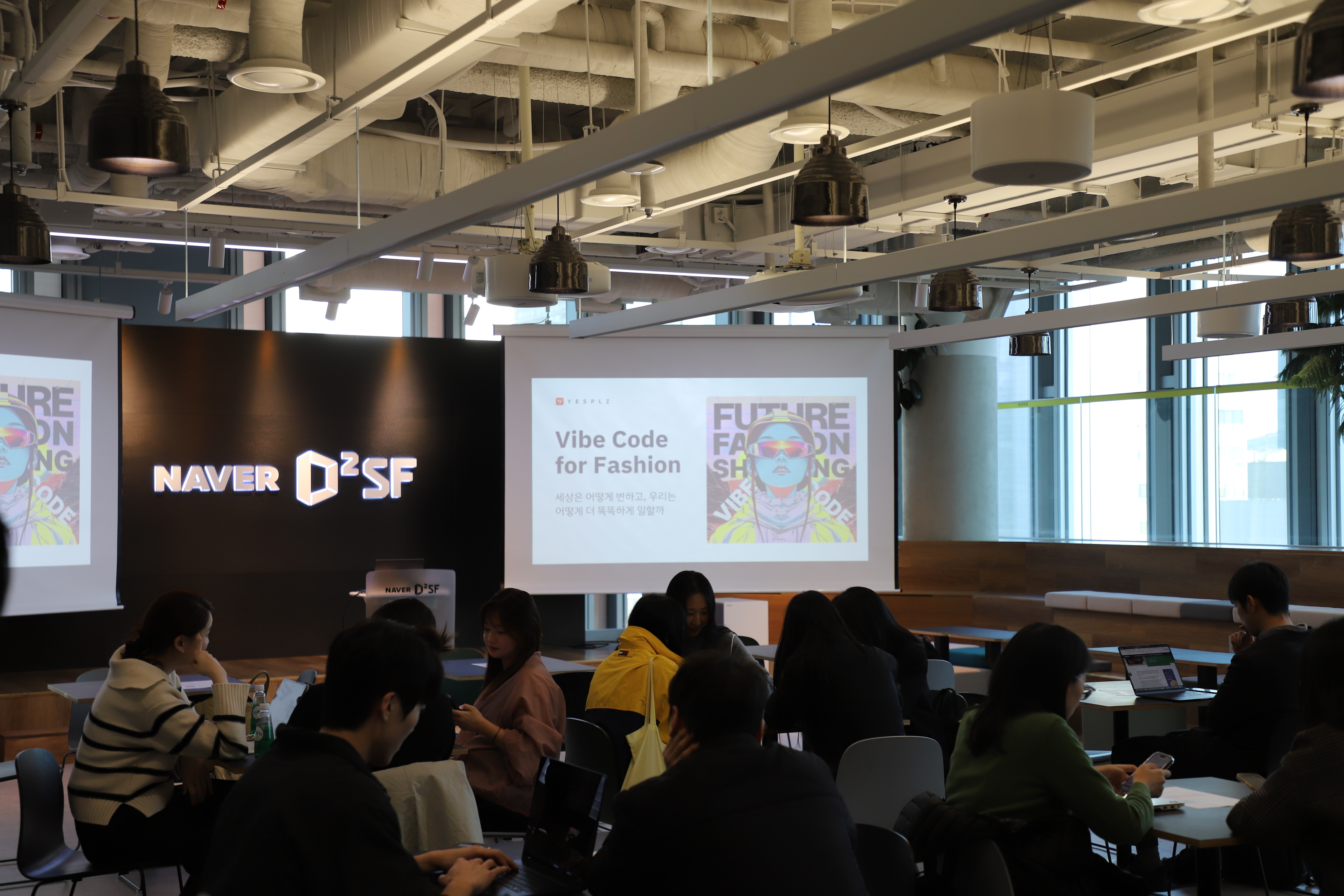
Vibe coding for fashion eCommerce means describing the shopping experience you want to create in plain words (a new feature, a collection page, a sales campaign, or a competitor report), and letting the AI build it. Then, you publish it to your online store, no code required.
The quick facts:
Our surprise: Wanda does more than handle feature requests; it unlocks creativity.
Creativity at the AI merchandising workshop did not depend on skill. It depended on giving Wanda specific guidance, then adjusting what came back. One sentence of intent became a working feature, and the next sentence reshaped it.
Below are the six common use cases we observed at the workshop.
Turn Your Imagination into a New Feature
You no longer need to wait for an engineer to develop a new feature. Instead, you can build it yourself.
At the workshop, one participant asked Wanda to build a virtual try-on for travelers: Shoppers upload their own photo, get outfit recommendations for an upcoming trip, and see each look on themselves as a page in a passport.
It is a fun way to shop for fashion. A feature like this would normally need a developer and a budget. But with Wanda, it started with a single sentence.
Six accounts asked for virtual fitting, each in their own words, and each shaped it to their own idea. The features came from the participants’ imagination, not from a ticket queue.
Create Interactive Games for Your Shoppers
Games turn browsing into play. A game in your store can encourage shoppers to engage with your brands and products.
At the workshop, one participant asked Wanda to combine virtual fitting with a jackpot roulette result. The next prompt asked for the entire template to look like pachinko.
In the game, a top, bottom, and shoes drop into place, and when shoppers make a perfect combo, they earn bonus credit. It is a playful way to shop, but exactly the kind of idea that rarely gets built.
Wanda built the game on the participant’s store catalog, which we had connected in advance. The participant then exported it as an HTML file, dropped it into their store, and went live.
Reshape Your Storefront with a Few Prompts
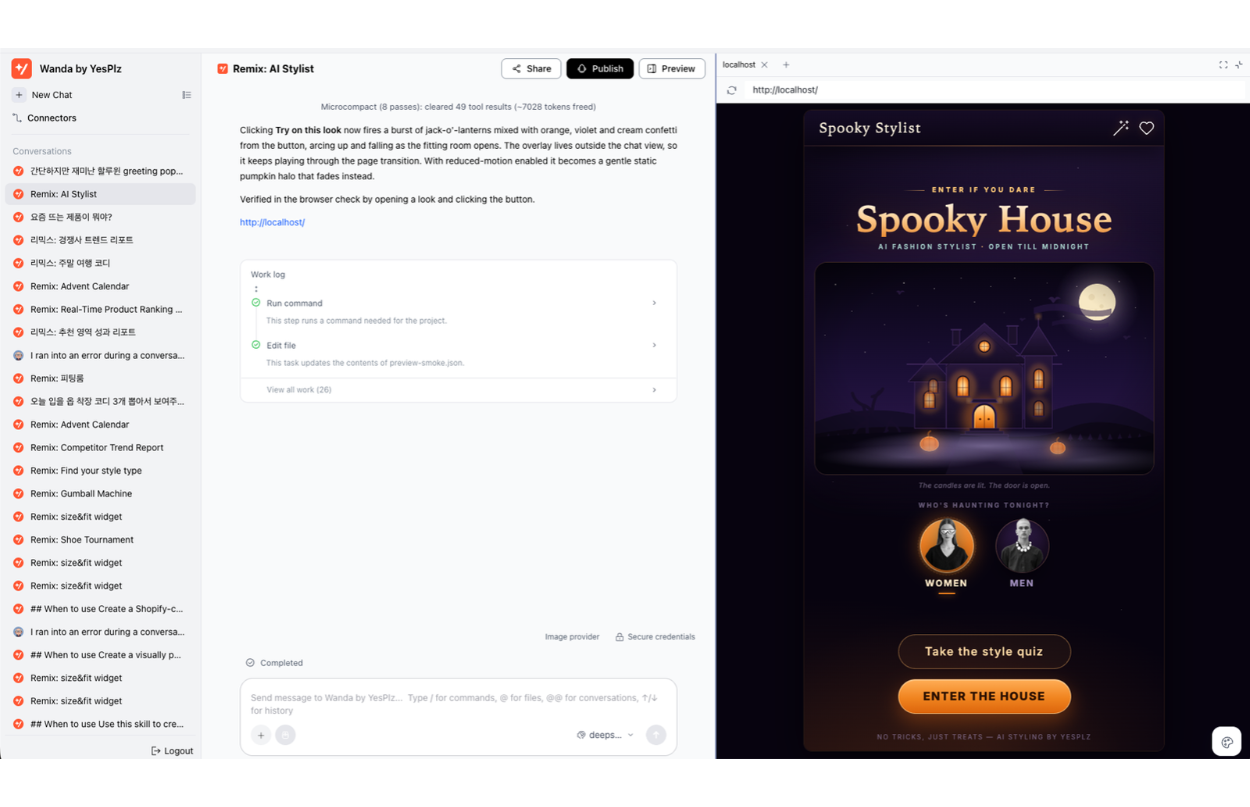
During our AI merchandising workshop, we saw plenty of ideas to renew storefronts for upcoming occasions, such as Halloween and Christmas.
One participant came up with a Christmas countdown Advent Calendar. She created a personal lookbook with 24 outfits for an MBTI type. Wanda described replacing the calendar doors and date locks with a 24-look grid and occasion filters.
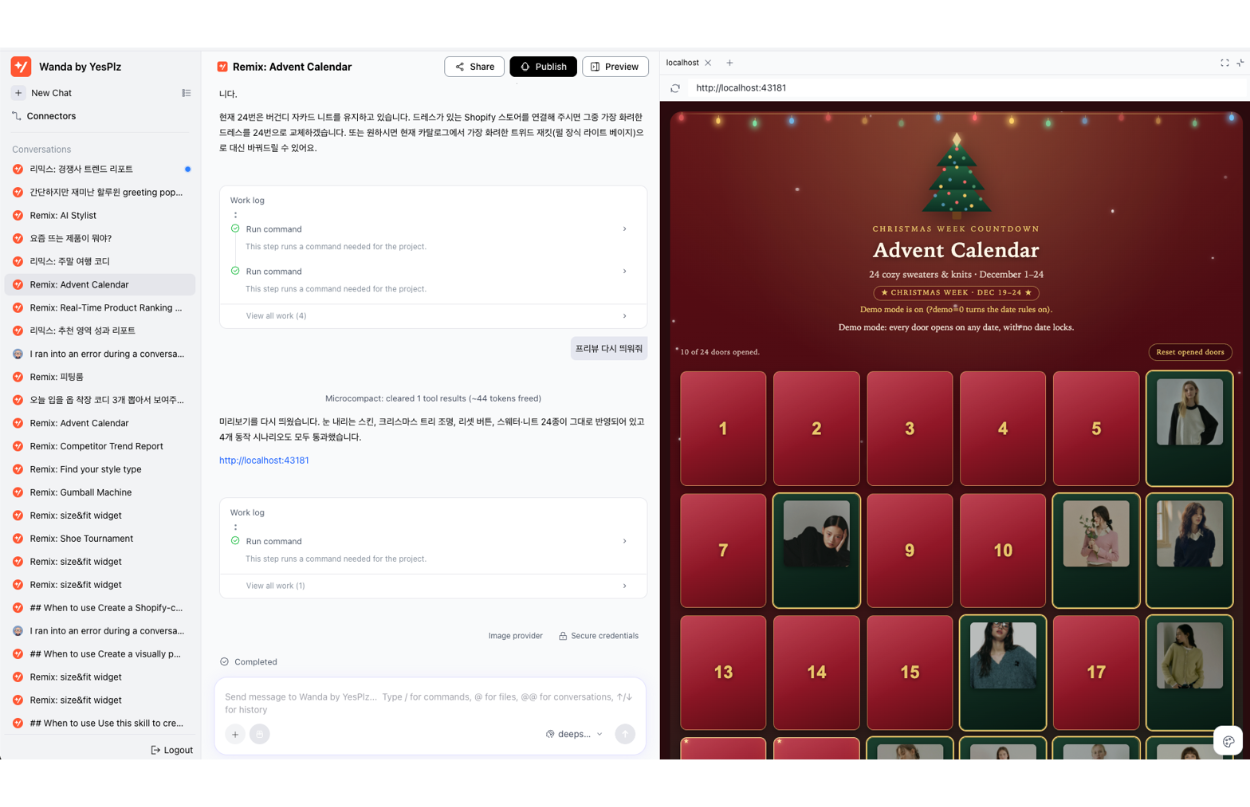 Another built a Christmas calendar that tells a story. It starts with ordinary winter clothes and gets more festive as December 24 approaches. Wanda described a staged selection, from neutral outerwear and knit layers to holiday colors, ending with ivory, green, and burgundy for the last three days.
The list of ideas goes on, and your store probably has a few of its own to try. Schedule a demo to try Wanda on your own store.
Convert Your Best Sellers into a Campaign Page
Participants did not stop at asking questions about their data. They turned the answers into something they could use.
One participant started with a sales ranking and moved straight to a winter campaign. Wanda described merchandise zones, promotions, a schedule, and proposed targets, all built from that data.
Another asked Wanda to write a customer journey report from their data, then asked to include more customers. Wanda reported rebuilding it on a broader group of customers and product views.
The insight and the campaign page came out of the same conversation. Your best sellers probably have a campaign waiting in them too.
Get Data Answers, and Check Where They Came From
The best part of asking AI about your numbers is being able to push back.
One merchandiser asked for last week’s best sellers, then asked, “Where did this data come from?” Wanda named the data connection, the date range, and the filters, and said the freshest data ended two days earlier.
When someone asked about shopper gender or loss-making products and the data wasn’t connected, Wanda said so and offered the closest analysis it could support. It doesn’t guess to please you, so you can trust what it does tell you.
Turn a Competitor’s URL into a Full Report
Your own store is only half the picture. Five participants in the workshop looked outward, using a link or a marketplace name to ask about their competitors.
You can ask which products on a site are likely to become best sellers, what is trending in outerwear, or which kids’ fall/winter items sell the most.
Wanda turns these questions into a report you can read straight away, without an afternoon of manual research.
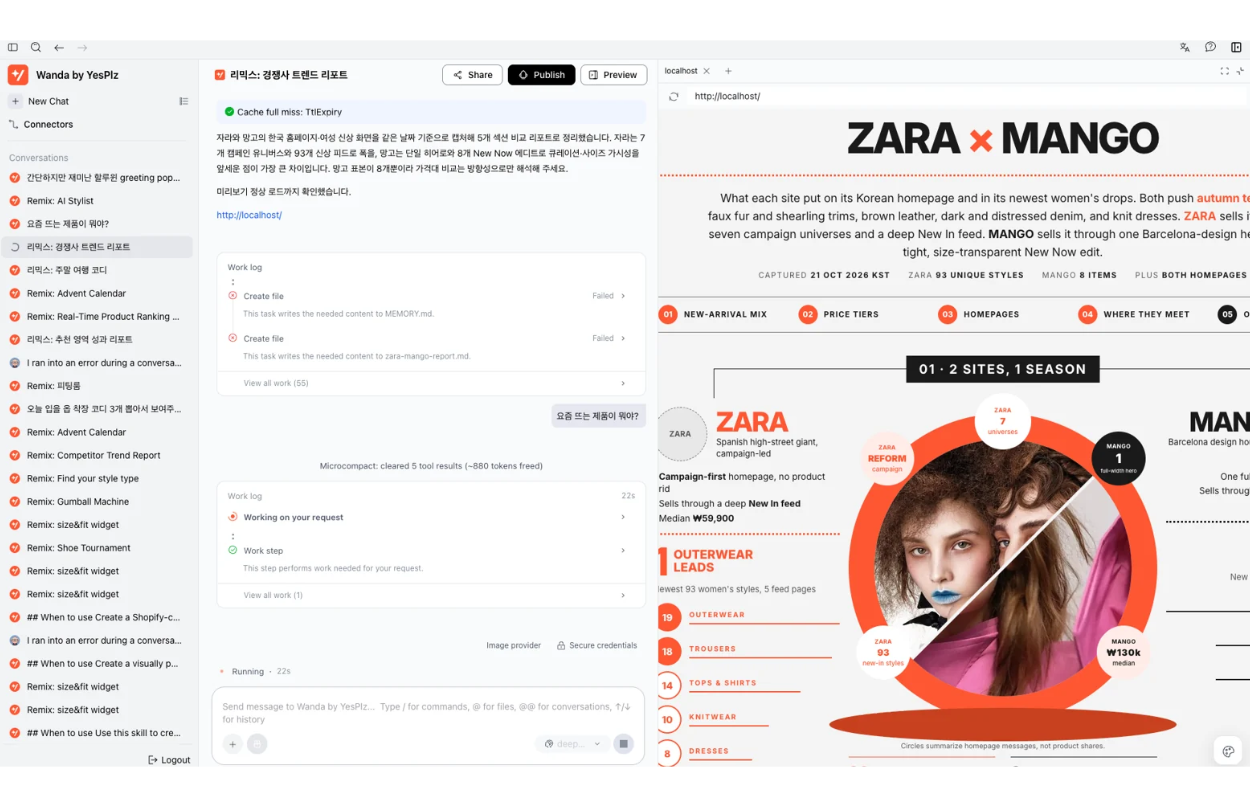 Competitor reports were a smaller part of the workshop, but they follow the same pattern: one question, then a report you can refine. Paste a link from a store you watch, and see what Wanda finds.
Here are AI prompts that you can copy and use in Wanda today. Some come from what merchandisers asked AI at the workshop. Others are starter prompts we provided.
You don’t need to write a perfect prompt. At the workshop, most participants started with one sentence and changed it after seeing the first result. Use the suggestions below as a starting point.
Replace anything in [brackets] with your own details, then adjust the result with follow-up prompts.
Prompts to Analyze Your Data
What was our top-selling product last month?
Which products have a high conversion rate but get little traffic? Can you explain why?
Which products dropped the most week over week?
What are the most popular search terms, and how do they relate to revenue?
How long does it take from adding to cart to purchase?
Prompts to Build New Features, Widgets, or Collections
Make a calendar where outfits start as ordinary [season] clothes and get more [holiday]-themed as [date] gets closer.
Create 24 outfits for [style or personality type], using only [brand] clothes.
Add a way to try the recommended outfit on my own photo, and show the result like a passport.
AI Prompts for Merchandisers to Create Interactive Games
Add a jackpot roulette that reveals a recommended outfit, and make the whole page look like [pachinko/a slot machine].
Create a card-flip game where shoppers pick a card and reveal a product and a coupon. When they click an opened card again, flip it back to the first card's face.
Make the loading screen a [bouncing ball/spinning reel] and show the result on three reels.
Prompts to Change the Original Design or Make Small Visual Adjustments
Change the main page to a [Halloween/Christmas/Valentine] concept.
Darken the background and bold the numbers.
Add [spooky/summer/festive] accessories around the products.
 Prompts to Turn an Insight into a Campaign
Pick the best sellers from the last 7 days and build a [season] campaign page with product zones, promotions, and a schedule.
Analyze data from more customers and update the report's charts to match.
Research recent fashion trends for women in their 20s on the web, connect them to our product data, and suggest three campaign ideas.
AI Prompts for Merchandisers to Analyze Competitors from a URL
Pull a report on what's trending in outerwear on [a leading fashion marketplace].
Analyze this site and tell me which products are likely to become best sellers: [URL]
Which kids' fall/winter items sell the most on [marketplace]? Give me about 20.
FAQ
What is an AI Merchandising Workshop?
An AI merchandising workshop is a hands-on session where participants use an AI tool to solve their own problems by describing them in words. At ours, participants used Wanda to add new features, change the original design, analyze data, make reports, and create interactive games for their online fashion stores.
What Are AI Prompts for Merchandisers?
AI prompts for merchandisers are plain-language instructions that run on an AI agent built for merchandising work. A general AI tool gives general answers. A merchandising agent is guided by fashion and retail know-how, so it understands products, categories, sell-through, and campaigns, and it knows what a good result looks like for a merchandiser.
You type one sentence, like “Which products dropped the most in sales week over week?” or “Change the homepage to a Halloween theme.” The agent pulls the right data, does the analysis or builds the page, and returns a result ready to use. You refine it with follow-up prompts, the same way you’d give feedback to a teammate.
What is Wanda?
Wanda is YesPlz's vertical AI agent for fashion merchandising and discovery. It is built on YesPlz AI's fashion search, recommendation, and tagging engine and connected to your catalog and sales data.
How Does Wanda Build New Features and Themes Without Code?
You describe what you want, and Wanda writes the code for you behind the scenes. It builds the feature, tests it, and shows you the result in a live preview. When you’re happy with it, Wanda publishes it straight to your storefront. You don’t need a developer.
What Data Does Wanda Use?
Wanda combines two sources: your store’s data (catalog, product attributes, sales, and analytics) and live information from the web, such as trends and competitor activity. The more data you connect, the deeper its analysis gets. When something isn’t connected, Wanda tells you what’s missing and what it would take to answer the question fully.
Every idea in this article started as a single sentence from a workshop participant, with no ticket and no sprint. Your store has its own ideas, whether that’s a virtual fitting feature, a seasonal storefront, or a campaign built from your best sellers.
Pick a prompt from the list above, replace the [brackets] with your own details, and see what Wanda builds on your catalog. Enjoy early access to Wanda today.