How to Classify Apparel in Product Taxonomy
Learn how to classify clothing items in eCommerce categories. See where jeans, sweaters, sweatshirts, hats, graphic tees, robes belong, with example category paths.

by YesPlz.AINovember 16, 2026

Learn how to classify clothing items in eCommerce categories. See where jeans, sweaters, sweatshirts, hats, graphic tees, robes belong, with example category paths.
by YesPlz.AINovember 16, 2026
If you have ever stared at a pair of jeans and wondered whether it belongs under Pants, Denim, or Bottoms, you already know why apparel product taxonomy matters.
This guide shows you how to classify clothing items in eCommerce categories consistently as your catalog grows.
You will get a recommended category structure, a set of classification rules, and a garment-by-garment cheat sheet covering the items that cause the most debate: shirts and graphic tees, sweaters and sweatshirts, jeans and pants, hats, and robes.
An apparel product taxonomy is a hierarchical system that sorts clothing items into categories and subcategories so that every product has one clear, predictable home. It decides where each item is grouped, what it is called, and how it is described.
If you are new to the topic, start with our guide on what a fashion taxonomy is.
While building your fashion clothing taxonomy, it is easy to confuse category, product type, and attribute (or fashion tag). Mixing these three terms up is the root of most taxonomy problems.
The table below helps you to understand the differences between them, including their functions and examples.
Term | What it does | Example |
Category | A location of a product in the hierarchy. It answers: Where is it? | Women › Clothing › Dresses |
Product Type | A descriptive label It answers: What is it? | Wrap dress |
Attribute | A word or short phrase for one detail of a product, like its color, length, or fabric. It answers: What is it like? | blackmidi polyester |
There is no universal rule, but it is recommended to stop at the level where products in a category are similar enough that one set of filters makes sense for all of them.
Two levels are usually too shallow to filter well. Beyond five, catalogs become hard to maintain.
For this reason, most online fashion stores organize products in a category tree of four or five levels: Department › Division › Broad Category › Product Type › More Specific Product.
For example: Women › Clothing › Tops › T-shirts
Want a fuller, copy-ready example? See our guide on Apparel Categories: A Copy-Ready 4-Level Fashion Taxonomy Tree.
The core rule is simple: Every product gets one primary category path. Other details, such as fit, fabric, color, neckline, and sleeve length, should live in attributes.
A black cropped graphic tee with short sleeves is still a T-shirt. So, its category path is Women › Clothing › Tops › T-shirts. Black, cropped, graphic, and short sleeves are attributes that describe it. You don’t need to create new subcategories for it to live in.
Use these steps as your online catalog category guidelines. They ensure your team of merchandisers, data entry staff, PIM specialists, and automated tools all make the same decision.
Is that item worn on the upper body, the lower body, over other clothes, or to sleep or lounge? Is it an accessory? This puts the item in the right division and category.
Choose the category name shoppers frequently search for. Sweatshirts are more common than fleece tops. Jeans are more popular than denim bottoms.
The product type is the most specific label, such as hoodies, cardigans, or bucket hats.
Fit, neckline, wash, length, graphic print, fabric, color, occasion, etc., should be attributes of a specific product type. Don’t create a new subcategory, or your category tree will become cumbersome.
Look at how you already classified a comparable product. If your new item does not follow the same logic, either the new item or the old one is wrong. Fix whichever it is.
This section includes quick-reference tables for the garments that cause the most confusion. The tables show the category paths in the 4- or 5-level tree:
Department: Women, Men, or Kids.
Division: Clothing, Shoes, Bags, or Accessories.
Broad category: Tops, Bottoms, Dresses, Outerwear, and so on.
Product type: T-shirts, Pants, Sweaters, Sweatshirts, and so on.
More Specific Type: Cardigans, Hoodies, Pullovers, Jeans, and so on.
Tag the details like sleeve length, color, fabric, print, fit, and occasion as attributes. These are your fashion tags.
Examples use Women as the department. The same logic applies to Men and Kids. Adapt the labels to your own catalog, but keep the structure and the logic the same everywhere.
Always confirm against the current Google product taxonomy and Shopify product taxonomy before you map your own categories.
This quartet causes more misclassification than almost any other group of fashion items. Shoppers often use these words interchangeably. Some brands use sweater as a catch-all for any warm mid-layer.
For eCommerce clothing category taxonomy purposes, separate them by fabric and features:
Sweaters are made from knitted or crocheted yarn, typically wool, cotton, cashmere, or acrylic. With sweaters, you can split cardigans (open at the front with buttons or a zip) from pullovers (pull on over the head).
Sweatshirts are made from fleece or jersey fabric. Hoodies are a type of sweatshirt. The hood is the defining feature, so zip-up versions are still hoodies.
Below are some questions that help you classify these fashion items:
Is it knitted or crocheted from yarn? If yes, it is a sweater.
If not, is it made from fleece or jersey fabric? If yes, it is a sweatshirt.
Does it have a hood? If yes, it is a hoodie, which sits under Sweatshirts.
Does it open at the front? If it is knit, it is a cardigan, which sits under Sweaters.
This is one of the most debated placements. For example, sweatshirts can sit between Casual Tops, Activewear, and Loungewear. Some online catalog category guidelines place them under Shirts & Tops. Meanwhile, others categorize a hoodie and a sweatshirt as Outerwear.
Item | Category Path | Google Product Category |
Sweatshirt | Women › Clothing › Tops › Sweatshirts | Apparel & Accessories › Clothing › Shirts & Tops |
Hoodie | Women › Clothing › Tops › Sweatshirts › Hoodies | Apparel & Accessories › Clothing › Shirts & Tops |
Sweater | Women › Clothing › Tops › Sweaters | Apparel & Accessories › Clothing › Shirts & Tops |
Cardigan | Women › Clothing › Tops › Sweaters › Cardigans | Apparel & Accessories › Clothing › Shirts & Tops |
Pullover | Women › Clothing › Tops › Sweaters › Pullovers | Apparel & Accessories › Clothing › Shirts & Tops |
Actually, there is no single correct answer. However, there is a correct approach: pick one location and apply it consistently.
From a shopper's perspective, jeans are their own category. Shoppers search for them separately and expect a dedicated page. But from an eCommerce platform perspective, they are often a kind of pants.
Bottoms overlap more than other categories. For example, stretchy jeggings sit between jeans and leggings. To place each item consistently, check length first, then fabric and construction:
Shorts: the hem ends above the knee, in any fabric.
Jeans: denim or denim-look fabric, with jeans construction.
Pants and trousers: woven fabric, tailored or casual cuts.
Leggings: stretch, close-fitting, usually knit.
Google’s list has no separate category for jeans, so jeans map to Pants. In your own tree, you can keep it as a specific product type, because that is the word shoppers frequently search for.
If you carry many styles, decide on clear boundaries. Trousers, chinos, and dress pants can share a category with fit and style filters. Or you can also classify them into specific categories.
Shorts and leggings typically deserve their own product types, because shoppers browse them differently.
Item | Category Path | Google Product Category |
Jeans | Women › Clothing › Bottoms › Pants › Jeans | Apparel & Accessories › Clothing › Pants |
Trousers | Women › Clothing › Bottoms › Pants | Apparel & Accessories › Clothing › Pants |
Chinos | Women › Clothing › Bottoms › Pants | Apparel & Accessories › Clothing › Pants |
Dress Pants | Women › Clothing › Bottoms › Pants | Apparel & Accessories › Clothing › Pants |
Shorts | Women › Clothing › Bottoms › Shorts | Apparel & Accessories › Clothing › Shorts |
Leggings | Women › Clothing › Bottoms › Leggings | Apparel & Accessories › Clothing › Pants |
Then, handle variations as attributes. For instance, skinny, straight, bootcut, wide-leg, and relaxed are fit attributes. Light wash, dark wash, and black are wash or color attributes.
Creating a subcategory for each attribute multiplies the number of categories in the hierarchy. Fashion tags do that job better and keep the taxonomy lean.
Tops cover the widest range of styles in womenswear. Shoppers search for tops by the names they know, such as tee, shirt, blouse, or tank. Match those names to simple rules so every item lands in the same place:
T-shirts: casual, usually knit fabric, pulled on over the head, no collar or buttons.
Shirts: typically woven fabric with a collar and button front.
Blouses: a women's category for dressier or softer tops, often with a different fit or fabric.
Tank top: sleeveless, usually knit, with shoulder straps and a scoop or round neckline.
Item | Category Path | Google Product Category |
T-shirt | Women › Clothing › Tops › T-shirts | Apparel & Accessories › Clothing › Shirts & Tops |
Graphic tee | Women › Clothing › Tops › T-shirts | Apparel & Accessories › Clothing › Shirts & Tops |
Tank top | Women › Clothing › Tops › Tank tops | Apparel & Accessories › Clothing › Shirts & Tops |
Blouse | Women › Clothing › Tops › Blouses | Apparel & Accessories › Clothing › Shirts & Tops |
Button-down shirt | Women › Clothing › Tops › Shirts | Apparel & Accessories › Clothing › Shirts & Tops |
Polo shirt | Women › Clothing › Tops › Shirts | Apparel & Accessories › Clothing › Shirts & Tops |
Should graphic tees be their own category? In most catalogs, no. A graphic tee is still a T-shirt. The graphic is a pattern or print attribute, not a reason for creating a new category. Tag it with a print attribute and let shoppers filter for it. The same applies to other attributes and fashion items like shirts or blouses.
Robes are a common trap. They are usually part of sleepwear and loungewear. They are not outerwear, even though they are worn over other clothes.
A satin kimono robe sold as loungewear is a robe. A traditional or ceremonial kimono is a different product.
How to tell the types apart:
Bathrobes: thick, absorbent fabric such as terry or waffle.
Dressing gowns and lightweight robes: satin, cotton, or similar fabrics.
Kimono robes: wide sleeves and a wrap front, sometimes used as a fashion layering piece.
Item | Category Path | Google Product Category |
Bathrobe | Women › Clothing › Sleepwear & Loungewear › Robes | Apparel & Accessories › Clothing › Sleepwear & Loungewear › Robes |
Satin or kimono-style robe | Women › Clothing › Sleepwear & Loungewear › Robes | Apparel & Accessories › Clothing › Sleepwear & Loungewear › Robes |
Pajama set | Women › Clothing › Sleepwear & Loungewear › Pajamas | Apparel & Accessories › Clothing › Sleepwear & Loungewear › Pajamas |
Traditional kimono | Women › Clothing › Traditional wear › Kimonos | Use Google’s separate Kimonos category |
In Google's taxonomy, robes sit as a child of Sleepwear & Loungewear alongside pajamas.
Shoppers browse dresses by length (mini, midi, maxi) and by style (wrap, shirt, etc.), so your site can give each one its own category under Dresses. Then add other attributes like sleeve length, silhouette, and occasion as filters. For example, a short-sleeve mini dress is still a mini dress with the short-sleeve attribute.
Item | Category Path | Google Product Category |
Mini dress | Women › Clothing › Dresses › Mini Dresses | Apparel & Accessories › Clothing › Dresses |
Midi dress | Women › Clothing › Dresses › Midi Dresses | Apparel & Accessories › Clothing › Dresses |
Maxi dress | Women › Clothing › Dresses › Maxi Dresses | Apparel & Accessories › Clothing › Dresses |
Wrap dress | Women › Clothing › Dresses › Wrap Dresses | Apparel & Accessories › Clothing › Dresses |
Shirt dress | Women › Clothing › Dresses › Shirt Dresses | Apparel & Accessories › Clothing › Dresses |
Hats belong in Accessories since they’re worn as add-ons to an outfit. Google’s taxonomy files them under Clothing Accessories. The specific styles (caps, beanies, bucket hats, sun hats) sit under Hats. The table shows how common styles are placed on your site and in your feed.
Item | Category Path | Google Product Category |
Baseball cap | Women › Accessories › Hats › Caps | Apparel & Accessories › Clothing Accessories › Hats |
Beanie | Women › Accessories › Hats › Beanies | Apparel & Accessories › Clothing Accessories › Hats |
Sun hat | Women › Accessories › Hats › Sun Hats | Apparel & Accessories › Clothing Accessories › Hats |
Bucket hat | Women › Accessories › Hats › Bucket Hats | Apparel & Accessories › Clothing Accessories › Hats |
Start with a clear hierarchy (department, division, broad category, product type, more specific type). Classify each item by what it is and how it is worn. Then, tag details like fabric, fit, and color as attributes. Give every product one primary category and document your edge-case decisions.
Both approaches work, as long as you apply one consistently. Many stores use gender or department as the top level and avoid repeating it at deeper levels. For standards-based feeds, make sure the gender and age group attributes are also filled in.
Choose the place a shopper would look first, record the decision in your master table, and apply it to every similar item. Use attributes or collections to surface the item elsewhere.
Applying these rules to every product by hand is slow. As your catalog grows and more people touch it, consistency starts to slip. YesPlz AI Product Tagging for Fashion is built to solve that.
Our fashion-trained AI reads a product image and automatically tags the attributes shoppers search by. In the example below, one photo of a floral dress turns into a complete, structured product record.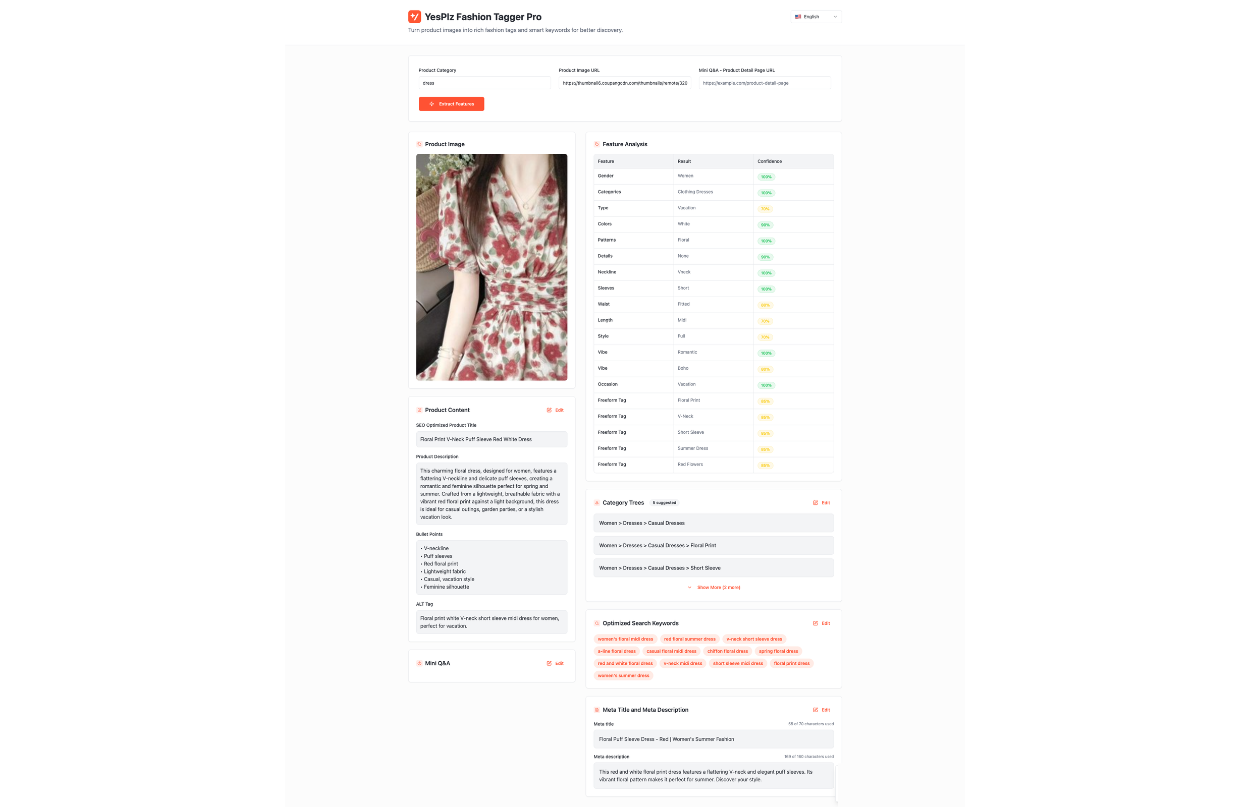 Here is what comes back for a single product:
Suggested category paths: The tool proposes several paths, such as Women › Dresses › Casual Dresses, and you choose the one that fits your taxonomy.
Tagged attributes: Gender, category, color, pattern, neckline, sleeves, waist, length, style, vibe, and occasion, plus freeform tags like floral print and summer dress.
Product content: An SEO-optimized title and description, bullet points, and image ALT text, all based on the tags.
Search keywords and metadata: A list of search keywords plus a meta title and meta description, ready for the product page.
Because every product is tagged the same way, the details this guide recommends stay consistent across the whole catalog. You can preview, approve, or edit any tag in the dashboard before it goes live.
The tool works through an API or CSV upload on Shopify, Cafe24, or custom stacks, and most retailers go live in two weeks.
Want to see it on your own catalog? Feel free to book a demo with us.

Written by YesPlz.AI
We build the next gen visual search & recommendation for online fashion retailers
