We talk to many fashion retailers and see the same bottleneck: most outfit recommendations on product detail pages (PDPs) are still curated manually. A merchandiser selects the dress, then the belt, then the shoes, one SKU at a time, across thousands of products. It's meticulous work that tells the brand story and drives cross-sell. But it's also one of the first things to break when a product catalog expands or a new season rolls in. And when it breaks, the cost is high.
When a shopper lands on a PDP, it becomes one of the highest-leverage moments in the entire shopping journey. Out of everything she browses, very little makes her stop and click. By the time she reaches a PDP, something has already caught her eye. That’s your opportunity not just to sell that item, but to show her how it pairs with other products. And without the right outfit recommendations, that opportunity goes to waste.
Your job is simple: show her what it styles with, spark outfit ideas, and open up more cross-sell opportunities. But not all recommendations work the same way. So which one is the right fit for your store?
In general, outfit recommendations fall into four types: Complete the Look, Shop the Look, Style With, and Bundle. Each is designed for a different shopper intent and commercial goal. The right choice depends on the shape of your catalog, the style of your product imagery, and the discovery experience you want to create. Get the match right, and your single PDP becomes a full outfit sale.
Let's walk through each type and its layout options so your shoppers can discover styles effortlessly.
Complete the Look - Shop the Look - Style With - Bundle: What are the Differences?
They are not four names for the same type, but four different ones that happen to share a surface:
But beneath these common points, each describes a distinct merchandising job.
The confusion between these four outfit recommendations is one of the most consistent points of friction in fashion eCommerce evaluations. You send out an RFP for Shop the Look and get demos of four different things. Nobody helps you flag the differences — so this post is the decoder.
By the end, you'll have three things:
Clear definitions of all four types of outfit recommendations
Six layouts, and what’s the best fit for each recommendation type
A framework for matching each type and relevant layout to your brand, catalog, and conversion goal
Before you decide which types to choose, let’s start by picking a vocabulary:
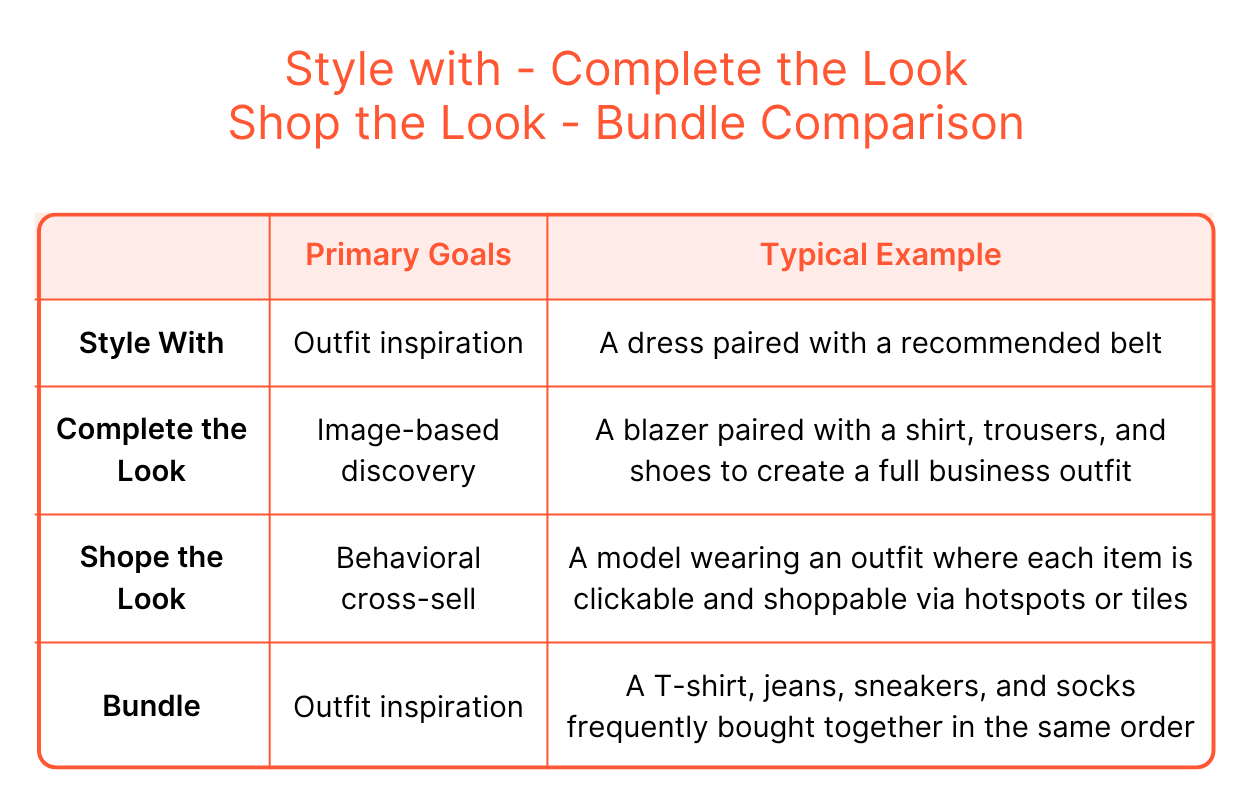 Shoppers don't arrive at a PDP in the same state of mind. Some are browsing with no clear destination. The others have found what they want and just need one last push. Some are ready to buy a full look in a single session. Each of these four outfit suggestion types is an answer to a different one of those moments. That's why the distinction matters before you go any further.
For each type in the sections below, you'll find a definition, a key purpose, a typical example, and guidance on when to use it.
What it is
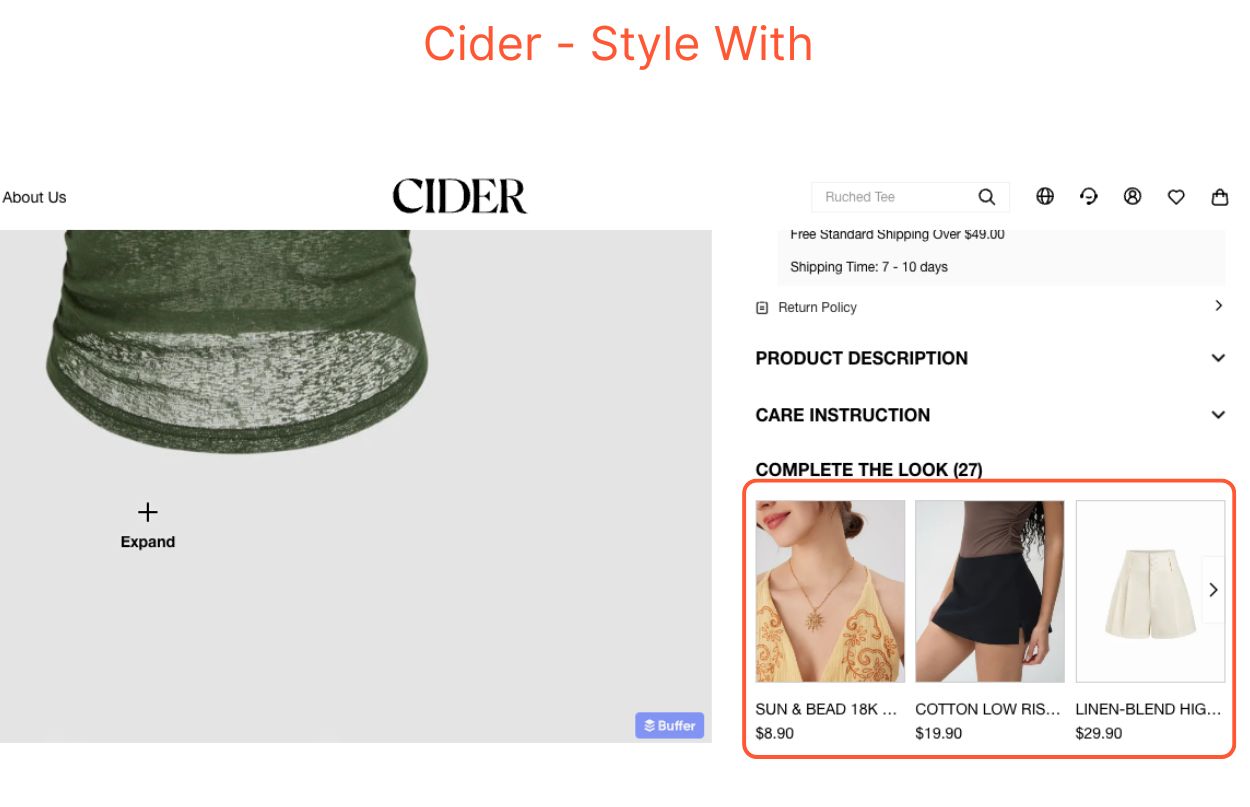
Style with is the simplest form of outfit recommendations. It is an item-level pairing. That means each item is recommended because it works with the hero product, not because it completes a full outfit.
Key Purpose
Provides a gentle and low-friction upsell that doesn’t overwhelm shoppers
Typical Example
When to Use
Style With is a natural fit for multi-brand retailers because brands often come with different image formats. It is also suitable if your catalog has only a few category types. Any of these makes full outfit curation difficult to execute. Style With solves both problems. Each suggested item is paired with the hero product, without needing all the items to coordinate with each other.
What it is
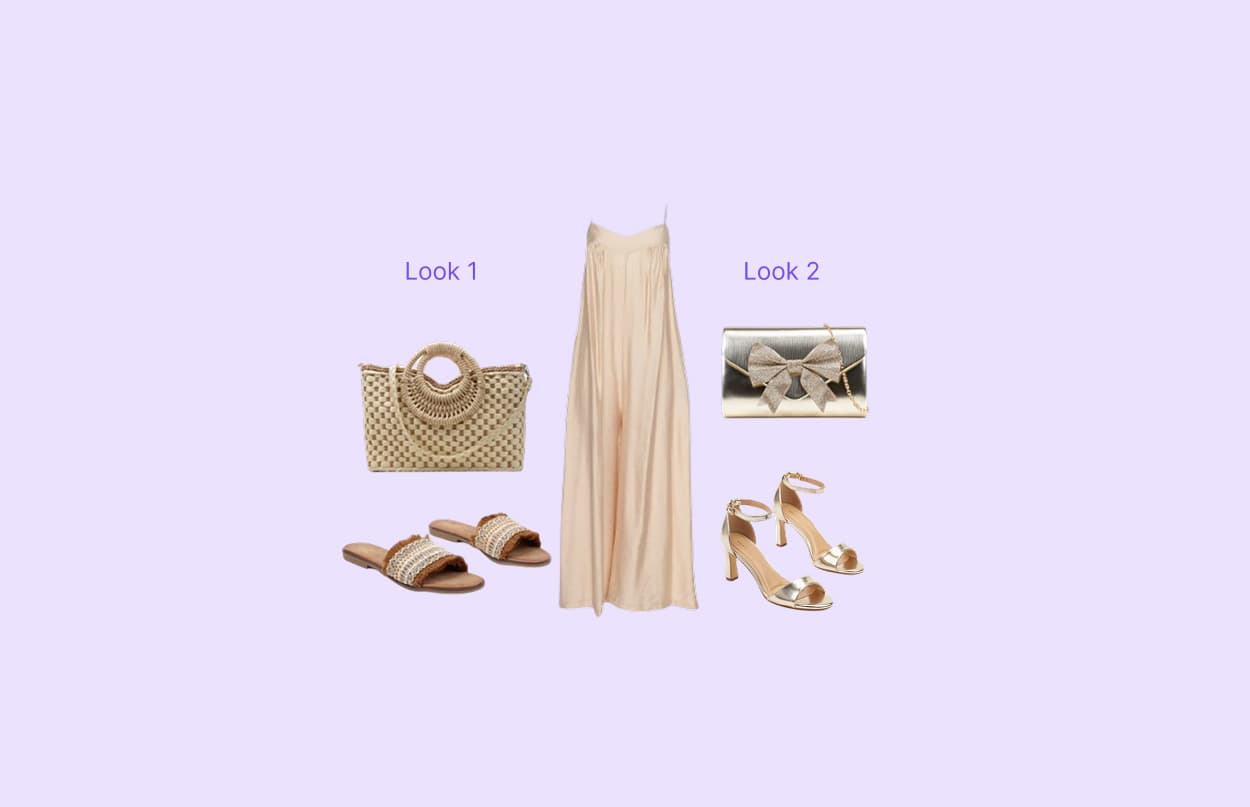
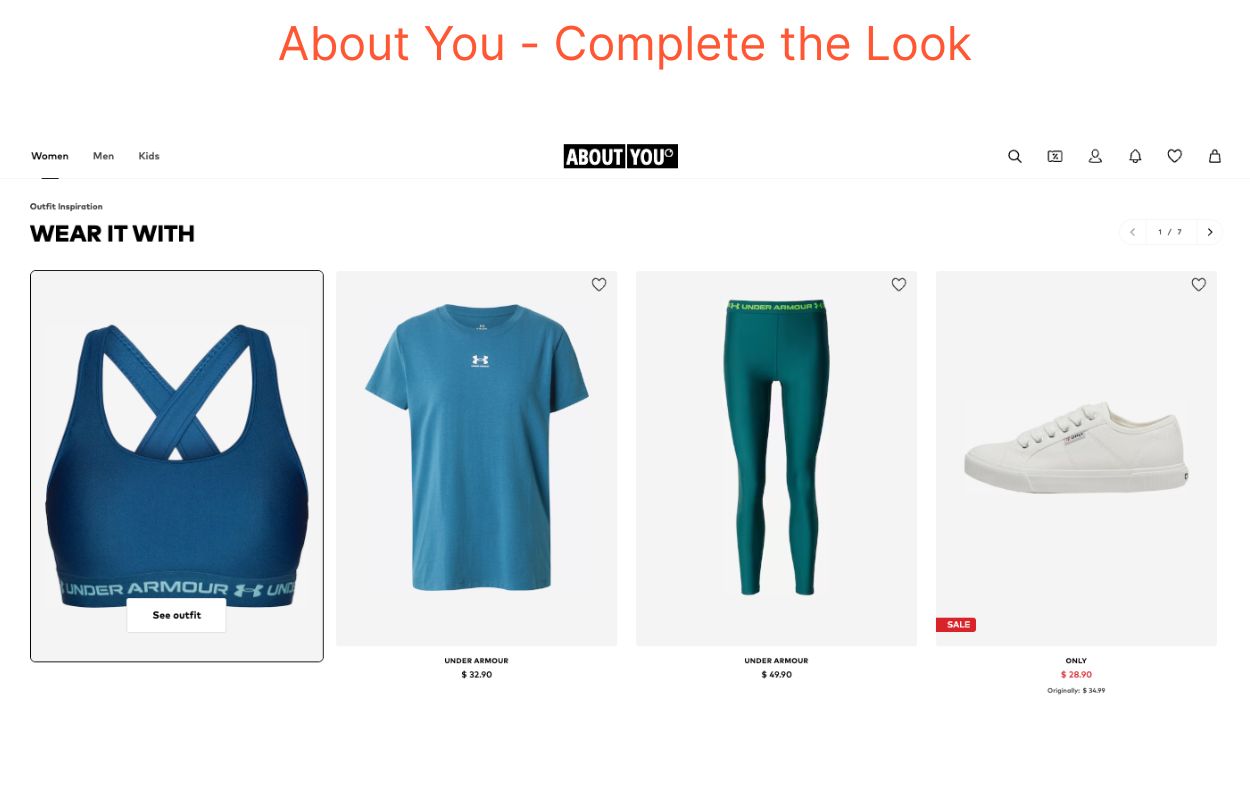
A curated set of items that together form a full outfit or cohesive style centered around the hero product.
Key Purpose
Inspires shoppers to envision a complete outfit
Typical Example
A blazer paired with a shirt, trousers, and shoes to create a full business outfit
When to Use
Complete the Look works best when your catalog has enough depth to form an entire outfit recommendation. That means carrying more than just apparel. Shoes, bags, and accessories are what turn a hero product into a full look. DTC brands with a large catalog, or retailers with a sizeable range across those categories, will get the most from this type. If your catalog is apparel-heavy with limited footwear or accessories, consistent outfit curation becomes hard to execute.
What it is
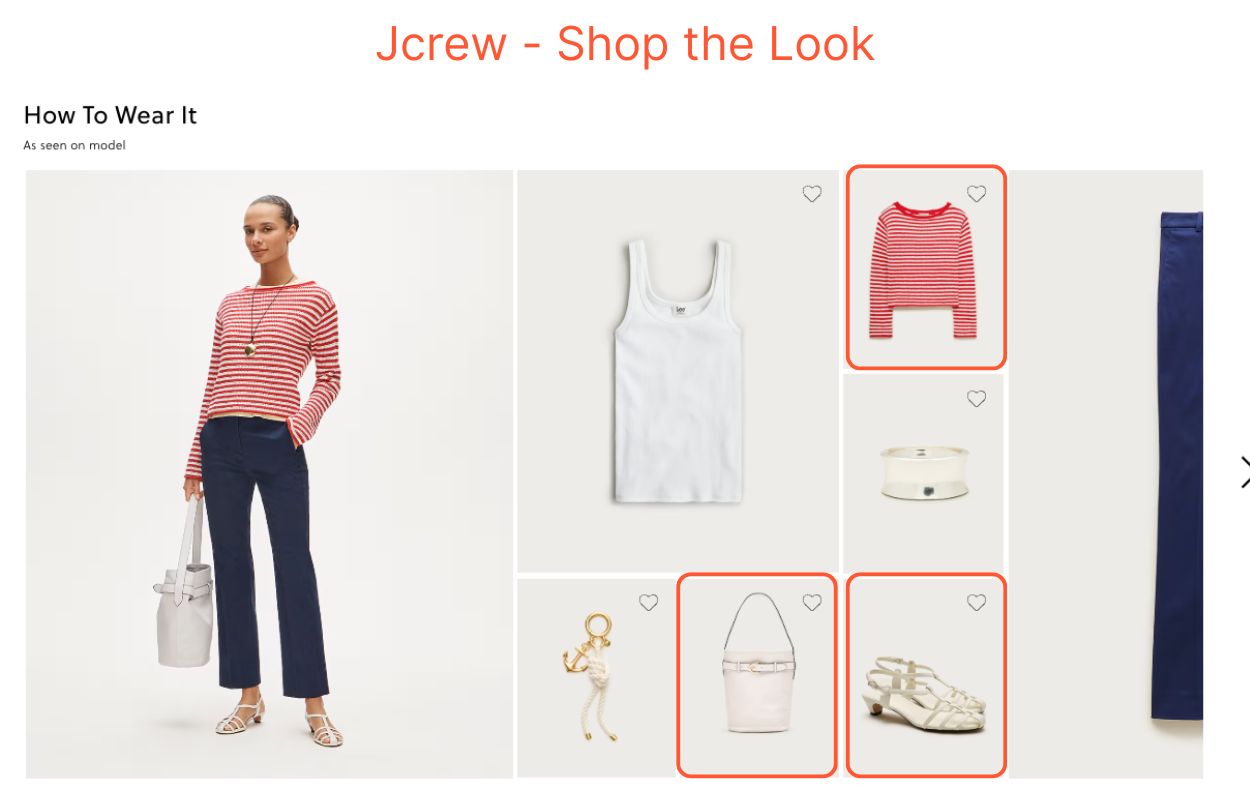
Shop the Look showcases a full outfit suggestion drawn directly from a styled hero image. Every item the model is wearing in that image is shoppable. Shoppers simply tap on whatever catches their eye, either via hotspots or product tiles.
Key Purpose
Enhances discovery and inspiration through visual storytelling
Typical Example
A model wearing an outfit where each item is clickable via hotspots or tiles
When to Use
Shop the Look works best when your product imagery does the selling. It fits brands where the styling work happens before the shoot. When your merchandising and styling team carefully curates outfits for every hero image — choosing pieces that speak to your brand identity — shoppers arrive already inspired. They just need a direct path to the items they see. For DTC brands with a limited accessory range, this is often a stronger fit than Complete the Look, since the styled image carries the look rather than relying on catalog depth to build one.
What it is
Bundle works similarly to Style With, but its outfit recommendations are based on shoppers' behavior. Instead of editorially curated pairings, it surfaces items that shoppers frequently view or purchase together, reflecting real demands.
Key Purpose
Turns collective shopper behavior into a cross-sell opportunity
Typical Example
A T-shirt, jeans, sneakers, and socks frequently bought together in the same order
When to Use
Use Bundle when your shoppers value convenience over curation. If the goal is to make it easy to pick items that go quickly together, Bundle delivers. It guides your shoppers towards outfit combinations that real purchase behavior has already validated. Everyday casual fashion is the strongest fit. However, Bundle is less suited to high-fashion or style-sensitive shoppers who prefer to make their own considered choice.
The Six Layouts of Outfit Recommendations
Before we go deeper into layouts, it's worth noting that a single PDP can carry more than one type. Style with under the buy box, and Complete the Look below the fold are serving different shopper intents at different stages of shoppers’ decision-making.
What it is
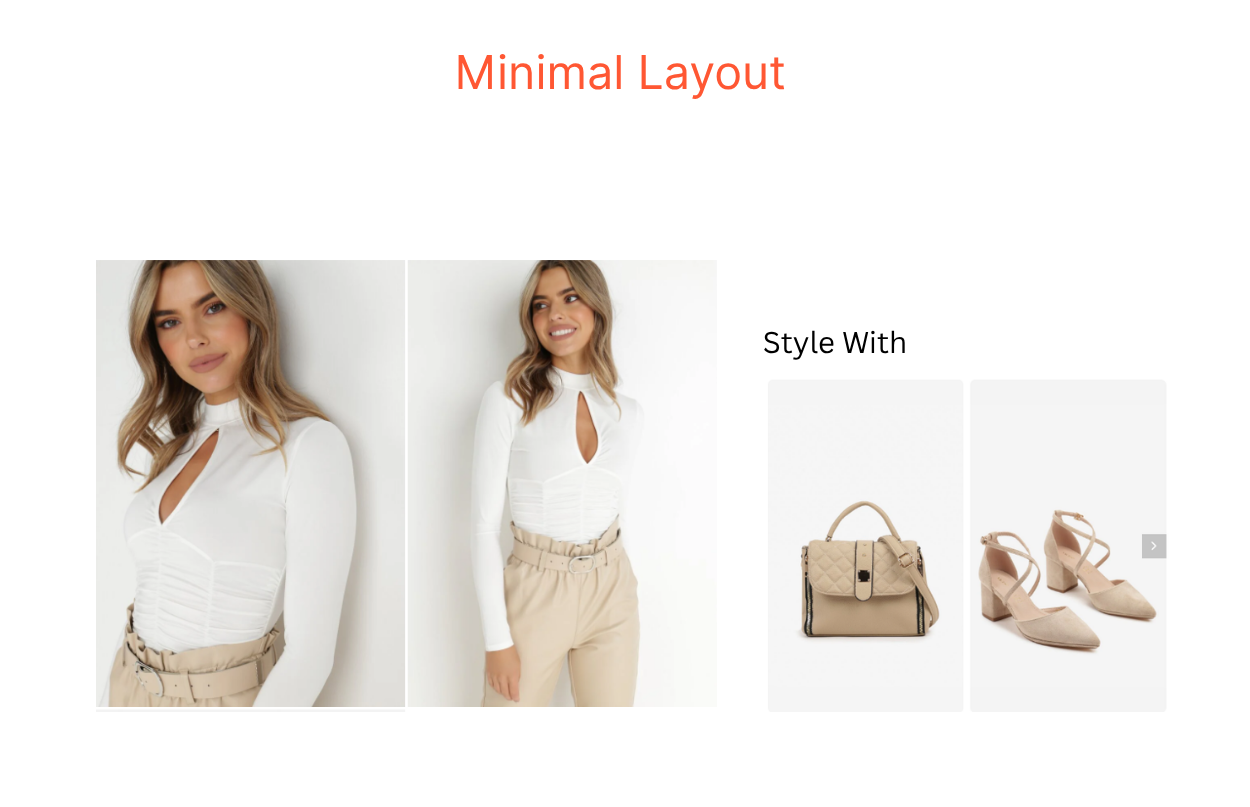
Minimal is exactly what it sounds like. The hero product is shown alongside a small number of suggested items. No outfit framing. No editorial hierarchy. No styled set. Each recommendation is an independent cross-sell suggestion without any promise that these items go together or complete a look. This layout is the natural choice when your catalog or imagery can't reliably support a fully styled outfit.
Commonly Powers
Style With
Design Benefit
Lowest visual weight compared to the six layouts of outfit recommendations. It doesn't compete with the hero product, so the shopper's main decision stays front and center.
Functional Benefit
Lifts UPT without distracting from the primary purchase. The ask is small, so the friction is small.
Best for
Multi-brand retailers and marketplaces with mixed imagery and inconsistent sourcing
DTC brands with a narrow category range
Any retailer whose catalog hasn't been merchandised into complete-look sets yet
Note: If your catalog already has the depth and visual consistency to support a fully styled outfit, the Minimal layout isn't making the most of it.
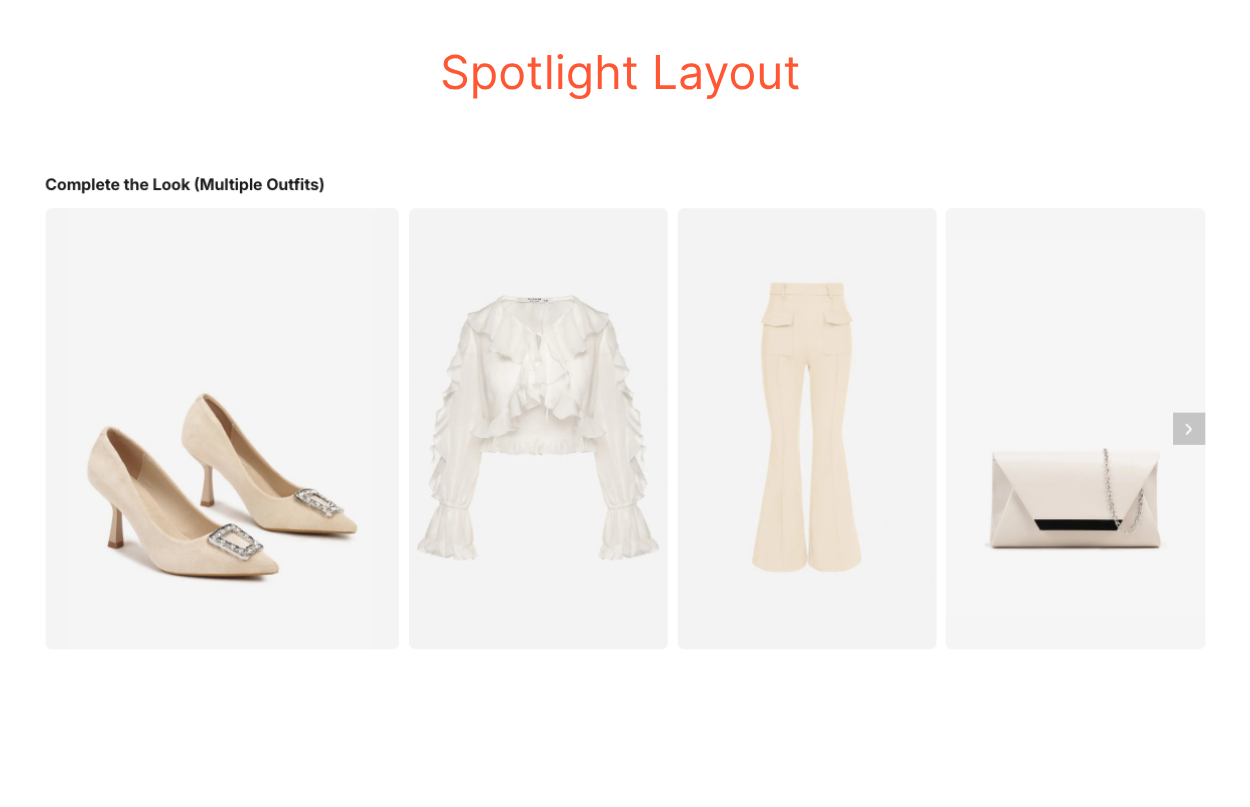
What it is
The Spotlight layout surfaces the hero product alongside recommended items as a complete styling idea. The hero product never moves. What changes are the recommended items built around it. Shoppers move through one fully styled look at a time, with nothing else competing for attention, before moving to the next. A carousel or click reveals the next outfit. It's the closest a PDP gets to a personal stylist guiding shoppers through choices one by one.
Commonly Powers
Complete the Look
Design Benefit
Keeps the hero product in view at all times while letting shoppers explore different outfit recommendations without leaving PDPs.
Functional Benefit
Let shoppers browse multiple outfit combinations on a single PDP. It helps increase time on page and gives your store more opportunities to close the sale.
Best for
Cross-category catalog depth to style the same hero product multiple ways
Clean, product-only imagery that reads well at a larger size
DTC brands like Atelier EME, Holland Cooper, or Gabriela Hearst
Note: The typical fit is a brand with a refined, coordinated assortment. Think about the depth and visual consistency of brands.
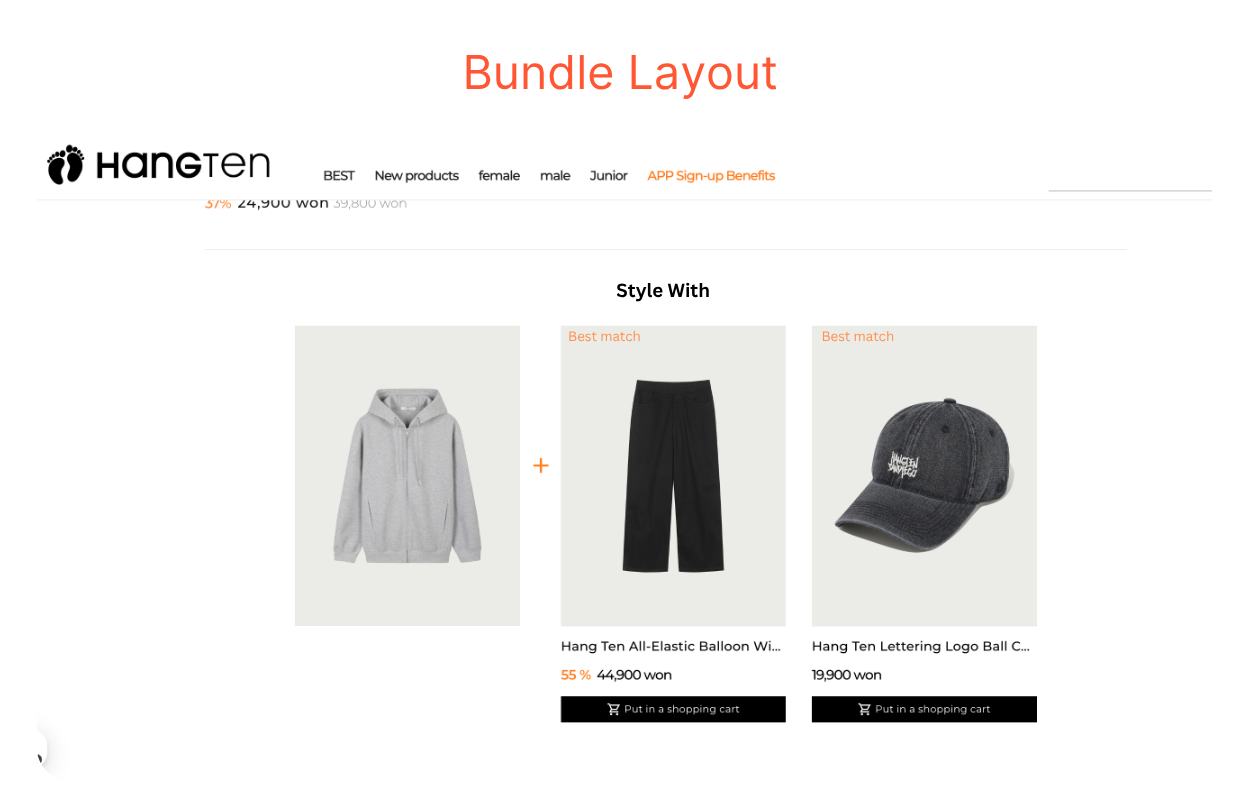
What it is
The Bundle layout presents a fixed group of items together, connecting the hero product to suggested pieces via a "+" symbol. This is a visual shorthand that signals these items belong together. Its goal isn't outfit inspiration like the Spotlight layout. It is built for conversion on the full set. Bundle earns its place when your catalog has natural set logic, for instance, pyjama sets, activewear kits, or loungewear. Or when your collaborative-purchase data is strong enough to turn a suggestion into a transaction.
Commonly Powers
Bundle, Style With, Shop the Look
Functional Benefit
The highest direct conversion intent among the six layouts of outfit recommendations. The path from inspiration to cart is as short as it gets.
Best for
Everyday casual fashion, where shoppers respond to convenience over curation
Activewear, loungewear, intimates, kidswear, gift-forward brands, and basics retailers
Note: It's less ideal in a context where considered taste is part of the brand promise.
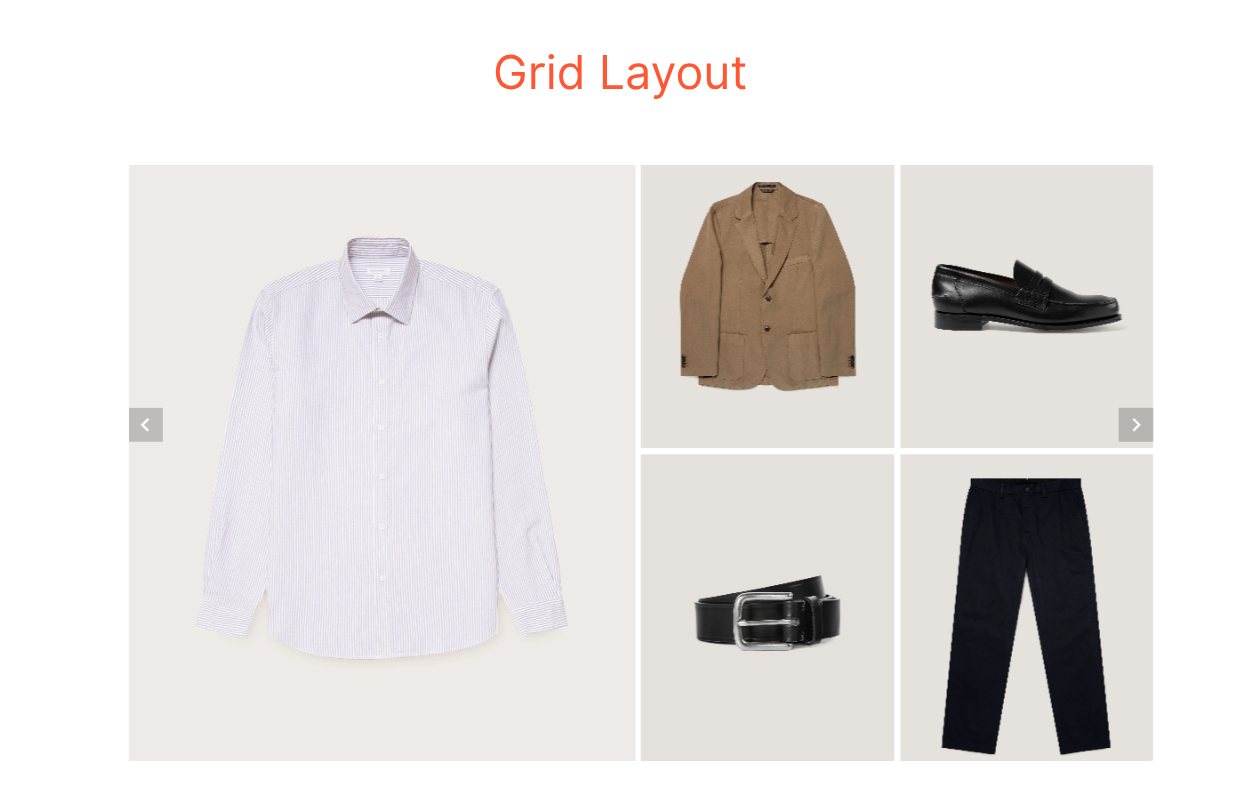
What it is
A uniform tile layout that surfaces multiple complementary items at equal visual weight. No item is more important than another. It signals "pick any" rather than a curated set.
Commonly Powers
Complete the Look
Design Benefit
Uniform tiles remove editorial hierarchy, which works in your favor when no single item is the obvious choice. Shoppers feel in control of the selection.
Functional Benefit
Strong for cross-category discovery. Particularly effective for jewelry, accessories, and shoes, where shoppers are open to options rather than looking for one specific pairing.
Best for
DTC brands with product-only imagery. The uniform tile format requires clean, consistent visuals to hold together.
Limited SKU count, focused category depth, and uniform PDP visuals are what make the Grid layout sing.
Brands like Everlane, Quince, Sunspel, and COS are good reference points.
Note: If product-only imagery isn't already in place, AI-generated product shots can close that gap and give the grid the visual consistency it needs.
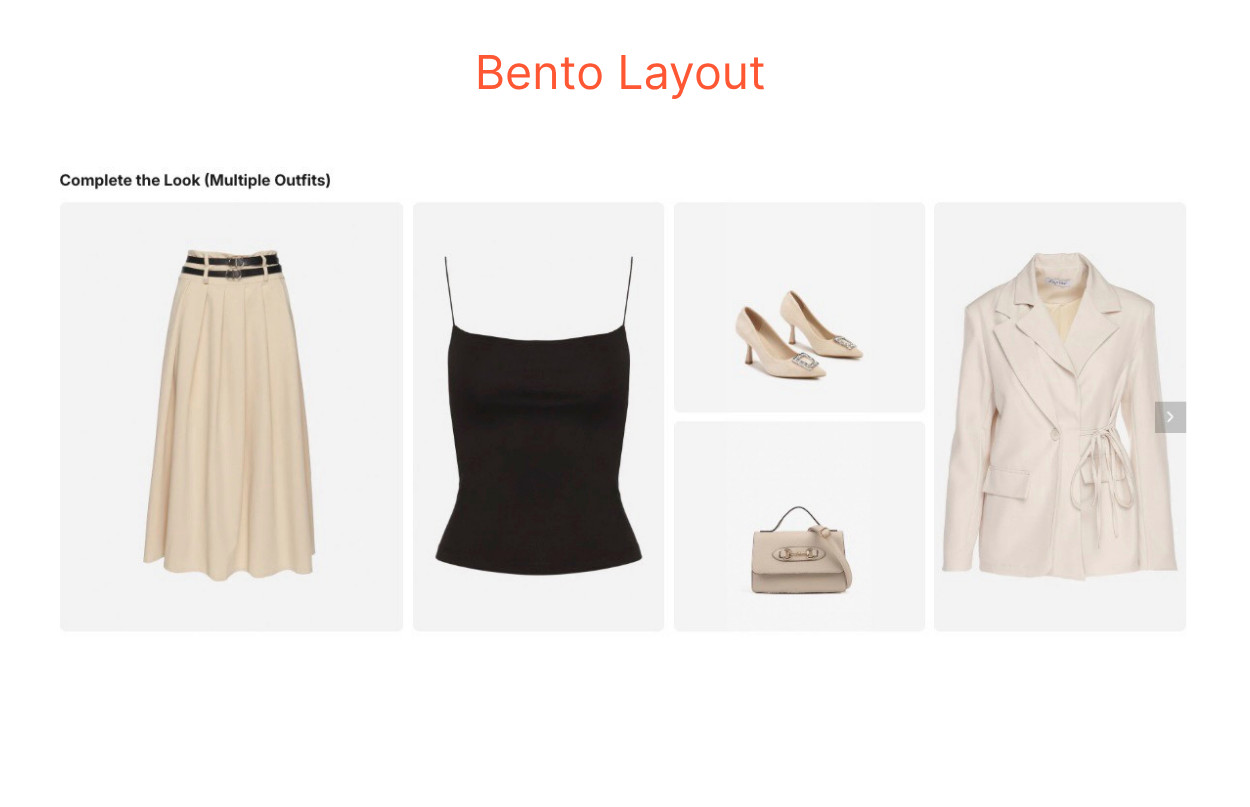
What it is
A varied tile layout that uses different sizes to create editorial hierarchy across the recommended items. In the outfit recommendations above, a midi skirt and a cami top get the larger tiles, while heels and a handbag occupy the smaller slots.
Commonly Powers
Complete the Look, Shop the Look
Design Benefit
The size variation communicates curation. Some items matter more than others. And the Bento layout makes that visible without needing a label to say so.
Functional Benefit
Communicates taste and editorial intent. The strongest layout fit for premium brands, where the feeling of being styled is part of the value proposition.
Best for
DTC brands with full cross-category depth — tops, bottoms, shoes, bags, and accessories
Note: The varied tile sizes create a narrative, making it especially effective for presenting multiple outfit recommendations across different occasions. Shopper read it like a styled look, not a product list.
What it is
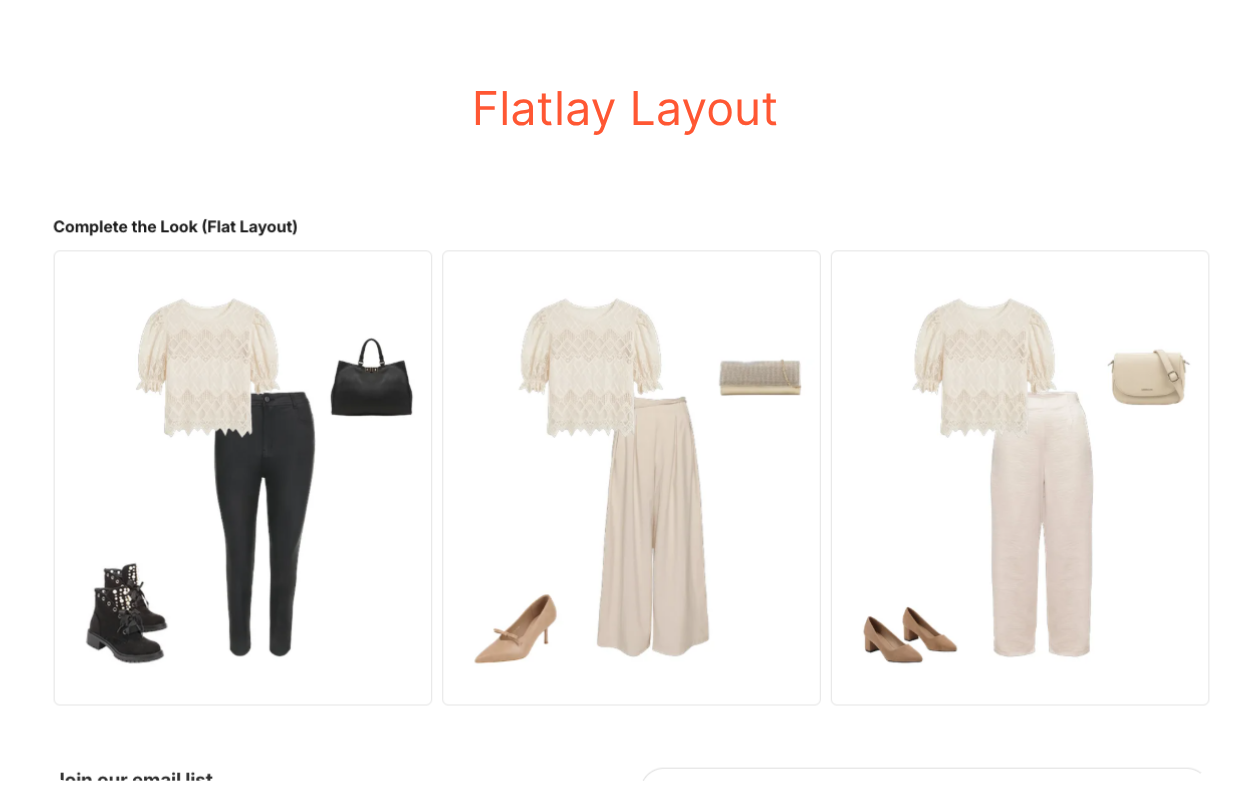
The Flatlay layout uses magazine-style overhead imagery. It presents multiple complete outfits side by side, each built around the same hero product. The layout shows shoppers how one item can live across multiple looks.
Commonly Powers
Complete the Look
Design Benefit
Shows how pieces actually go together in the real world.
Functional Benefit
Strongest layout for inspiration and save-for-later behavior. Weaker for direct conversion, since the editorial format creates more distance between shoppers and the add-to-cart action.
Best for
Editorial multi-brand retailers, trend-led DTC brands, and boutique or concept stores
Brands that lead with storytelling over transaction
Note: The Flatlay layout struggles with sparse assortments or brands without that visual foundation. A half-hearted flatlay is worse than no flatlay at all.
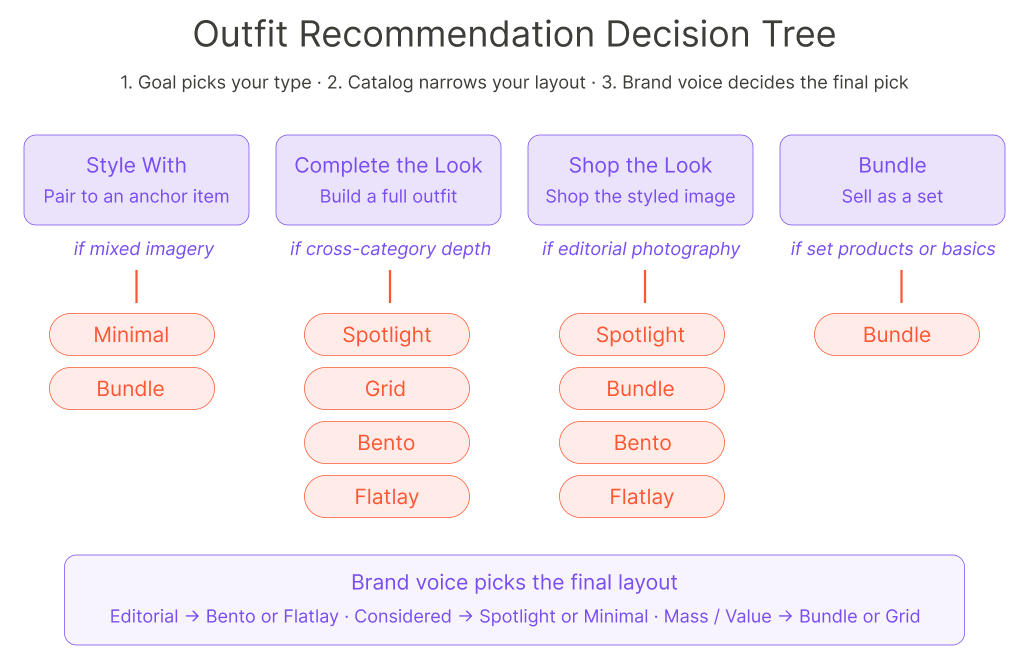
Six layouts. Four types of outfit recommendations. We know it can feel like a lot. But it doesn't have to be. Start with the right type for your store, and everything else follows. The type is the strategy. The layout is the execution. Ask these three questions in sequence, and you'll have your answer.
Question 1: What type of outfit recommendations are you trying to ship?
Start here. The type always comes before the layout. If your goal is a low-friction upsell with a single complementary item, you're building Style With, which narrows your layout to Minimal. If your goal is a pre-packaged group of items with a single add action, you're building Bundle, which points you toward the Bundle layout. If your goal is outfit inspiration centered on a hero product, you're building Complete the Look, which opens up Spotlight, Bento, and Flatlay as viable options.
Question 2: What does your catalog look like?
Your catalog mix shapes which layouts are even viable. If you're heavy on accessories, the Grid layout is natural because there's no obvious single hero item. If you sell full outfits with a clear anchor piece, the Spotlight and Bento layouts work well because they're designed around a hero. If your catalog is deep enough to style the same hero product multiple ways, Spotlight earns its place.
Question 3: What is your brand voice?
The layout you choose sends a signal before the shopper reads a single word. Editorial and premium brands belong in Bento or Flatlay — the visual hierarchy communicates taste. Mass and value-oriented brands are better served by Bundle or Grid, where the commercial intent is clear. Minimalist and considered brands often fit Minimal or Spotlight layouts that respect the shopper's attention and don't oversell.
No single type wins across the entire funnel. The most effective setups layer different types at different touchpoints, matching the right merchandising job to the right moment in the shopper's journey.
A shopper browsing a category page is in discovery mode. She hasn't committed to anything yet. A Flatlay layout powering Shop the Look meets her there, leading with inspiration rather than a hard sell.
By the time she lands on a PDP, her intent has sharpened. A Spotlight layout powering Complete the Look gives her outfit context around the hero product. Meanwhile, a Minimal layout powering Style With sits quietly under the buy box for a low-friction last nudge.
At the cart, the moment calls for something more direct. A Bundle layout steps in to handle the last-mile UPT lift — one action, everything added.
You don't have to choose only one type. You can run both on different surfaces, serving different shopper intents.
YesPlz Complete the Look ships with all six layouts and supports all four types out of the box. Merchandisers can configure and A/B test per category without engineering work. If you're still not sure which combination is right for your catalog, we can walk through it with you. Book a demo and bring your PDP — we'll map your catalog structure to a type and layout recommendation in the first call.
FAQ Outfit Recommendations for Fashion eCommerce
What are outfit recommendations in eCommerce?
Outfit recommendations are merchandising features on a product detail page (PDP) that suggest additional items to pair with the hero product. They fall into four types — Style With, Complete the Look, Shop the Look, and Bundle — each designed for a different shopper intent. Their primary goal is to lift Average Order Value (AOV) and Units Per Transaction (UPT) by turning single-item interest into multi-item orders.
What are the four types of outfit recommendations?
Style With suggests a single complementary item paired with the hero product. Complete the Look suggests a full outfit curated around the hero product. Shop the Look makes every item in a styled hero image individually shoppable. Bundle groups items shoppers frequently buy together based on collective behavior. Each type is designed for a different shopper intent and a different stage of the buying journey.
What's the difference between Shop the Look and Complete the Look?
Shop the Look starts with a styled hero image and makes every item the model is wearing shoppable, usually via hotspots or product tiles. Complete the Look starts with a hero product and curates a full outfit around it — the recommended items don't have to appear in the original image. Shop the Look depends on strong editorial photography. Complete the Look depends on cross-category catalog depth.
The difference between Style With and Complete the Look?
Style With is item-level — each suggested item pairs with the hero product, with no requirement that the suggestions coordinate with each other. Complete the Look is outfit-level — the suggested items form a cohesive full look together. Style With is the lower-friction upsell. Complete the Look is the higher-inspiration play.
Which outfit recommendation type drives the highest AOV?
Bundle and Complete the Look typically drive the highest AOV per session because they encourage multi-item purchases in a single action. Bundle wins on conversion intent (one click, full set added). Complete the Look wins on order value when shoppers buy across categories. Style With drives the most incremental UPT lift relative to its low friction. The right answer depends on your catalog mix and brand positioning.
Where on the site should outfit recommendations appear?
Different types fit different surfaces. Shop the Look works on category and inspiration pages where shoppers are browsing. Complete the Look and Style With work on PDPs where intent has sharpened. Bundle works at the cart, where shoppers are ready to convert and one action can lift UPT. Most fashion retailers run a combination, matching the recommendation type to the shopper's stage in the journey.
How do I choose the right outfit recommendation layout?
Start with the type, then pick the layout. Ask three questions in sequence: What's your primary merchandising goal (upsell, inspire, convert)? What does your catalog look like (apparel-only, cross-category, set-based)? What's your brand voice (editorial, considered, value)? The type comes from the goal. The layout viability comes from the catalog. The final layout choice comes from brand voice. Six layouts are available — Minimal, Spotlight, Bundle, Grid, Bento, and Flatlay — each tuned for a specific combination.