A good eCommerce site search has to do two things well. First, it has to return products that match what shoppers typed. Second, it has to return products that match what they meant. We call these search accuracy and search relevance, the most important criteria.
Search accuracy and search relevance sound similar. Many teams treat them as one, but they aren't.
What is Search Accuracy?
Search accuracy measures how exactly results match a search query. An accurate search returns products shoppers described.
Take a shopper who searches for ‘white pants.’ Are returned products really white pants? Or are they a different category?
It sounds simple, but it often goes wrong. Here are two examples we see regularly.
A T-shirt can show up for this query because its description says: “This T-shirt is perfect to wear with white pants.”
Or, right products in your catalog don't appear at all because their titles or descriptions say ‘trousers’ or ‘jeans’ instead of ‘pants.’
What is Search Relevance?
Search relevance measures how well results match shopper intent, beyond what a search query literally says. Order is part of it: among all results, products that fit best belong at the top.
Take a shopper who searches for ‘black dress for a wedding.’
A black jersey T-shirt dress and a black sequin mini dress are both technically accurate.
But relevant results fit the occasion, like elegant midi or maxi dresses that suit a wedding guest.
The T-shirt dress is accurate but not relevant.
Key Takeaways for eCommerce Managers
Accuracy checks what shoppers type. Relevance checks what shoppers mean, including result order.
More clicks don't mean more orders. Better clicks do.
Intent is hard to capture with fixed rules, but shoppers show it through what they click and buy.
In our previous articles, we covered how to improve search accuracy by fixing typos and synonym mismatches and by updating trending keywords.
This article explains how to improve eCommerce search relevance with a Learning to Rank model, and what happened when we put it to the test.
Learning to Rank (LTR) is a search ranking algorithm for eCommerce that uses machine learning to decide the order of search results.
It doesn't rely on fixed rules or plain keyword matching. Instead, it learns from data which results should come first.
How Does YesPlz AI's LTR Model Work?
Our goal is to put the products people go on to buy first, not just return the exact matches. There are two reasons for that.
Based on that, our LTR model works in two steps. First, it finds candidate products for the query. Second, it orders the top results using a variety of signals it has learned from. So, how does it learn?
Every time a shopper searches, clicks a product, adds it to cart, or makes a purchase, that action shows which results were useful for that query.
Our AI learns from these signals and reorders the results so the items shoppers are most likely to buy appear at the top.
Why is this Different from Sorting by Bestsellers?
The ranking is per search query. The top results for ‘black midi dress’ are learned from what shoppers who searched ‘black midi dress’ engaged with.
They aren't simply your store's most popular items overall. The model weighs relevance, so a trending item doesn't jump to the top of a search it doesn't match.
As a result, shoppers find what they want faster, which means higher click-through, more conversions, and more revenue from the search traffic you already have.
A ranking can attract clicks without producing orders. If you judge a search change only by how many clicks it gets, you can end up rewarding results that look interesting but don't sell.
Here is how to measure relevance beyond clicks. Three metrics give you a fuller picture:
CTR (Click-Through Rate): Total clicks divided by total searches, shown as a percentage. Every click counts, so if one shopper clicks five products, that is five clicks.
sCTR (Click-Through Rate Per Session): Searches with at least one click divided by total searches, shown as a percentage. A search counts only once, no matter how many products a shopper clicks, so one shopper clicking five products still counts as one.
CTR and sCTR tell you which products shoppers paid attention to. CR tells you whether the results helped shoppers buy. If you only watch the first two, you can miss the number that matters.
The cleanest way to see the true effect of a ranking change is a 50/50 A/B test. Half of your search traffic sees your current ranking, and half sees the new one.
Because both groups get similar traffic, any difference in results comes from the ranking itself.
That is exactly how we tested retailers' existing search ranking (Group A) against our Learning to Rank model (Group B).
Test 1: Kids' Fashion
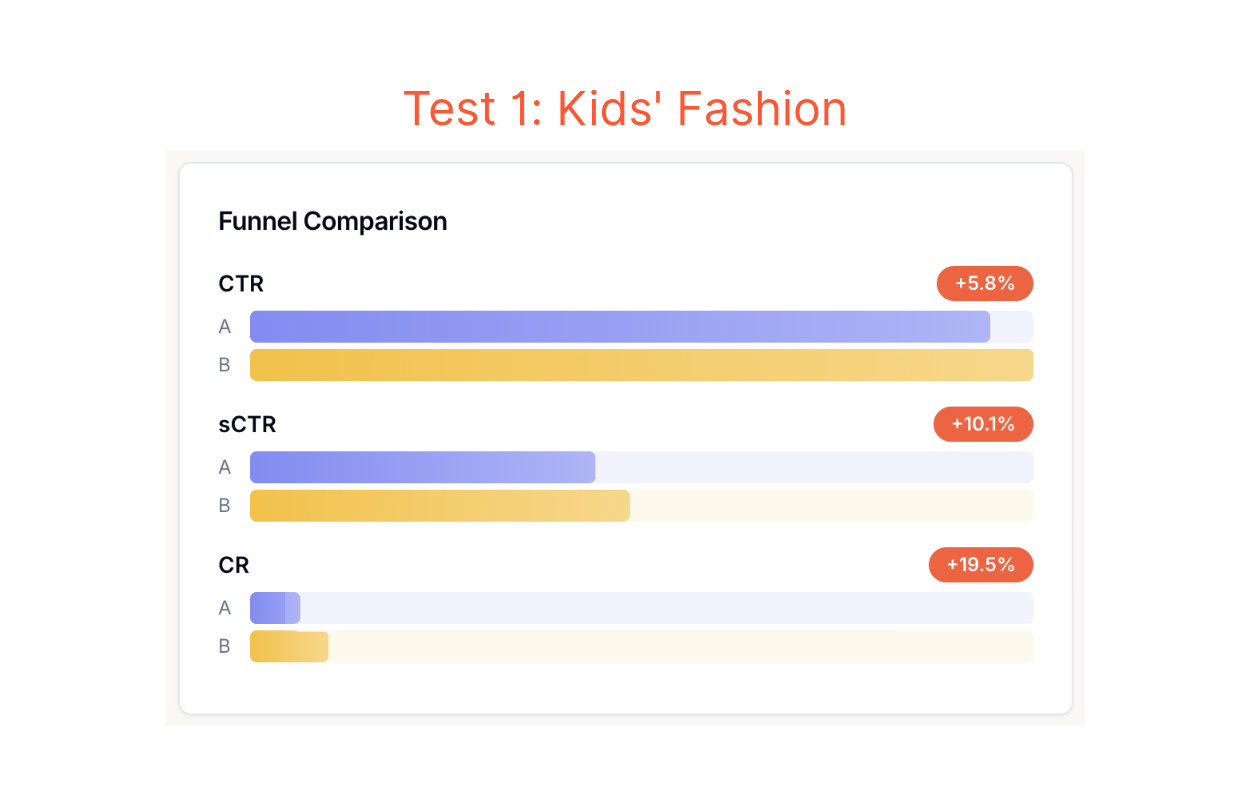
The first test ran on a kids' fashion retailer's search. Shoppers clicked more with Learning to Rank.
But the bigger change came after the click. More searches ended in an order. Conversion grew about twice as fast as click-through rate per session.
CTR +5.8%
sCTR +10.1%
CR +19.5%
Test 2: Casual Lifestyle Apparel
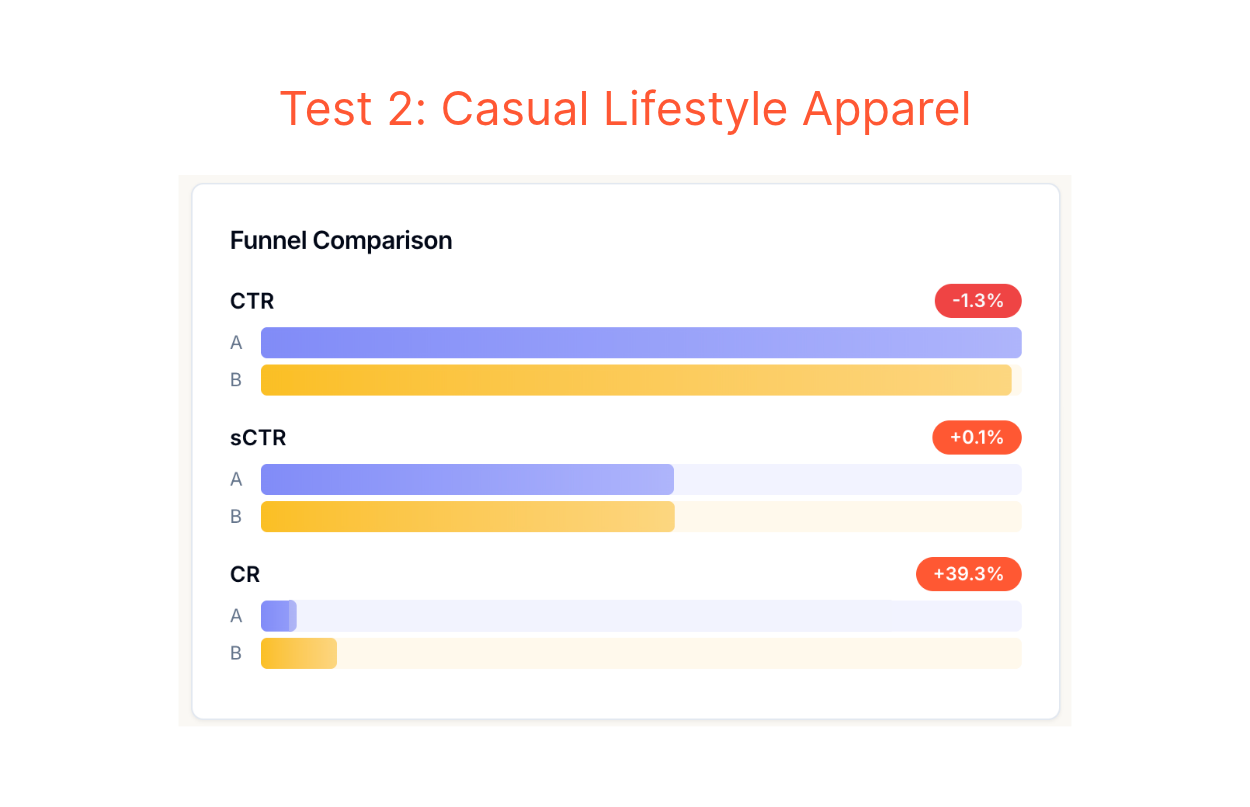
The second test ran on a casual lifestyle apparel retailer. Clicks barely moved, yet shoppers bought far more.
CTR -1.3%
sCTR +0.1%
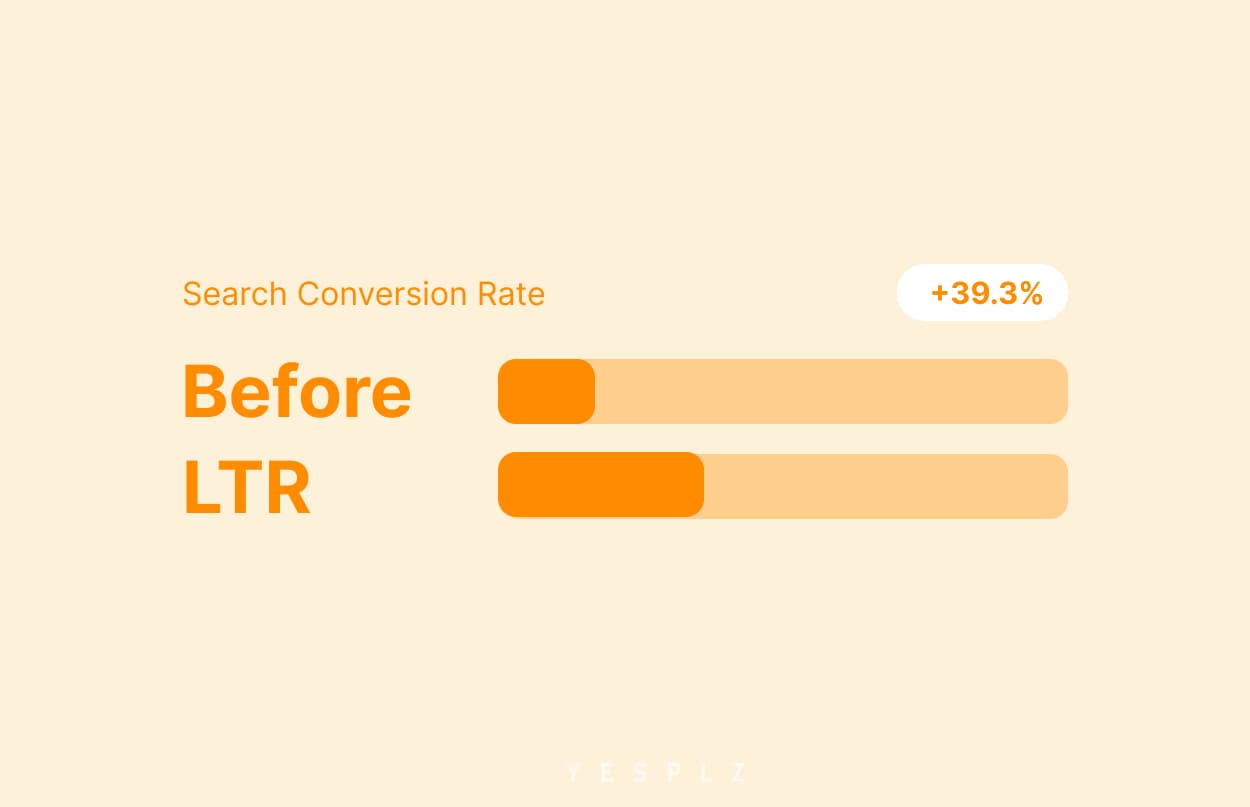
CR +39.3%
Why Better Clicks Beat More Clicks
Test 2 shows the point most clearly. Clicks barely changed, but conversions jumped. So where did the extra orders come from?
When the right products are shown first, the first clicks are more likely to be the ones that end in an order. Shoppers don't need to open a dozen products, scroll down, and refine their search. They click a few, on the right items, and buy.
A ranking built to maximize clicks can look great on a dashboard and still leave revenue on the table. A ranking built around what shoppers go on to buy produces fewer wasted clicks and more orders.
So, to increase search conversion rate, judge search by what shoppers buy, not by how often they click.
You don't need to start from scratch. Learning to Rank builds on what you already have:
Your shopper behavior history: Past searches, clicks, add-to-carts, and purchases show which results worked for which queries. This is what the model learns from.
Frequently Asked Questions
1. Do I need to replace my current search engine to use Learning to Rank?
Learning to Rank works as the ranking layer in your search, so you will need a search setup that supports it. We've seen it improve conversion.
2. Can the Learning to Rank model fix typos and zero-result searches?
Partially. It pushes the most relevant results that shoppers click to the top. Fixing typos and handling zero-result searches belong to the accuracy side of search, which we covered in our earlier articles.
3. How much data do I need to get started?
The model learns from what shoppers search, click, and buy, so more history gives it more to learn from. Typically, it takes 2-4 weeks to gather enough data to start with.
4. Will the Learning to Rank model just push my bestsellers?
No. It uses clicks, views, and purchases to find the best signal tailored to each store, and it ranks per query rather than across your whole catalog.
5. Is Learning to Rank the same as personalization?
No. Learning to Rank orders results for a query based on what shoppers click and buy. Personalization tailors results to one individual shopper. They can work together, but they solve different problems.
6. How is Learning to Rank different from manual boosting?
Manual boosting depends on people writing and maintaining rules. Learning to Rank is automatic: it learns from shopper behavior and updates as that behavior changes.
You already have the traffic. The question is whether the right products are at the top when shoppers arrive. Book a demo with us to see how Learning to Rank can increase search conversion rate.