eCommerce Site Search: Query Types, Features & 9 Best Practices
Is your search bar losing sales? See how eCommerce site search works, which features matter, the query types shoppers use, and 9 best practices.

by YesPlz.AIOctober 16, 2026


Is your search bar losing sales? See how eCommerce site search works, which features matter, the query types shoppers use, and 9 best practices.
by YesPlz.AIOctober 16, 2026
Open your store and run three searches: “jewlery” (a typo), “trainers” (a synonym search query, if your products are listed as sneakers), and “clothes for pear-shaped body” (a symptom search query). What came back?
If all three returned relevant products, your eCommerce site search is in better shape than many. Baymard found that 46% of desktop, 58% of mobile, and 64% of app eCommerce sites have a “mediocre or worse” search experience.
This guide is for eCommerce managers who want to fix that. It covers how site search works, which features matter, which kinds of queries shoppers type, and how to optimize site search functionality for eCommerce.
Think about how you shop in a physical store. If you know what you want, you ask a salesperson. If you don't, you walk the aisles until something catches your eye.
Online stores work the same way. Walking the aisles is browsing: category pages, product listing pages, and filters. Asking is a search.
eCommerce site search is the process that lets visitors easily find products on an online selling platform or digital storefront.
In most cases, the term refers to the tool shoppers use to do it: the search bar. It is the internal search engine of your store. Shoppers type a word or phrase, and it returns matching products from your catalog.
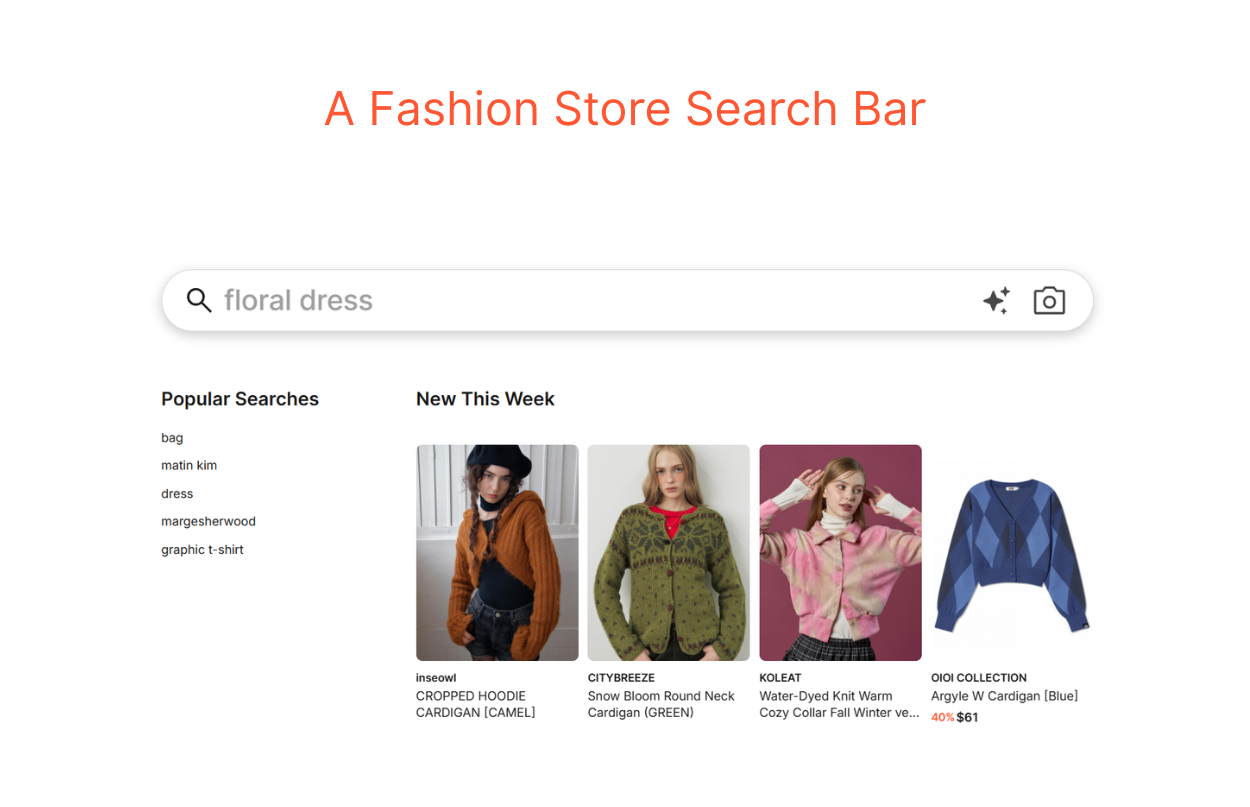 You've seen the search bar in many shapes. It might be a rectangle with rounded corners, or a magnifying glass that expands when you tap it.
Some stores place it in the middle of the page. Others tuck it into the left or right corner. The shape and the position change from store to store, but its main function doesn't.
For a shopper who already knows what they're after, that's the shortest path to the product. And for eCommerce managers, it's the one place on your site where shoppers say exactly what they want.
These shoppers are giving you valuable information. Keep that in mind, because it explains most of what follows in this guide.
It matters because of the choice it gives shoppers.
Without a search bar, finding a product means browsing. Shoppers open a category, scroll a product listing page, and apply filters until the list is short enough to scan.
With a search bar, they skip all of that. They just type keywords or phrases, and the search bar does the work.
These shoppers are not wandering. They arrive with a specific product in mind, and they know what they want. That gives them stronger purchase intent than the average visitor, and the numbers reflect it.
Hello Retail's eCommerce site search statistics show that:
30–50% of visitors use site search.
Search sessions convert about 1.8x to 3x higher than sessions without search.
People using the search bar are your best-qualified visitors.
There are two big benefits of eCommerce site search:
By its nature, the search bar helps visitors find what they want. The easier it is to find the right product, the more likely a shopper is to convert. And each conversion adds to your online revenue.
Search is good for your user experience and your revenue. It’s also one of the best sources of data you have. You can use site search trends to guide your business strategy.
If many shoppers search for products you don't sell, you can expand your offering. Besides, search terms show the words your shoppers use to find products. Based on that, you can learn where your synonym gap is.
In the early days of eCommerce, search algorithms were simple. The engine matches the words in the search box against indexed product names. That works only when the shopper and the merchant use the same words.
Say a shopper typed "trainers," but your products were titled “sneakers.” The shopper saw zero results, and you lost the sale.
Modern eCommerce site search is often called intelligent search, smart search, or AI site search. The names differ, but they describe the same shift. The engine no longer just matches keywords to product names. It does four extra jobs:
Corrects spelling errors
Handles synonyms
Infers shopper intent
Influences the product ranking
Whatever name it goes by, one rule holds: good search depends on reliable data. An engine can only find what it's given. We cover this in detail in our guide to building a site search with a 3-layer stack.
Shoppers don't all search the same way. So, site search engines handle input in three ways: text search, visual search, and hybrid search.
Text search is the one everyone knows. A shopper types words. Then, the engine returns products. It's the most common type and the foundation of everything else.
Text search comes in levels:
Basic keyword search matches the exact words.
Fuzzy search tolerates typos and spelling variants.
Semantic search goes further and works out what the words mean.
Text search works well when shoppers know what to call the product. It struggles when they don't.
Visual search lets shoppers search with an image instead of words.
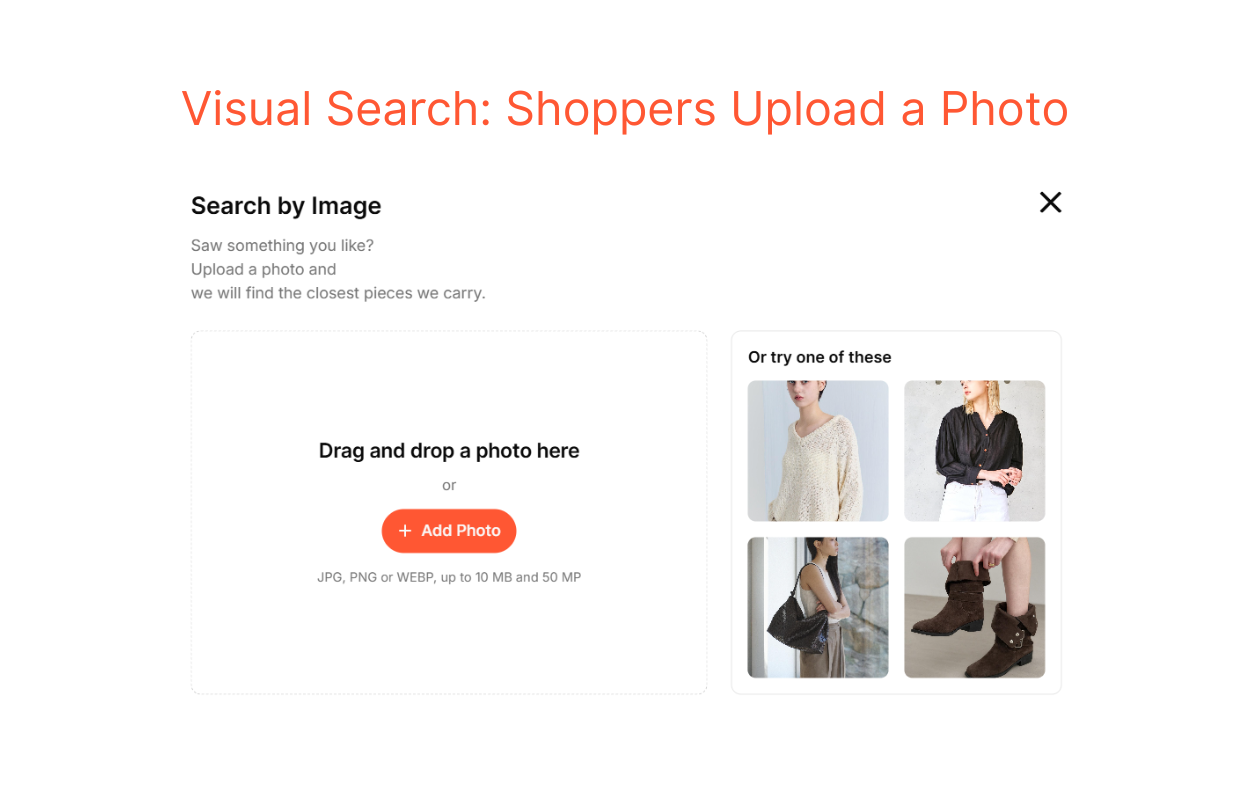 Picture a shopper who sees an outfit on a celebrity and wants something close. They can screenshot and upload it to the search bar. The engine analyzes the image and finds the closest matches by shape, color, and style.
 This is where visual search eCommerce fills the gap that text search leaves. For shoppers searching from a feeling or a visual memory, finding the right words is often the hardest part. Visual search removes that step.
Hybrid search combines text, semantic, and visual search in one system. A short keyword, a semantic search query, and an uploaded photo all work in the same search bar.
This matters because your shoppers are a mix. Some arrive with a model number, some with a mood, and others with a photo. A hybrid eCommerce site search engine is built for that range.
Text Search | Visual Search | Hybrid Search | |
Shopper input | Text | Photo | Text or photo |
Works best when | Shoppers know the right term. | Shoppers can't describe the item. | Shopper intent varies widely. |
Requirement (to work well) | Needs matching text | Needs image recognition capability | Needs the capability to understand both text and images |
Text, visual, and hybrid describe how shoppers enter a search. Features describe what the engine does with it.
Two stores can both offer a text search bar. However, one still sends shoppers to the right product while the other sends them to a dead end. The difference is in the features.
When you compare eCommerce search software, these are the features to check:
This feature predicts a query as a shopper types. On a phone, typing is slow, and typos are common. That is where autocomplete helps most, because it guides shoppers toward better queries. It can:
Help shoppers avoid typos
Teach them the right product terms
Steer them toward queries your catalog can answer
As shoppers type, they see suggestions they hadn’t thought of. Every suggestion is a promise: tap this, and you’ll get results.
Semantic search breaks down phrases to understand shopper intent, rather than just matching exact words. Take a query like “dress shirts.”
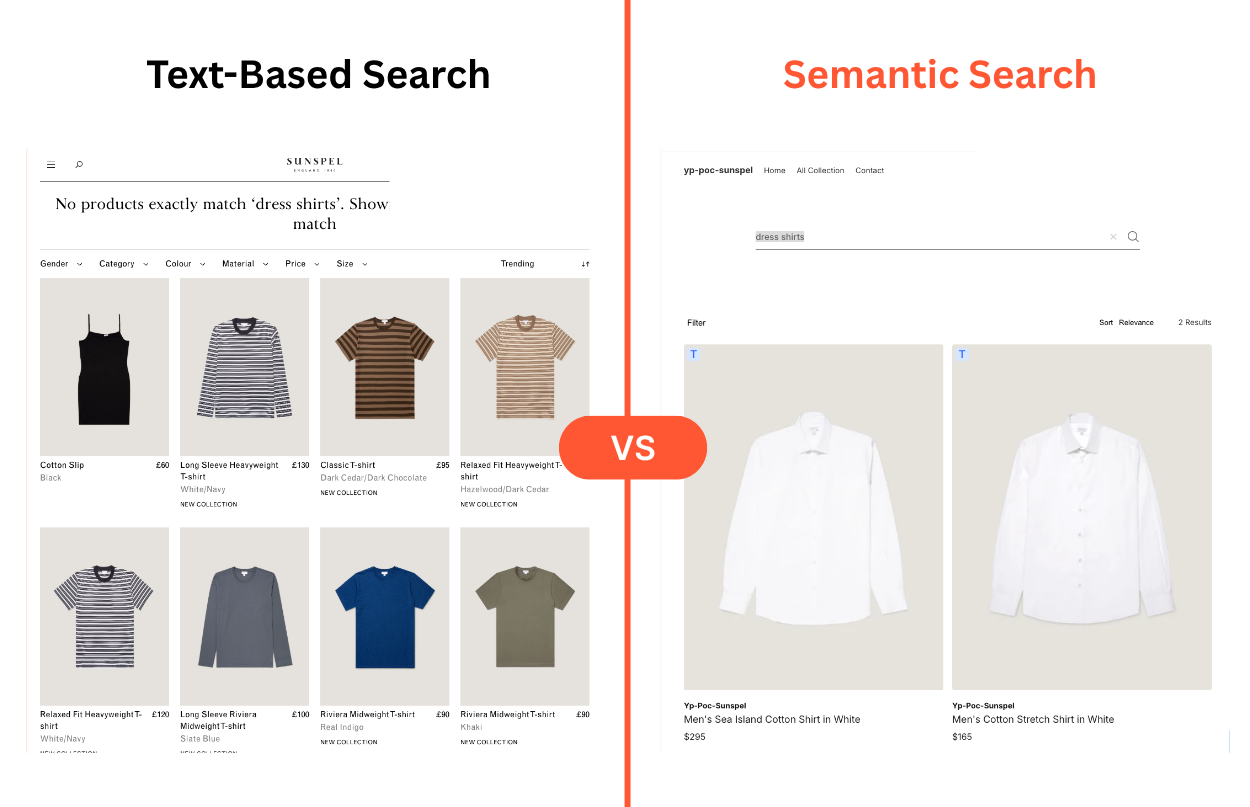 A keyword-only engine may return a mix of dresses and shirts because both words appear in product titles. A semantic engine understands that the shopper wants formal button-up shirts and shows relevant results.
We cover this in more detail in our guide to AI site search strategies for eCommerce.
Visual search lets shoppers search with a photo, instead of words. It helps most in categories where style is hard to describe, and fashion is the clearest case.
The previous section explains how it works, and our guide to visual search in eCommerce goes deeper.
This feature uses shopper data, such as purchase history, to decide what appears first. The same query can return a different product order for different shoppers. For example, someone who always buys petite sizes sees petite sizes first.
It can also rank results using internal factors like profit margins and inventory levels. So in-stock items appear above sold-out ones. Or, items with healthy margins get a fair chance at the top.
Faceted filtering lets shoppers narrow results by combining several filters at once. Each group of options, like “Size” or “Color,” is called a facet.
Say a shopper wants a formal halter-neck dress in size M under $250. They can apply all of those in a few clicks, without guessing which keywords will work.
Typos such as “jaket” and “dreses” shouldn't lead to a dead end. A smart eCommerce site search engine should automatically correct them to “jacket” and “dresses” and return relevant results.
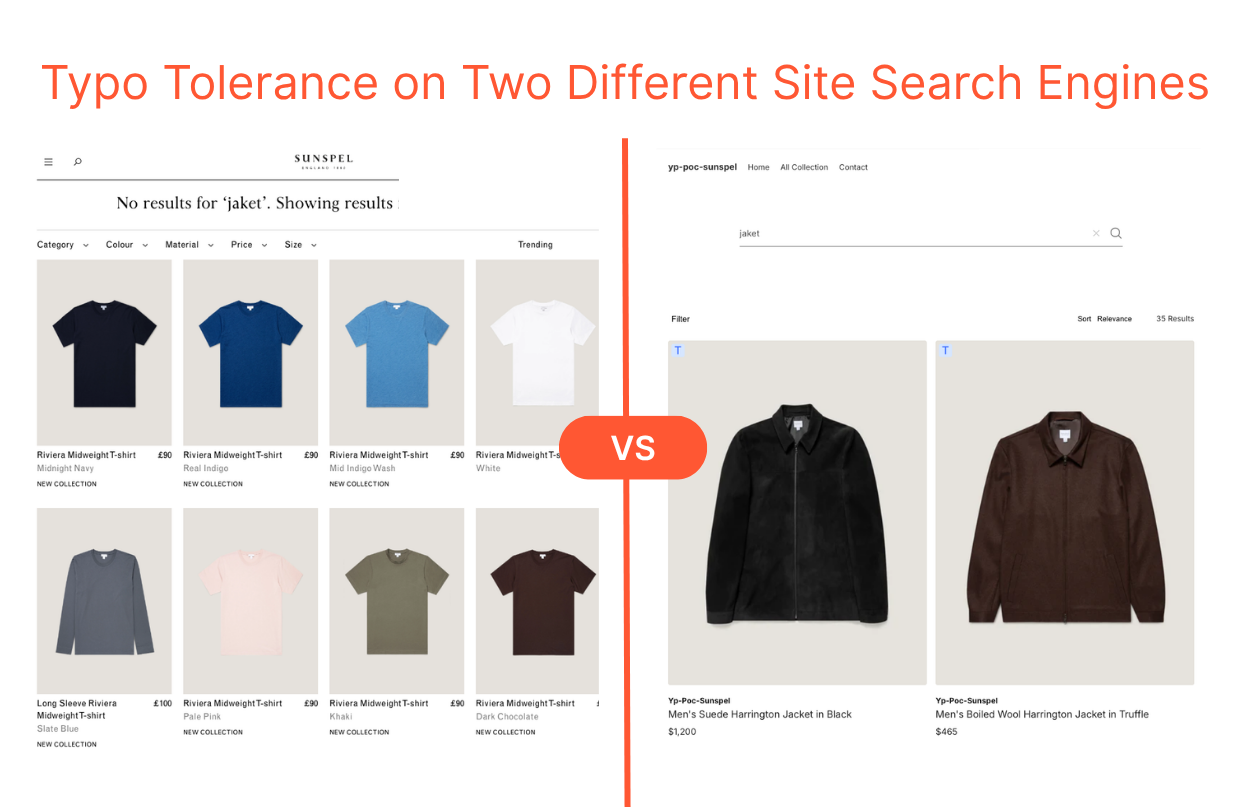 Synonyms work the same way. “Sneakers,” “trainers,” and “runners” are three names for the same type of product. The engine should treat them as the same search.
Without this, what a shopper sees depends on the word they happened to type. See how this works in our guide to fixing search typos and synonym mismatches.
Features like Popular Searches and New This Week give shoppers ideas when they open the search bar with nothing in mind.
Not every visitor arrives with a product name. Some are just looking around. An empty search bar gives them nothing to start with. A short list of what other shoppers search for, or what just arrived, gives them a place to begin.
Every shopping scenario is unique. Some shoppers arrive at your site with a specific product in mind.
Others aren't looking for a product at all. They need advice or help with an issue related to your products or industry.
With the rise of AI search platforms, the way people search has changed significantly.
Baymard’s research covers eight eCommerce search query types, each with its own intent. Below are five that matter most. Natural language queries are not one of Baymard’s eight, but we include them because shoppers increasingly search this way.
Product Type Queries: Shoppers who run these have a general idea of what they're looking for. But they aren't sure of the specifics, so they're ready to compare options.
Non-Product Queries: Some shoppers want to do a little research before they buy. They search for things like sizing guides, shipping details, or the return policy.
Exact Queries: This is what happens when a shopper knows exactly what they want. They may have a product number handy or know the name and model.
Symptom Queries: Sometimes a visitor comes to your site looking for a solution to a specific issue, not a product. They describe a problem and trust your eCommerce site search to name the product.
Natural Language Queries: As people get used to conversational AI, queries start to sound more like natural language.
Baymard scored 170+ eCommerce sites and apps on how well they support each search query type. The table shows how many have a mediocre or worse experience.
Query Type | Examples | % of Sites with Issues |
Non-Product | how to measure waist size for jeans how to style wide-leg jeans | 66% |
Symptom | outfit to hide love handles clothes for pear-shaped body | 37% |
Product | work blazers black jeans | 20% |
Exact | Levi's 501 original jeans Nike Air Force 1 '07 white | 12% |
Natural Language | Can you find me a dress for a summer wedding that isn't too formal, costs less than $150, comes in a size 12, and can arrive by Saturday? | Not tracked |
The more a query depends on structured data and interpretation, the more often stores fail. Exact search and product type queries fail the least. Symptom search and non-product queries fail much more often. Natural language queries aren’t in Baymard’s data. In our experience, though, they fail most often.
Imagine a salesperson who only understands one word for each product. A shopper asks for trainers. However, the salesperson says your store doesn’t have any, even though she is standing next to the sneakers.
A search engine makes the same kind of mistake when it can’t handle the challenges below: synonyms, misspellings, stemming, and natural language queries. They show up in every store, every day.
There are many ways to search for the same thing. Think of sweaters, jumpers, and pullovers. The word a shopper picks depends on where they live, how old they are, and where they first saw the item.
Your eCommerce site search should be sophisticated enough to account for these different searches and return accurate results.
Some words are hard to spell: jewelry, accessories, espadrilles. What happens when a shopper looking for jewelry doesn't type it correctly? They might type “jewellry,” “jewlery,” or “jewelery.”
With the right site search solution, this shouldn't be a problem, and the right results still show up. Without one, each misspelling ends on a zero-result page.
Stemming means cutting a word back to its root, so the different forms of a word are treated as one. The engine trims endings like “-es,” “-ed,” and “-ing,” and keeps the core.
For example, “dresses” becomes “dress,” so a shopper who types either word sees the same products. Without stemming, the engine reads them as two different words.
Spacing and hyphens cause a similar problem. “Tshirt,” “T-shirt,” and “T shirt” refer to one product type to humans. But an engine can read them as three different words.
It might seem like an insignificant detail, but your search technology should handle it.
As shoppers get used to conversational AI, their queries get longer. A keyword-based engine treats it as a string of words, matches the ones it can, and returns either nothing or a random mix.
To return relevant results, the engine has to read the meaning and split the request into parts it can match: occasion, formality, price, size, and delivery date. That takes semantic search, plus structured product data for those parts to match against.
The challenges above come down to one question: Can shoppers find what they want no matter the words they use?
These 9 site search best practices are how you say yes. They cover what results to show, how to help shoppers search, and how to keep search improving as your catalog changes.
Together, they show how to improve site search conversion rate for eCommerce websites because each one makes it easier for shoppers to find the right product.
One of the most frustrating search experiences for online shoppers is typing in a query and getting zero results. To prevent that, your eCommerce site search must handle different query types and overcome the challenges above.
That's a time-consuming task, so consider using AI for support. The problem usually lies in your product data, so multi-modal layers such as text, context, and image tagging matter.
Some shoppers know exactly what they want but can't put it into words. Give them a visual search feature. They upload a photo, and your search technology shows similar products.
A camera icon inside the search bar is enough, so shoppers can switch from words to a photo without leaving the page.
Beyond zero results, irrelevant results are one of the main reasons search exit rates run high. To deliver relevant results, the engine needs to understand shopper intent.
Even an accurate search for “white pants” can return hundreds of matches. But which ones matter most to shoppers? Your site search should surface the most relevant products at the top of the first page.
A quick way to do this is to sort by popularity, which highlights the white pants your shoppers buy most often. A more sophisticated approach is to apply a Learn to Rank (LTR) model, which learns from shopper behavior to rank products by popularity for each query.
We’ve seen this approach lift sales by 19% on average. Learn more about our hybrid AI search.
Supporting features like Autocomplete, Popular Searches, and New This Week help when someone opens the search bar without a query in mind. Each one helps at a different moment. They save typing and give ideas. We list the 3 features every search engine should have.
Use browsing and purchase history, demographic details, and location to show each shopper results that fit them. Start with the data you already have, such as past purchases and recent views, and use only what shoppers have agreed to share.
Filters help most after a broad search. A shopper who types “black jeans” gets a long list, and filters turn it into a short one. Put the filters shoppers use most, such as color, size, and brand, at the top.
Show which filters are applied, and add a Clear All option. Gray out options that no longer match, so shoppers don’t click into an empty list.
Your search data shows what shoppers want and where your eCommerce site search engine falls short. Each week, check the top queries, the ones that return zero results, and the searches shoppers leave right after.
Catalogs change with the season, so a query that worked in spring can fail in fall. Use what you find to add synonyms, fix product tags, or stock what shoppers keep asking for.
Each device (desktop, laptop, mobile) has a different screen size, and your search experience should account for that. This matters more than it seems.
Baymard found that 58% of mobile sites have a mediocre or worse search experience, compared with 46% on desktop. On a phone, keep the search bar easy to reach and the suggestion list short enough to see above the keyboard.
Generative AI, natural language processing, and conversational search are changing the experience and the expectations. Many shoppers now expect to talk in plain and conversational language with AI chatbots and shopping agents.
With tools that understand the context of natural language queries, you stay ahead of the curve and ready to compete in the new era of AI.
How to improve eCommerce site search optimization? To answer this question, you need to know how to define success and which metrics to track. The table below shows the most common site search metrics.
Metric | What it shows | Benchmark |
Search usage rate | How many visitors use search | 30–50% is common. Below 20% suggests shoppers can’t find the search bar. |
Search conversion rate | How many search sessions end in a completed purchase | Compare with your non-search rate. Searchers often convert 1.8x–3x higher. |
Zero-result rate | How often search finds nothing | A common target is under 5%. |
Search exit rate | How many shoppers leave right after a search | The target to aim for is less than 30%. |
Search attribution | The share of total revenue that comes from search sessions | n/a |
Our guide to the 4 numbers behind your conversion rate goes deeper.
A good salesperson doesn’t just match the words you say. They listen, work out what you need, and bring you something that fits. Shoppers now expect the same from your eCommerce site search engine, and AI is making it possible.
Four changes stand out, including:
From keywords to intent: Early search engines looked for the exact words a shopper typed. AI now reads what the shopper means, so it can return relevant products even when no product title uses those words.
From typing to conversation: Shoppers who use conversational AI elsewhere bring the same habits to your store. They write full sentences and expect an answer, not a long list of loosely related products.
From manual upkeep to automation: Someone on a merchandising team used to update synonym lists, add trending terms, and fix typo variants by hand. AI can now watch shopper behavior and do much of this on its own. We explain how it handles trend keywords in 6 critical flaws that AI search engines can solve.
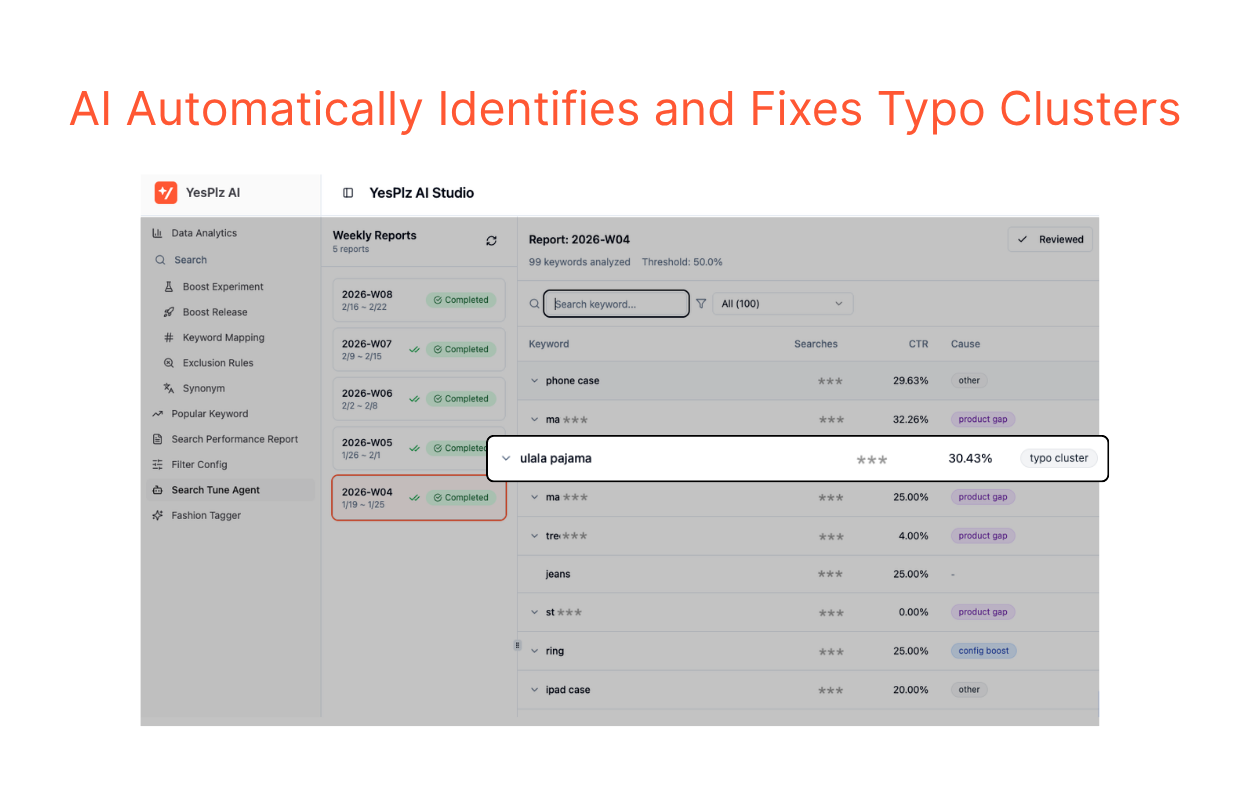
From search bars to AI shopping agents: AI assistants are starting to search catalogs on behalf of shoppers. We cover what agents need from your catalog in what an MCP server does.
Each of these changes depends on the same thing: structured, reliable product data. AI search with poor data produces confident wrong answers.
There is no single best solution. The right one depends on your catalog, your shoppers, and your team.
"A simple rule of thumb:
Does the search return accurate matches, and are those matches relevant to your shoppers?
A good engine needs to do both."
___Jiwon Hong, CEO of YesPlz AI___
Before you compare vendors, check your product data. If your tags are thin or inconsistent, a new engine won’t fix relevance, because it can only find what it’s given.
If your data is in good shape, there are many options for eCommerce search software. These questions help you compare them:
Question | Why it matters |
Does it support semantic search? | It handles queries with no exact word match. |
Does it support visual search? | It helps shoppers who can’t describe an item. |
How much control do merchandisers get? | Your team needs to be able to guide results. |
How does it learn over time? | It means less manual work on synonyms and trending terms. |
Does it report the metrics above? | You need to review search data every week to update your strategy. |
How does it connect to your platform? | It affects setup time and cost. |
What is the full pricing model? | Compare total cost, not just the entry price. |
Build or Buy? Building your own eCommerce site search engine is an option if you have engineering resources and budget. The harder part is the data around it, such as product tagging, which takes a lot of expert-reviewed work. For most stores, buying is more practical.
Go back to the three searches at the start of this guide. A typo, a synonym, and a symptom query each test a different part of your eCommerce site search. If one of them failed, you now know where to look.
Start with your product data, since an engine can only find what it’s given. Then fix the basics: typos, synonyms, and zero-result pages. Track your search metrics every week, and add features like semantic and visual search when you’re ready.
Curious to see how your own catalog performs? Get your free site search audit report and see how much search sales you can increase.

Written by YesPlz.AI
We build the next gen visual search & recommendation for online fashion retailers
